How to record Loan Transaction?
One of the most popular methods of financing is borrowing. Loans can be short term, long term, secured, or unsecured and should be recorded accordingly.
It is important to keep track of the principle and interest amount, and record them respectively in books for correct accounting. Classification is vital as ‘interest’ paid on loan is an expense incurred to avail the loan, whereas principle repayment is nothing but repayment of the amount borrowed.
Going by the golden rule of accounting for personal accounts, you should debit the receiver, and credit the giver. The same can be done by passing a journal entry.
There will be two aspects as far as the accounting is concerned.
Recording the loan/borrowing in the books, And
Recording the repayment of the same in the books,
Before recording transactions, you will have to create the following A/c Heads:
- ‘Secured/Unsecured Loan’ under A/c Group - ‘Current/Non Current Liability’ (Depending on the nature of the loan)
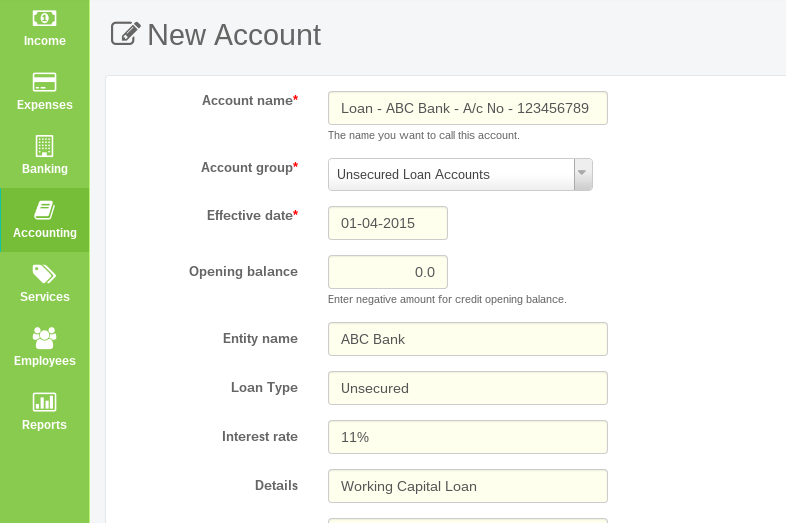
- Similarly, also create ‘Interest on Loan’ Under A/c Group - ‘Finance Expenses’
Let’s discuss these aspects in detail now.
1) Recording loan transaction.
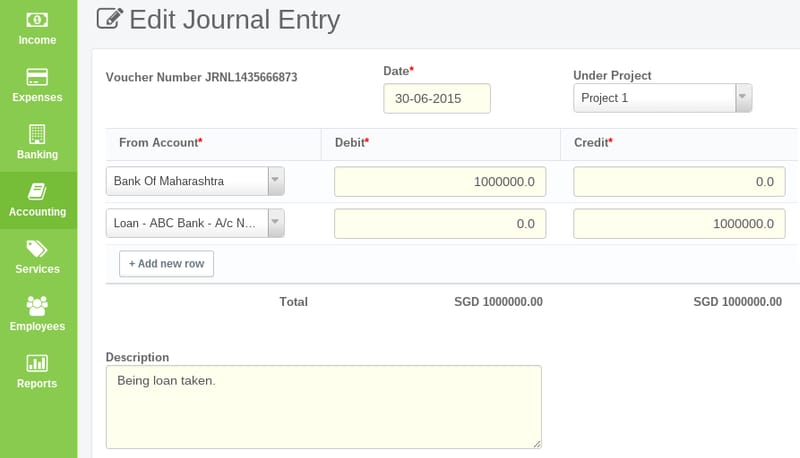
Make a journal entry debiting the Bank A/c as we have received the money, while crediting the say, ‘Unsecured Loan A/c’ created earlier.
2) Recording repayment of the same i.e. installments
- First step is to bifurcate the principle and interest amount.
- Now, since we are making the payment, go to Expenses–> Make payment.
- Select the bank from which you are making the payment of installment, in the ‘Pay From’ field.
- Under Pay to, select ‘Unsecured Loan’ and enter the principle amount. This will ensure that the loan is reduced by the amount you have repaid.
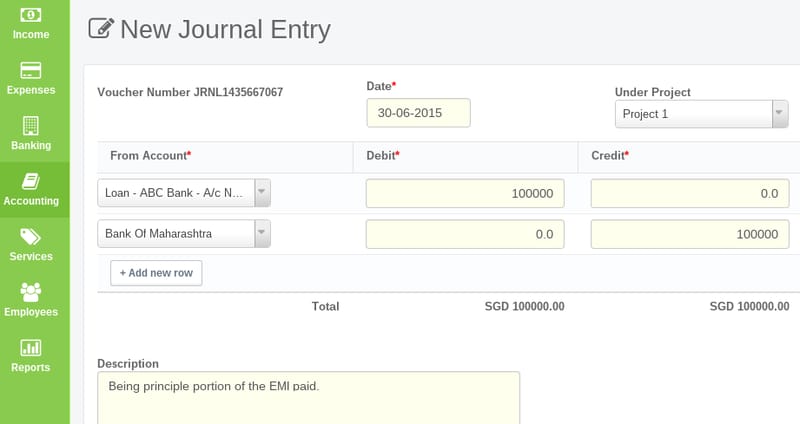 3) Then repeat the process and pass another entry, this time select 'Interest on Unsecured Loan' A/c and enter the amount of interest paid.
One must always keep in mind that the crux of Accounting is to record the transactions as they happen in a way that reflects the true and fair financial position of the company.
Also read :
How to record credit card transactions in ProfitBooks.
How to account for owner’s contribution in business.