Customer and Vendor Management: A Practical Guide
On this page 50 sections
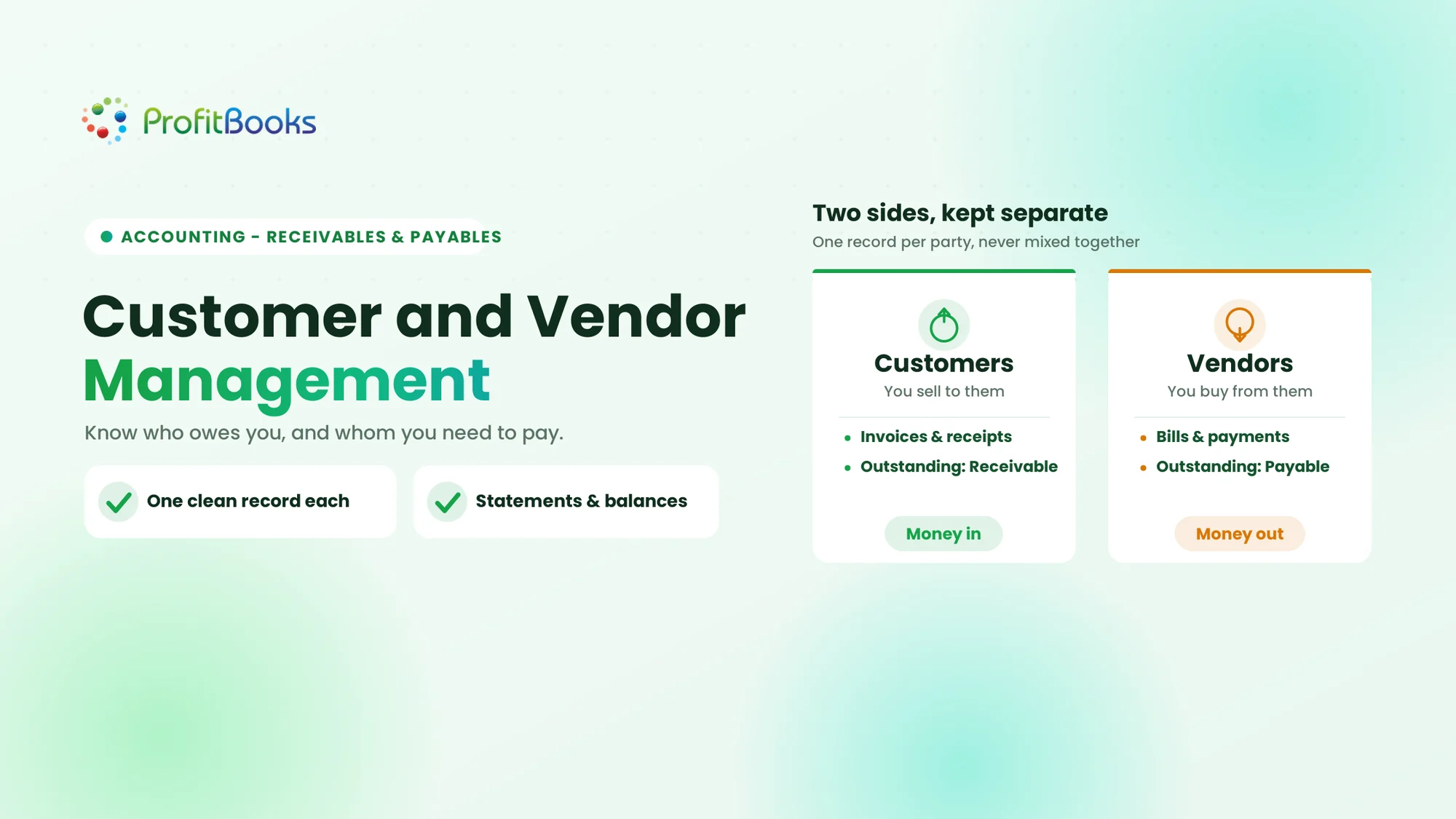
Customer and vendor management is the process of maintaining accurate records of the people and businesses a company sells to and buys from. It covers contact and tax information, recorded transactions, payments, outstanding balances, and a history of each business relationship.
By Mohnish Katre, Co-founder, ProfitBooks
Last reviewed: 21 November 2026. Practical guidance for small businesses in India.
Why Customer and Vendor Management Matters
Picture a distributor who sells to about 40 regular customers and buys stock from 15 suppliers. Payments arrive on different dates, a few customers always run late, and the business pays some suppliers in advance. If all of that lives in separate spreadsheets and WhatsApp messages, finding the full history of one customer or one vendor turns into a half-hour hunt every time.
Customer and vendor management is the practice of keeping organised records of the people and businesses you sell to and buy from, along with every transaction tied to those relationships. Contact and tax details are only the start. What makes the records useful is the transaction history, the payments received and made, and a clear running figure for what each customer owes you and what you owe each supplier. This guide covers what to maintain, how to keep customer and vendor records clean, the mistakes that quietly distort your receivables and payables, and how it all comes together inside ProfitBooks.
What Is Customer and Vendor Management?
What is customer management?
Customer management means keeping a financial identity for every customer and connecting it to the transactions that flow through your business. For each customer, that usually includes contact information, billing and shipping addresses, GSTIN or other tax details, any customer-specific pricing or currency, the invoices and receipts raised against them, their outstanding balance, and their statement of account. It is about knowing, at any moment, what a customer has bought and what they still owe.
What is vendor management?
Vendor management works the same way on the buying side. You keep a profile for each supplier with their contact details, GSTIN, payment terms and preferred payment details, then attach every purchase bill, payment, advance and debit note to it. The goal is a clear answer to a simple question: how much do you owe this supplier, and is anything overdue?
Why manage customer and vendor records together?
Both are part of the same accounting process. A business needs to know who owes it money, whom it needs to pay, which transactions have happened, which payments have been received or made, and which advances are still waiting to be adjusted. Managing both sides together is what turns scattered records into a usable view of cash flow. This does not mean merging a customer and a vendor into one account. Even when the same firm buys from you and sells to you, the two records should stay separately identifiable.
What Information Should You Maintain for Every Customer and Vendor?
Not every field matters for every business, but consistency matters for all of them. Think of each record as having four layers.
Basic contact information
The name (ideally the correct legal name), a contact person, phone number, email address, and the business address. For customers, keep billing and shipping addresses separate where they differ, since both feed onto invoices and delivery documents.
Tax and registration details
Maintain the relevant tax identifiers, such as GSTIN for registered Indian businesses, along with PAN where you capture it. Tax details should be verified before the first transaction and kept current, because a wrong or missing GSTIN flows straight into your GST returns.
Payment and commercial details
Agreed payment terms, the credit period you allow or are allowed, the preferred payment method, and the applicable currency. Store sensitive information such as bank details only when genuinely needed, and restrict who can see it. Role based access is relevant the moment more than one person touches your financial records.
Transaction history
This is what separates a real record from a contact card. Each profile should connect to the actual documents behind it. For customers that means invoices, receipts, credit notes, advance receipts and the outstanding balance. For vendors it means purchase bills, payments, advance payments, debit notes and the outstanding balance.
| Information | Customer records | Vendor records |
|---|---|---|
| Contact details | Required | Required |
| Tax identification | GSTIN as applicable | GSTIN as applicable |
| Transaction history | Invoices and receipts | Purchase bills and payments |
| Outstanding balance | Receivable | Payable |
| Advances | Advance received | Advance paid |
| Statements | Customer statement | Vendor statement |
How to Manage Customer Records Effectively
Managing customer records well is a day to day habit, not a one time setup. Six practices do most of the work.
1. Create a complete customer profile
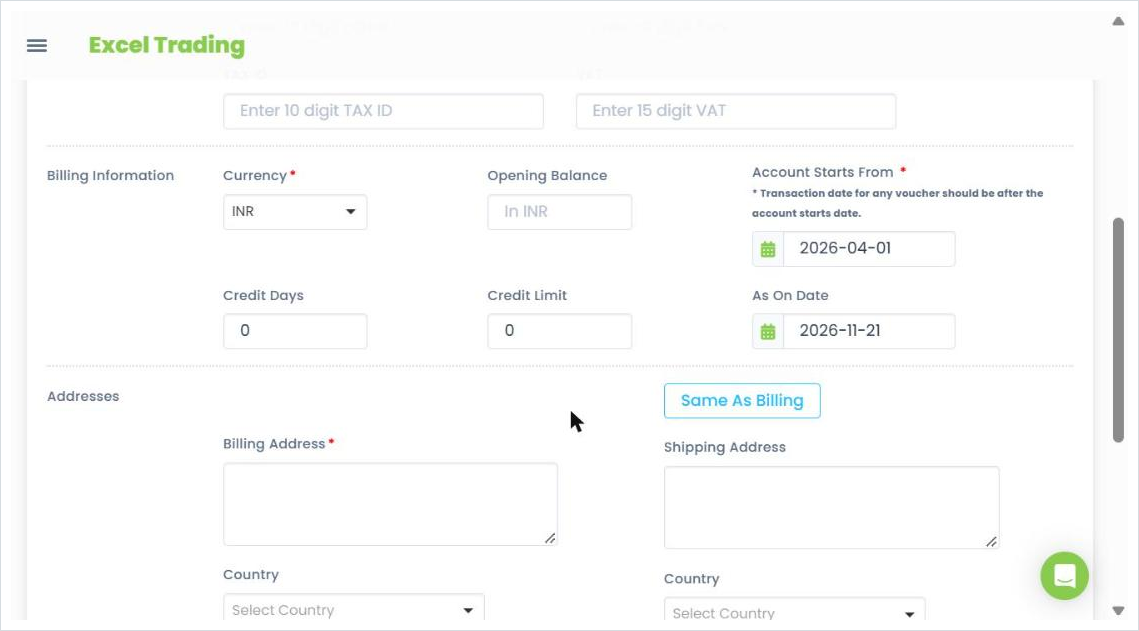
When you add a customer, capture the correct name, contact details, billing and shipping address, GSTIN if applicable, and the agreed payment terms. If you are migrating from spreadsheets or an older system, record the opening balance so the customer ledger starts from the right number. A distributor adding a new retail customer, for example, should set the credit period and any credit limit at this stage rather than deciding it invoice by invoice.
2. Keep sales and invoice records accurate
Every invoice, credit note and receipt should be linked to the correct customer. That is what lets you see a customer's full transaction history without digging through separate files, and it is what makes a payment dispute a two minute check rather than an afternoon.
3. Track payments and outstanding invoices
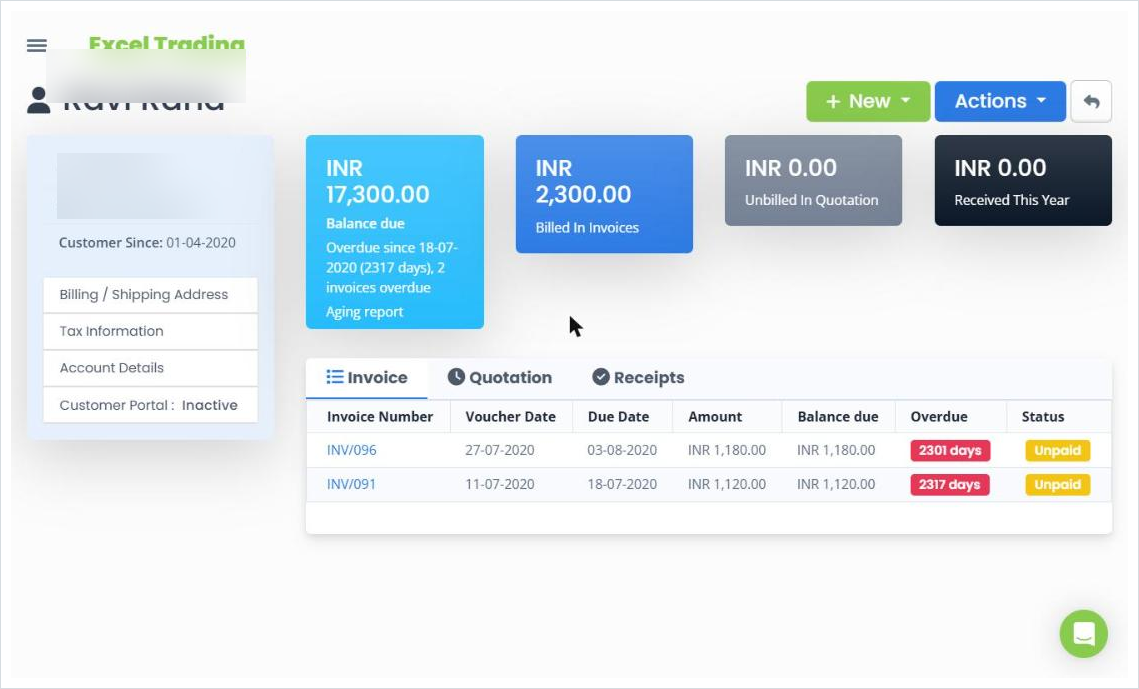
For each customer, keep sight of the total invoiced, the amount received, the remaining balance, which invoices are overdue, and the payment history. A simple case: a customer has been invoiced ₹1,00,000 and has paid ₹70,000.
| Particulars | Amount |
|---|---|
| Total invoices | ₹1,00,000 |
| Payments received | ₹70,000 |
| Outstanding balance | ₹30,000 |
The ₹30,000 outstanding should always reconcile back to specific invoices and receipts, not just sit as a lump figure.
4. Maintain customer statements
A customer statement summarises a customer's transactions over a chosen period: invoices raised, receipts received, credits, and the outstanding amount. It is the fastest way to answer a payment query and to communicate a balance clearly.
5. Record customer advances
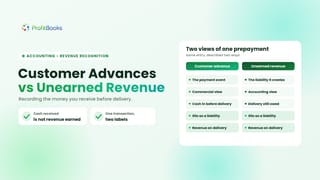
Customers sometimes pay before goods or services are delivered. If a customer pays ₹20,000 in advance against a future order, that advance is not the same as a payment against an existing invoice, and treating it like one distorts your receivables. Record the advance separately and adjust it against the relevant invoice when the sale is completed. For the accounting treatment behind advances, see how unearned revenue works.
6. Review customer accounts regularly
Set a rhythm to check overdue balances, missing receipts and unusual entries. A short weekly or monthly review catches problems while they are still small.
How to Manage Vendor Records Effectively
Vendor records follow the same logic in reverse. The focus is knowing what you owe, to whom, and by when.
1. Create and maintain vendor profiles
Record the vendor name, contact details, address, GSTIN and payment information, and keep them current. An outdated address or an old GSTIN can cascade into incorrect purchase bills and delayed payments. Keep one profile per supplier so their history does not split across duplicates.
2. Link every purchase to the right vendor
Purchase bills, expense entries and purchase returns should all link back to the correct vendor. Remember that not every vendor purchase is inventory. Businesses also buy services, rent and utilities, and those bills belong against a vendor too. If you use purchase orders, connect them as well, though the full order to bill flow is covered in purchase orders and invoices.
3. Track vendor payments
Record each payment against the correct vendor bill and keep a history of what has been paid. A bill of ₹80,000 with a payment of ₹50,000 leaves ₹30,000 payable.
| Particulars | Amount |
|---|---|
| Vendor bill | ₹80,000 |
| Payment made | ₹50,000 |
| Outstanding payable | ₹30,000 |
Multiply that across twenty vendors with different terms and the occasional debit note, and manual tracking starts to break down quickly.
4. Record advances paid to vendors
A payment made to a supplier before receiving goods or services is an advance, not a settled bill. Recording it as an ordinary payment closes out a liability that does not exist yet and creates a mismatch when the real bill arrives. Keep a ₹25,000 advance identifiable until it is adjusted against the related purchase.
5. Maintain vendor statements
A vendor statement lets you verify purchase bills, payments, advances and outstanding amounts against the supplier's own records. It is how you catch a bill you never recorded or a payment the supplier missed.
6. Review vendor balances and due dates
Review upcoming payments, overdue bills and any unallocated advances on a regular cycle so nothing is paid twice and nothing is missed.
Customer Management vs Vendor Management: Key Differences
The two processes mirror each other, but the direction of money and the records involved are opposite.
| Factor | Customer management | Vendor management |
|---|---|---|
| Business relationship | You sell to the customer | You buy from the vendor |
| Main records | Sales invoices and receipts | Purchase bills and payments |
| Money movement | Money comes in | Money goes out |
| Outstanding balance | Accounts receivable | Accounts payable |
| Advance transaction | Advance received | Advance paid |
| Account statement | Customer statement | Vendor statement |
| Main objective | Track sales and collections | Track purchases and payments |
How both processes connect to your accounting
Customer transactions affect sales and receivables. Vendor transactions affect purchases, expenses, inventory and payables. Both feed the same books. Suppose a distributor sells ₹1,00,000 of goods to a retailer on credit and buys ₹60,000 of inventory from a supplier on credit. The business has to track ₹1,00,000 receivable and ₹60,000 payable as two separate balances. They cannot simply be offset against each other, even though both sit in the same accounting system.
How to Track Customer Payments and Vendor Payments
Most recording errors happen at the payment stage, so it is worth being deliberate about it.
Recording payments received from customers
When a customer pays against an invoice, record the receipt against the correct customer and the correct invoice. Capture the amount, the date, the payment method, the bank or cash account, the invoice being settled, and any balance that remains.
Recording payments made to vendors
Vendor payments should link to the correct vendor bill wherever one exists. Capture the vendor, the date, the amount, the method, the bill being paid, and the remaining payable.
Handling partial payments
Partial payments are where lump balances go wrong. If a customer has an invoice of ₹50,000 and pays ₹30,000, the remaining ₹20,000 must stay visible against that specific invoice. The same applies to a vendor bill you pay in instalments.
Keeping advances separate from payments
A payment against an existing invoice or bill is not the same as an advance paid or received before the invoice exists. Keeping the two distinct is what keeps your receivables and payables honest. For the wider distinction between what you are owed and what you owe, see accounts payable and receivable.
Why Customer and Vendor Statements Matter
A statement of account is a running summary of every transaction with one customer or vendor over a period, ending in the outstanding balance.
Customer statements
A customer statement shows the invoices raised, receipts received, any credits or adjustments, the outstanding amount, and the transaction history for the period. When a customer disputes a charge or claims they have already paid, the statement is your evidence.
Vendor statements
A vendor statement does the same in reverse, letting you review purchase bills, payments, advances and outstanding payables against the supplier's records. Comparing the two often surfaces a missing bill or an unrecorded payment.
Why regular statement reviews are useful
Reviewing statements regularly helps you spot missing transactions, investigate differences between your records and the other party's, answer payment queries, and follow up on outstanding balances. One caution: a statement should always be checked against the supporting invoices, bills, receipts and payments. A statement on its own does not prove every transaction is correct, which is also why bank reconciliation sits alongside it as a routine check.
Common Customer and Vendor Management Challenges
Duplicate customer or vendor records
Sharma Traders and Sharma Traders Pvt Ltd end up as two profiles, invoices split across both, and neither outstanding balance is accurate. Inconsistent spellings and different contact names are the usual cause.
Missing or outdated contact and tax information
An outdated GSTIN, billing address or contact detail creates invoicing problems and tax filing errors that surface at the worst time.
Unrecorded receipts or payments
A receipt or payment that never gets entered makes an outstanding balance look higher than it really is, and leads to a customer being chased for money they have already paid.
Unallocated advances
An advance that is not tracked separately, or never adjusted against the final invoice or bill, quietly distorts both receivables and payables.
Incorrect outstanding balances
Missing credit notes, partial payments recorded as full, or duplicate entries all push receivable and payable figures away from reality.
Records scattered across spreadsheets
When contact details, invoices, payments and statements live in different files, reconciling them is slow and error prone. This is usually the root cause behind several of the problems above.
Best Practices for Maintaining Accurate Records
- One record per party. Keep a single, consistent profile for each customer and vendor, and resist creating a second one for a slightly different spelling.
- Update records when details change. Review contact, address, tax and payment information periodically rather than only when something breaks.
- Record transactions promptly. Enter invoices, bills, receipts and payments as they happen, not when you remember them.
- Allocate payments correctly. Link every receipt and payment to the right invoice or bill, and keep advances separate.
- Review outstanding balances regularly. Check receivables and payables by party and follow up on overdue amounts on a set cycle.
- Keep supporting documents. Store invoices, purchase bills, receipts and payment confirmations alongside the transactions they relate to.
- Use accounting software for a single source of truth. An integrated system connects customer and vendor records with invoices, purchases, payments and reports, so the records update themselves as you work.
How ProfitBooks Helps Manage Customers and Vendors
Managing customer and vendor information becomes far easier when contact details, transaction history, payments and outstanding balances are connected to the same accounting records. ProfitBooks is built that way.
Keep customer and vendor information in one place
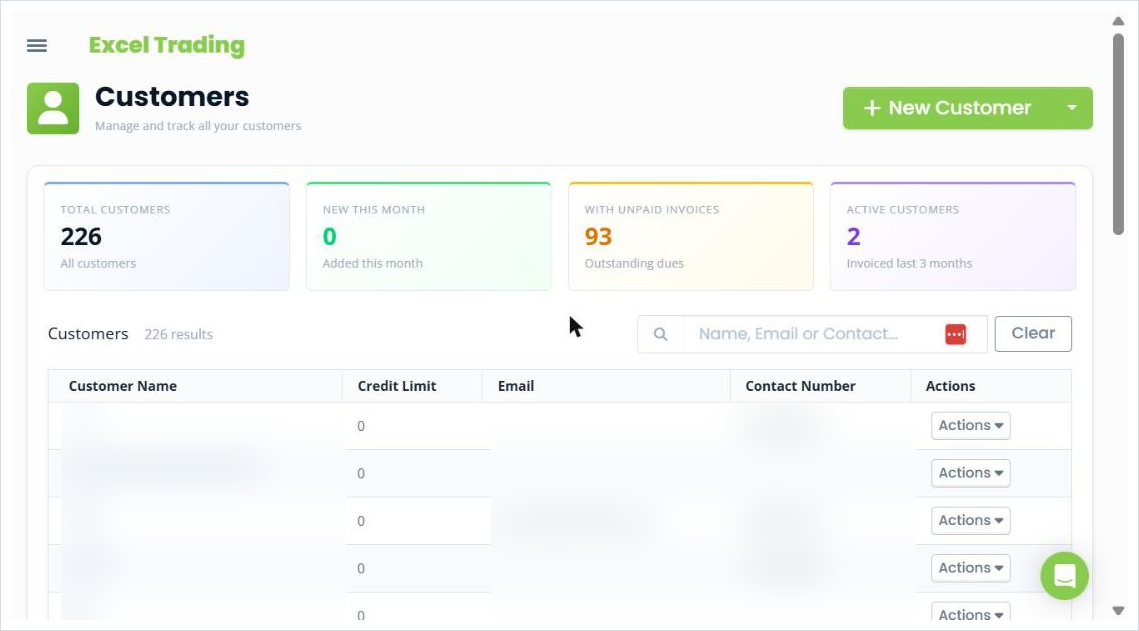
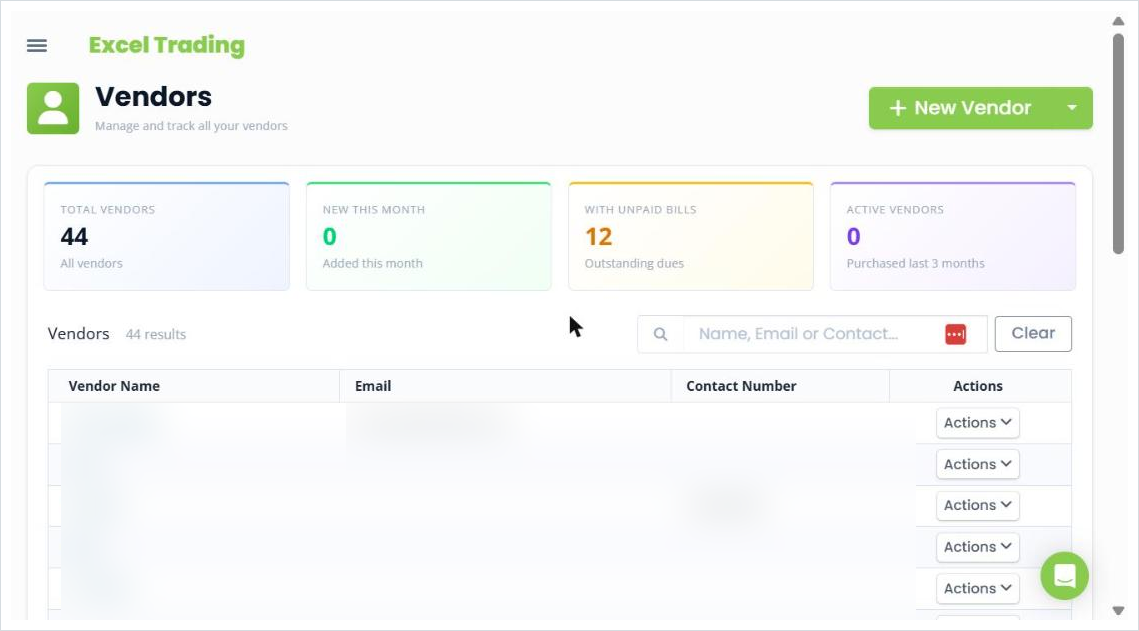
Customers live under Income and vendors under Expenses, each as a searchable list with filter tiles for totals, new additions this month, parties with outstanding dues, and active parties. A new customer or vendor record holds contact details, tax information such as GSTIN and PAN, billing and shipping addresses, currency and opening balance. Customer records additionally carry a credit period and a credit limit field. You can also import customers and vendors in bulk rather than adding them one by one.
View customer and vendor statements
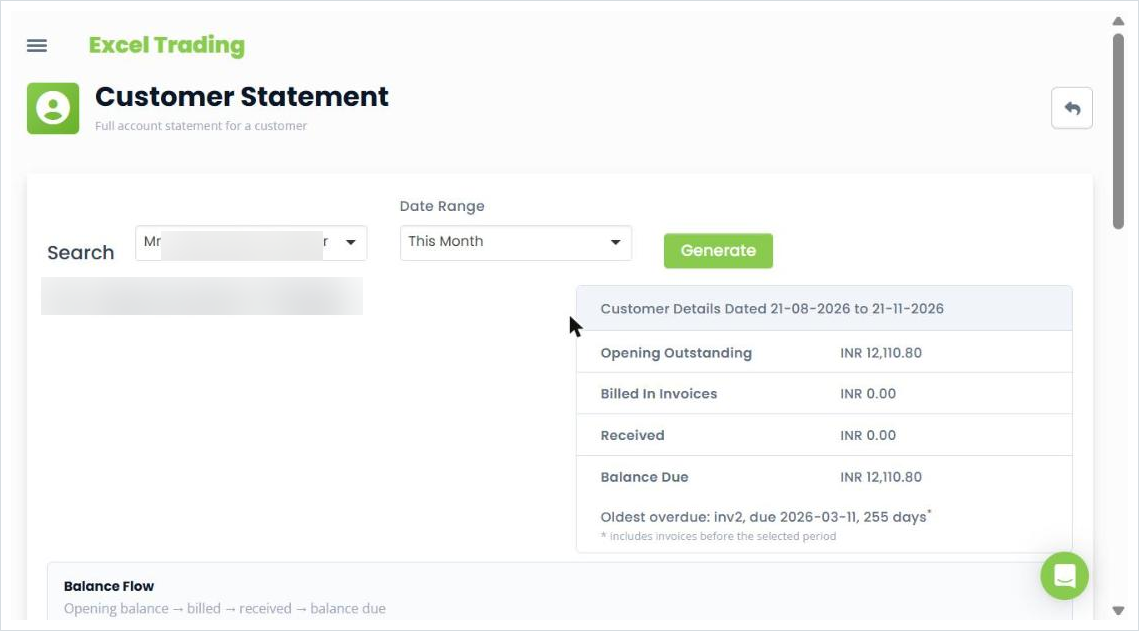
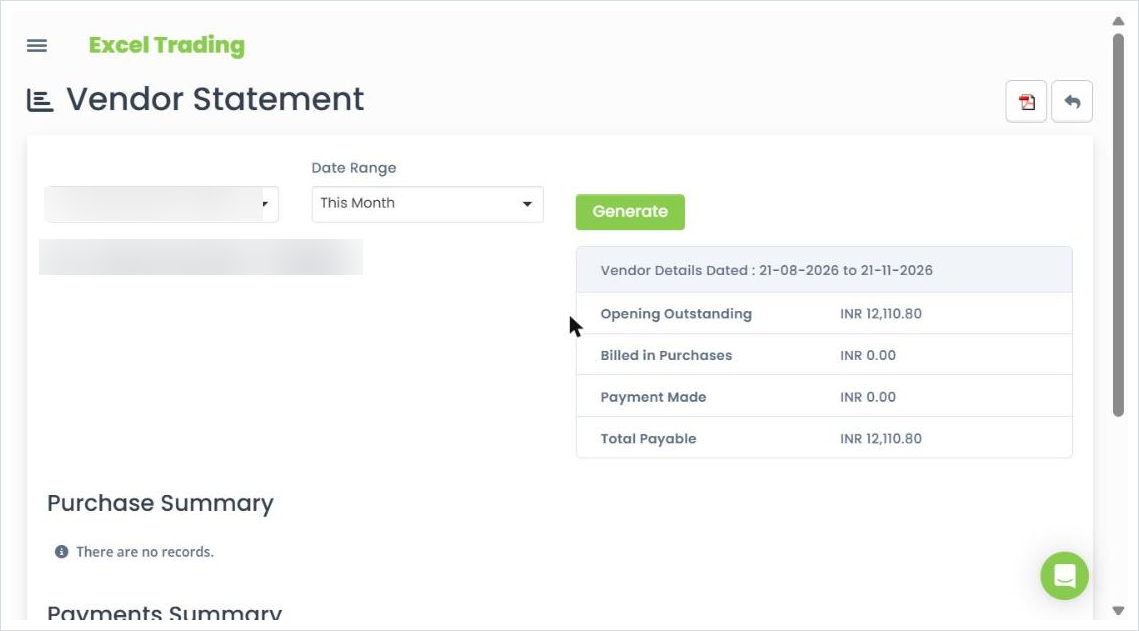
Under Reports, the Customer Statement lets you pick a customer and a date range and generate a full account statement, showing opening outstanding, amounts billed and received, the balance due, and the oldest overdue invoice. Vendor statements sit under Expense Reports and do the same on the buying side. You can also open a customer's statement directly from the customer page through the Actions menu.
Track vendor bills, payments and advances
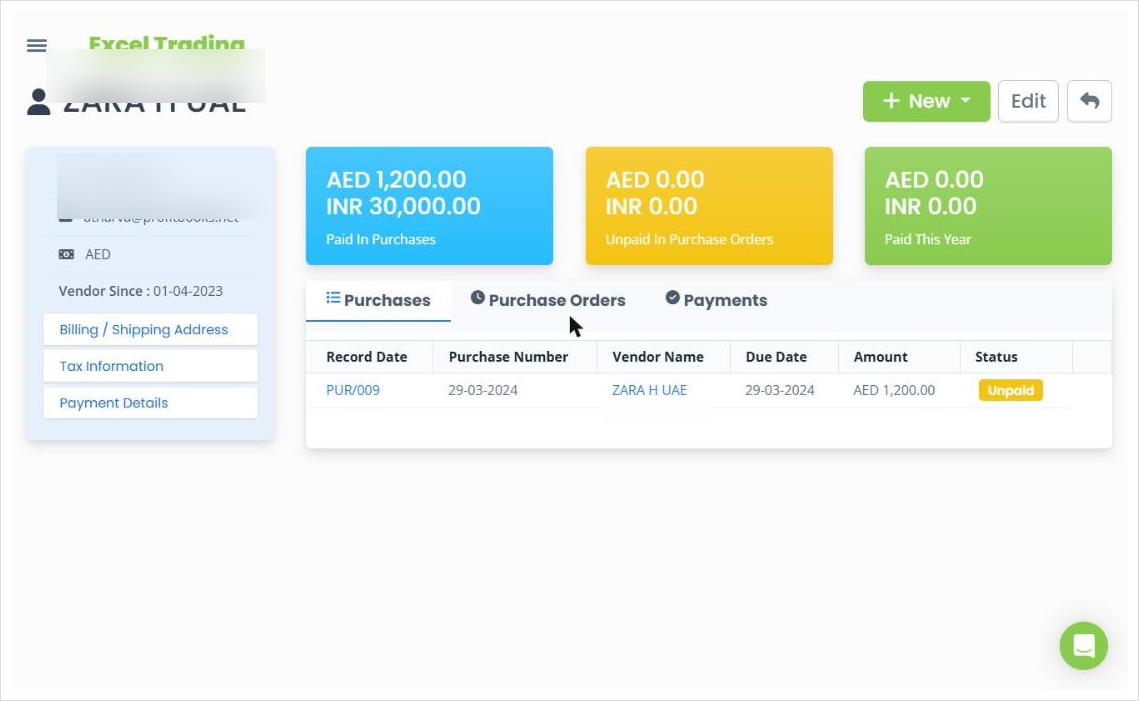
Each vendor page shows what has been paid in purchases, what is unpaid in purchase orders, and tabs for purchases, purchase orders and payments. Advances are recorded separately from bill payments, under advance payments for vendors and advance receipts for customers, so a prepayment stays identifiable until it is adjusted against the related transaction.
Monitor receivables and payables
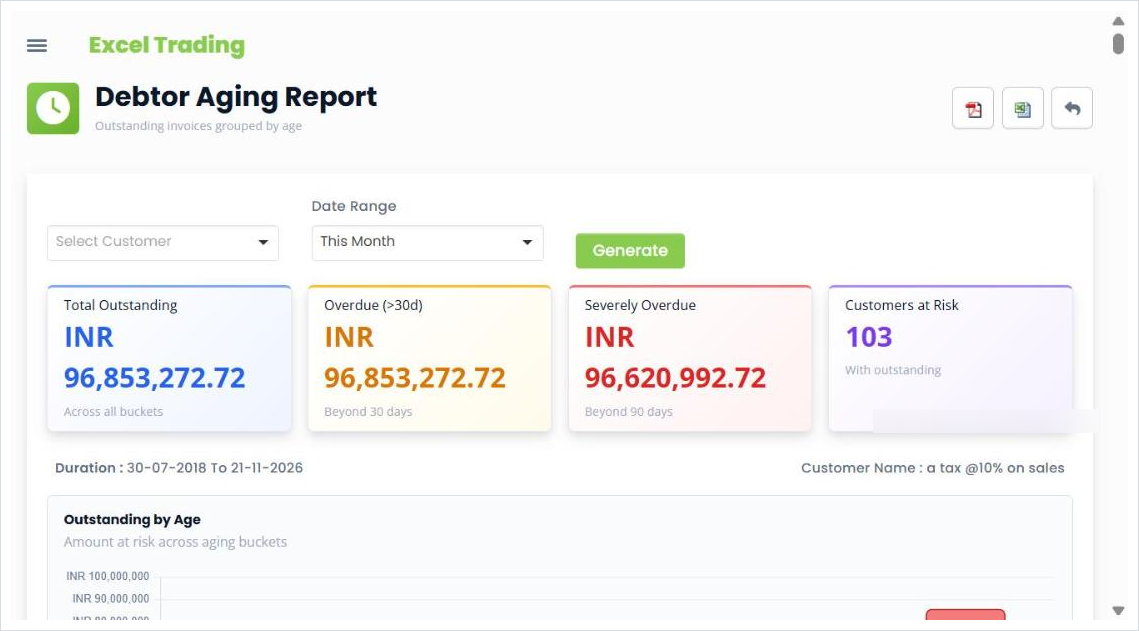
The Receivable Aging report groups outstanding invoices into age buckets, from 1 to 30 days through to more than 180 days, and flags total outstanding, overdue amounts and customers at risk. Customer Summary and Vendor Summary give every party's opening balance, movement and closing balance in one view, so you can see where the money is tied up.
Keep accounts connected to your books
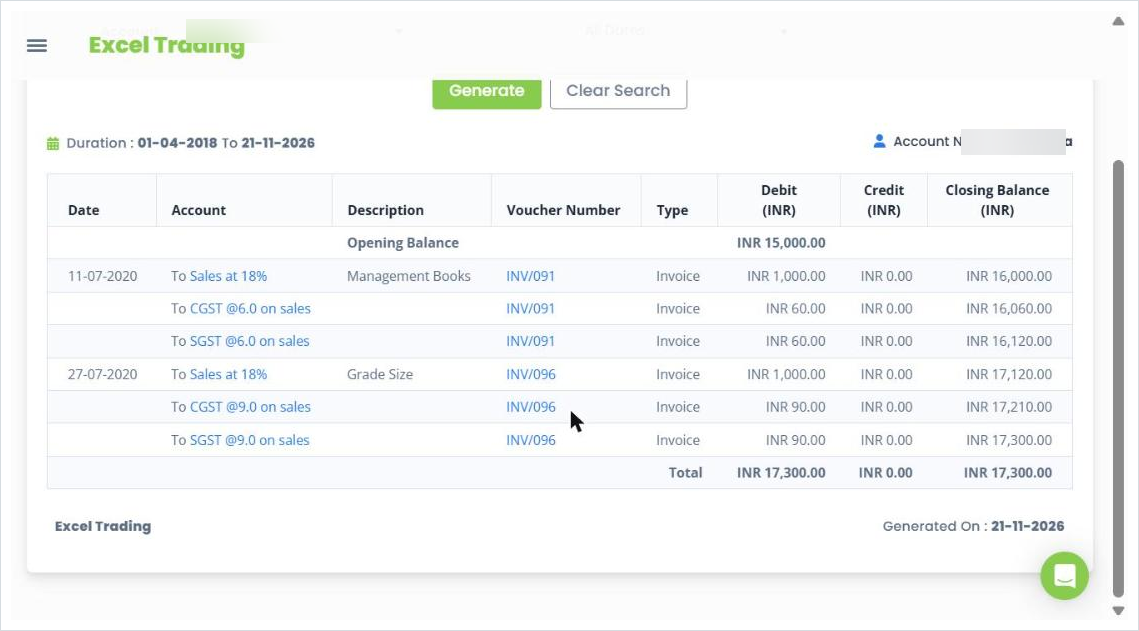
Because every invoice, bill, receipt and payment posts to the ledger, a party's balance stays in step with the accounts. Open the Ledger report for any customer or vendor and the running closing balance matches the balance due shown on their page. Statements and reports can be exported to PDF, and several to Excel, to share with a customer, a supplier or your accountant.
Manage customers and vendors in one place
ProfitBooks keeps customer and vendor records, invoices, bills, payments, advances and statements connected, so you always know who owes you and whom you need to pay.
Explore ProfitBooks customer and vendor management →
Frequently Asked Questions
What is customer and vendor management?
Customer and vendor management is the process of maintaining organised records for every business you sell to or buy from, including contact details, tax information, transaction history, payments, advances and outstanding balances. It gives you a reliable picture of who owes you money and whom you need to pay.
What is the difference between customer management and vendor management?
Customer management tracks sales, invoices raised and money received. Vendor management tracks purchases, bills recorded and money paid. The mechanics mirror each other, but the direction of money is opposite: receivables on the customer side, payables on the vendor side.
What information should a business maintain about its customers?
Contact details, billing and shipping addresses, tax identifiers such as GSTIN, agreed payment terms, and the full transaction history of invoices, receipts, advances and outstanding balances. Keeping tax details verified and current is especially important for GST.
What information should a business maintain about its vendors?
Supplier contact details, GSTIN and tax information, payment terms and payment details, and the history of purchase bills, payments, advances and outstanding payables. One consistent profile per supplier keeps that history from splitting across duplicates.
How can businesses track customer outstanding payments?
Record every invoice and receipt against the correct customer and invoice, keep partial payments linked to their invoice, and review outstanding balances regularly. Customer statements and a receivable aging report show what is outstanding and how overdue it is.
How can businesses track vendor payments and advances?
Record each payment against the correct vendor bill, and keep advances paid before a bill separate until they are adjusted against the related purchase. A vendor statement lets you reconcile bills, payments and advances against the supplier's own records.
What is a customer or vendor statement?
It is a summary of all transactions and the running balance for a particular customer or vendor over a selected period. It helps resolve payment disputes, surface missing records, and confirm that both parties agree on what is owed.
Can accounting software manage customers and vendors together?
Yes. Accounting software lets you create customer and vendor profiles, link invoices, bills, receipts and payments to them, track receivables and payables, and generate statements from one place. In ProfitBooks these records stay connected to the ledger, so balances update as you work.