Recurring Invoices: Benefits, Examples and How They Work
On this page 58 sections
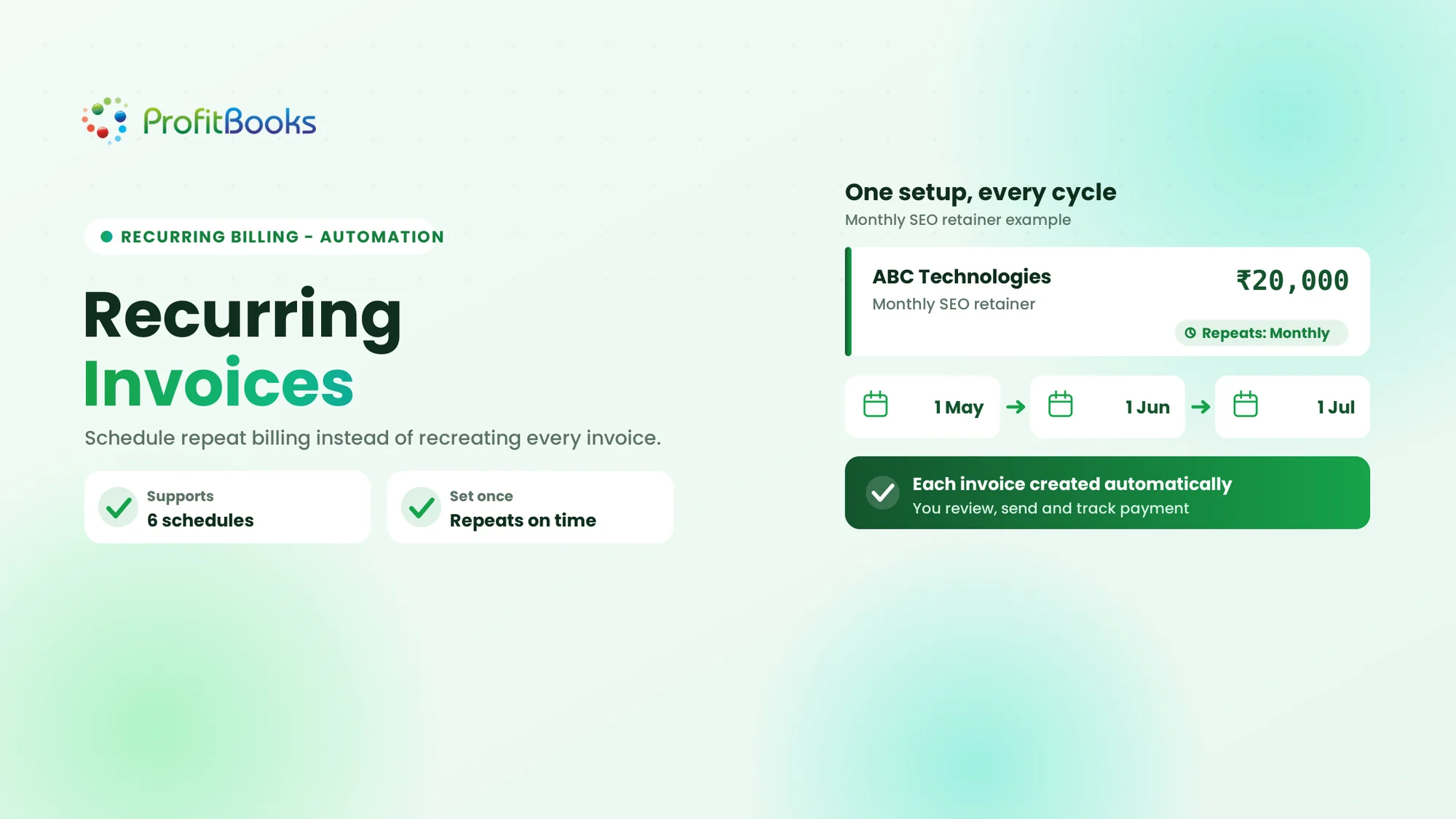
A recurring invoice is an invoice scheduled to be generated repeatedly for the same customer at predetermined intervals. Businesses use recurring invoices to bill customers regularly for ongoing products or services without manually creating a new invoice for every billing cycle.
By Mohnish Katre, Co-founder, ProfitBooks
Last reviewed: 19 November 2026.
Why Businesses Need Recurring Invoices
Picture a digital marketing agency that manages 15 clients on monthly retainers. Every month, its accounts team prepares 15 invoices with the same customer details, the same service descriptions, and the same agreed fees. Recurring invoices exist to remove exactly this repetition, by letting a business schedule repeat invoice creation instead of preparing each invoice by hand.
Recurring invoicing matters because businesses regularly charge customers for ongoing services, and recreating identical invoices every cycle is slow and avoidable. Manual billing also leaves room for missed invoices, inconsistent details, and unnecessary administrative work. With a recurring schedule, the billing pattern is defined once in advance. This article explains what recurring invoices are, how they work, the common schedules and benefits, how they differ from recurring payments, and exactly how to create them in ProfitBooks.
What Are Recurring Invoices?
In practice, the process looks like this:
- A business creates an initial invoice or invoice template.
- It selects the customer and adds the products or services.
- It defines the billing frequency.
- The invoicing system generates new invoices according to the saved schedule.
- Each generated invoice can be reviewed, sent, and tracked separately.
A simple example of a recurring invoice
A Pune-based digital marketing agency charges a client ₹20,000 per month for SEO services. It sets up the recurring schedule once, and the system creates each following invoice on the scheduled date.
| Billing detail | Example |
|---|---|
| Customer | ABC Technologies |
| Service | Monthly SEO retainer |
| Invoice amount | ₹20,000 |
| Billing frequency | Monthly |
| Start date | 1 April 2026 |
| Next billing dates | 1 May, 1 June, 1 July |
The schedule is defined once, and subsequent invoices are created automatically on the scheduled dates. The same invoice number is not reused, and generating an invoice does not mean the customer has paid it.
How Do Recurring Invoices Work?
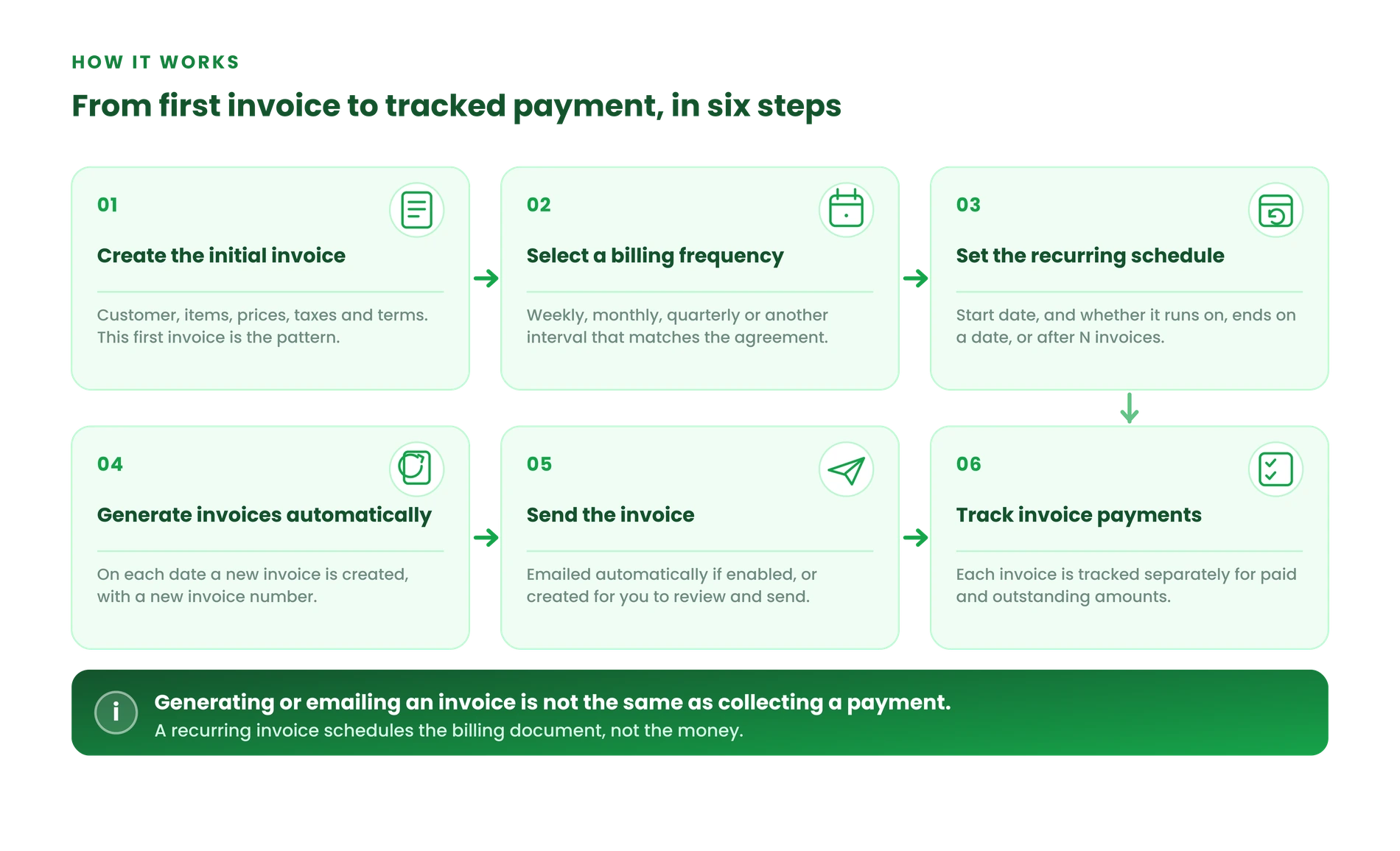
A recurring invoice moves through a clear sequence, from the first invoice to tracking each payment.
Step 1. Create the initial invoice
The business selects the customer and enters the invoice details, including products or services, prices, quantities, taxes, and payment terms. This first invoice becomes the pattern for the series.
Step 2. Select a billing frequency
The business decides whether the invoice should repeat weekly, monthly, quarterly, or at another supported interval, matching the customer agreement.
Step 3. Set the recurring schedule
The business chooses a start date and decides whether the schedule should continue indefinitely, stop on a specified date, or end after a fixed number of invoices.
Step 4. Generate invoices automatically
On each scheduled date, the software creates a new invoice using the saved invoice details, with a new invoice number for that cycle.
Step 5. Send the invoice to the customer
If the software supports it and the option is enabled, the generated invoice can be emailed to the customer automatically. Otherwise, it is created for the business to review and send.
Step 6. Track invoice payments
The business monitors each generated invoice separately to see which are paid and which are outstanding. Invoice creation and payment collection are separate activities.
Keep one distinction in mind throughout: generating or emailing an invoice is not the same as collecting a payment. A recurring invoice schedules the billing document, not the money.
Recurring Invoice Examples Across Different Businesses
Recurring invoices suit any business that bills the same customers on a regular cycle. These examples show how different business models use them.
1. Digital marketing agencies
Agencies offering SEO, social media management, content marketing, and advertising services often charge fixed monthly retainers. For example, an agency bills a client ₹30,000 every month for SEO and content services.
2. IT and software service companies
IT companies may charge recurring fees for technical support, software maintenance, system monitoring, and managed services. For example, a company charges ₹15,000 per month for ongoing IT support.
3. Consultants and professional service providers
Consultants, accountants, and business advisors often work on monthly or quarterly retainers for continuous professional services. For example, a consultant charges ₹12,000 per month for business advisory services.
4. Website maintenance providers
Web development agencies may bill for regular website updates, maintenance, and technical assistance. For example, a provider bills ₹9,000 every three months for website maintenance.
5. Equipment rental and maintenance businesses
Businesses with recurring rental or maintenance agreements can schedule invoices to match the contract. For example, an equipment provider charges ₹8,000 every month for equipment rental.
6. Training and other ongoing service providers
Training companies, professional coaches, and other service providers may invoice customers for ongoing programmes or periodic services on a monthly or quarterly basis.
| Business | Recurring service | Typical billing interval |
|---|---|---|
| Digital agency | SEO retainer | Monthly |
| IT company | Technical support | Monthly |
| Consultant | Advisory services | Monthly |
| Web agency | Website maintenance | Quarterly |
| Equipment provider | Equipment rental | Monthly |
| Training provider | Ongoing programme | Monthly or quarterly |
These are examples of recurring billing arrangements, not a claim that every business in these industries uses recurring invoices. The frequency always depends on the customer agreement.
Types of Recurring Invoice Schedules
Recurring invoices can follow different schedules depending on the agreement with the customer. The common intervals are below.
Weekly recurring invoices
Useful for services or arrangements billed every week.
Biweekly recurring invoices
Invoices generated once every two weeks. This means once per fortnight, not twice in a week.
Monthly recurring invoices
The most common choice, used for monthly retainers, maintenance services, and ongoing support contracts.
Quarterly recurring invoices
Useful when a business charges a customer once every three months.
Half-yearly recurring invoices
Suitable for agreements billed every six months.
Annual recurring invoices
Useful for services or contracts billed once a year, such as an annual maintenance contract.
| Frequency | Billing interval | Example |
|---|---|---|
| Weekly | Every 7 days | Weekly service fee |
| Biweekly | Every 2 weeks | Fortnightly service |
| Monthly | Every month | Monthly retainer |
| Quarterly | Every 3 months | Quarterly maintenance |
| Half-yearly | Every 6 months | Six-month service agreement |
| Yearly | Every 12 months | Annual maintenance contract |
ProfitBooks supports all six of these intervals as repeat options: Weekly, Every 2 weeks, Monthly, Every 3 months, Every 6 months, and Yearly.
Benefits of Recurring Invoices for Small Businesses
1. Saves time on repetitive billing
Businesses do not need to recreate the same invoice every cycle. Once the schedule is configured, new invoices are generated automatically on their dates.
2. Helps prevent missed billing cycles
A saved schedule reduces the dependence on someone remembering to raise an invoice each month. Businesses should still monitor upcoming invoices and check that the schedule is active.
3. Maintains consistent invoice details
Using saved invoice information keeps customer details, service descriptions, and agreed pricing consistent across billing periods.
4. Makes billing more predictable
Businesses can plan their invoicing around agreed customer schedules. Predictable invoice generation is not the same as guaranteed revenue or payment, so collection still needs to be tracked.
5. Reduces repetitive administrative work
Finance teams spend less time creating duplicate invoices and more time reviewing outstanding payments and records. For the follow-up side, see the guide on dealing with late payments.
6. Supports businesses with repeat customers
As a service business adds more customers on monthly or quarterly arrangements, scheduled invoice creation becomes steadily more useful.
Recurring Invoices vs Regular Invoices vs Recurring Payments
These terms are often confused, so it helps to separate them clearly.
Recurring invoices vs regular invoices
A regular invoice is created for a particular transaction. A recurring invoice is scheduled to be generated repeatedly for an ongoing customer arrangement.
Recurring invoices vs recurring payments
A recurring invoice is a billing document generated on a schedule. A recurring payment is a payment transaction that happens repeatedly under an authorised payment arrangement. Generating an invoice does not automatically charge a customer's bank account or card.
Recurring invoicing vs subscription billing
Subscription billing is a broader process that can include managing customer plans, renewals, upgrades, downgrades, usage-based charges, and recurring payment collection. Recurring invoicing can be one part of subscription billing, but it does not by itself provide all subscription-management functionality.
| Factor | Regular invoice | Recurring invoice | Recurring payment |
|---|---|---|---|
| Main purpose | Bill an individual transaction | Schedule repeat invoice creation | Collect repeat payments |
| Frequency | As needed | Predefined schedule | Predefined payment schedule |
| Invoice generated | For each transaction | Automatically on scheduled dates | May be linked to invoices |
| Payment collection | Separately arranged | Separately tracked | Repeated payment collection |
| Example | One-time project invoice | Monthly service invoice | Monthly authorised card charge |
What to Check Before Setting Up Recurring Invoices
A few checks before activating a schedule prevent errors from repeating every cycle.
Confirm the customer's billing agreement
Confirm the agreed service, amount, billing frequency, and payment terms with the customer.
Verify customer and invoice information
Check the customer name, address, GSTIN where applicable, products or services, quantities, prices, and tax details, using a correct GST invoice format where GST applies.
Choose the right billing frequency
The schedule should match the agreement, not just the business's preferred administrative routine.
Set appropriate start and end dates
Make sure the schedule begins when the service arrangement starts and does not run beyond the agreed period.
Review prices and tax details
If the fee, tax treatment, or customer details change, review the recurring setup before the next cycle.
Monitor upcoming invoices
Review the schedule regularly so invoices are generated as expected.
Quick pre-launch checklist: customer details correct, service and amount correct, frequency matches the agreement, start and end conditions correct, tax details checked, delivery settings appropriate, and upcoming invoices reviewed periodically.
How to Create Recurring Invoices in ProfitBooks
ProfitBooks lets businesses schedule recurring invoices instead of manually creating the same invoice every cycle. You can start from an existing invoice or from a new one. There are two ways to set one up.
Method 1: Make an existing invoice recurring
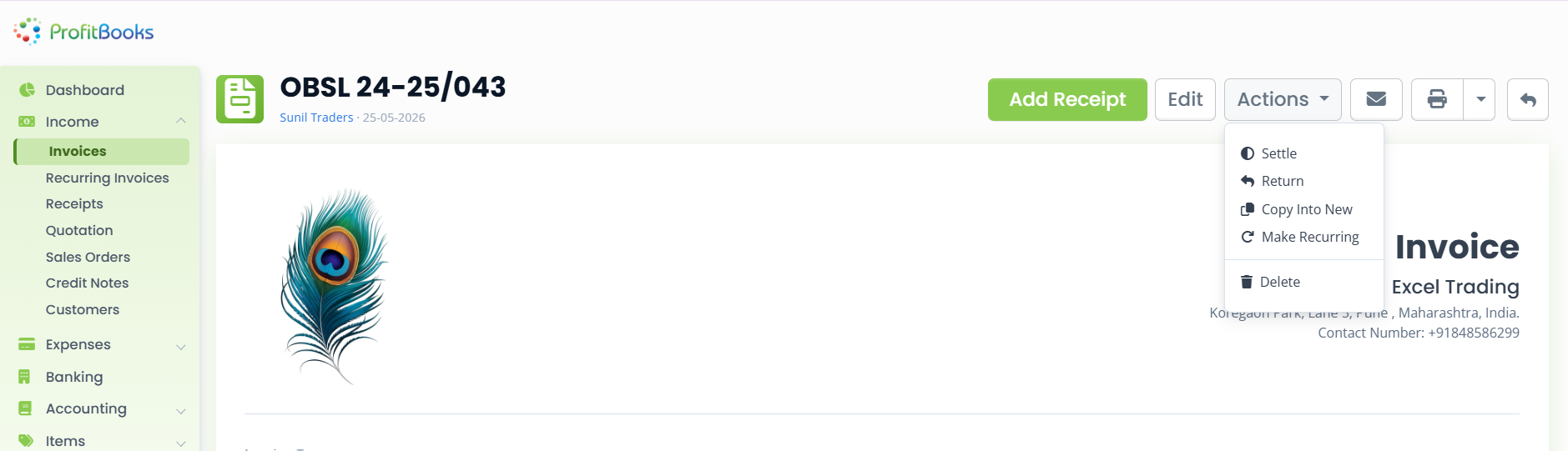
- Open the invoice you want to repeat.
- Click Actions.
- Select Make Recurring.
- ProfitBooks opens the recurring invoice setup screen.
- Review the invoice details before setting the schedule.
Method 2: Create from the Recurring Invoices section
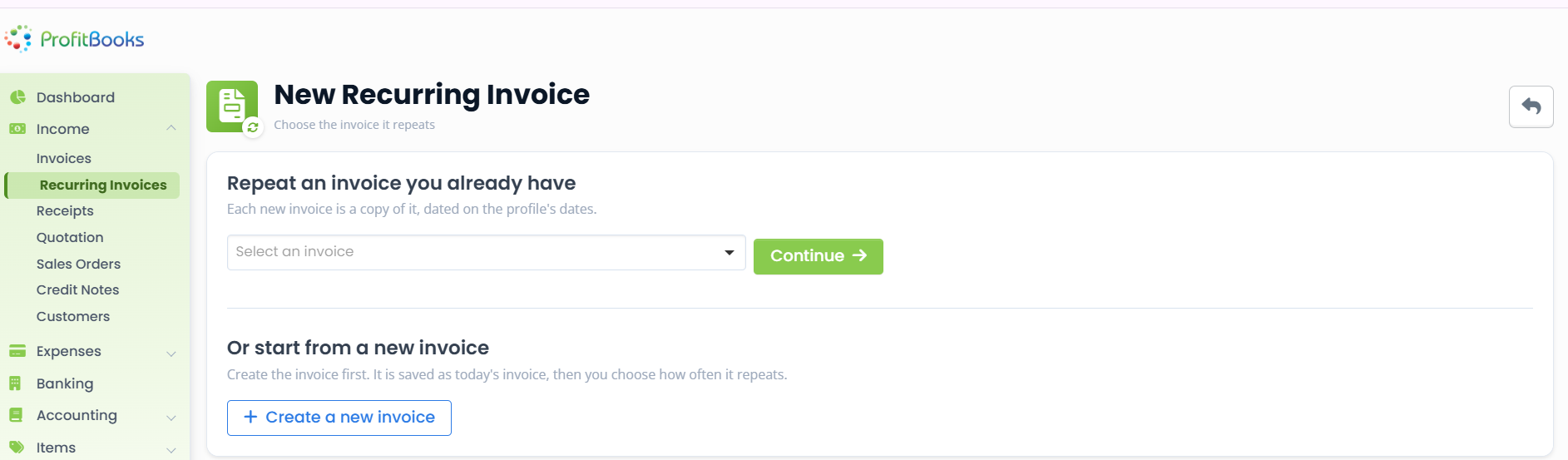
- Go to Income → Recurring Invoices.
- Click + New Recurring Invoice.
- Select an existing invoice from the dropdown and click Continue.
- Or select + Create a new invoice to prepare a new invoice first.
- Continue to the recurring schedule configuration.
Configure the recurring invoice schedule
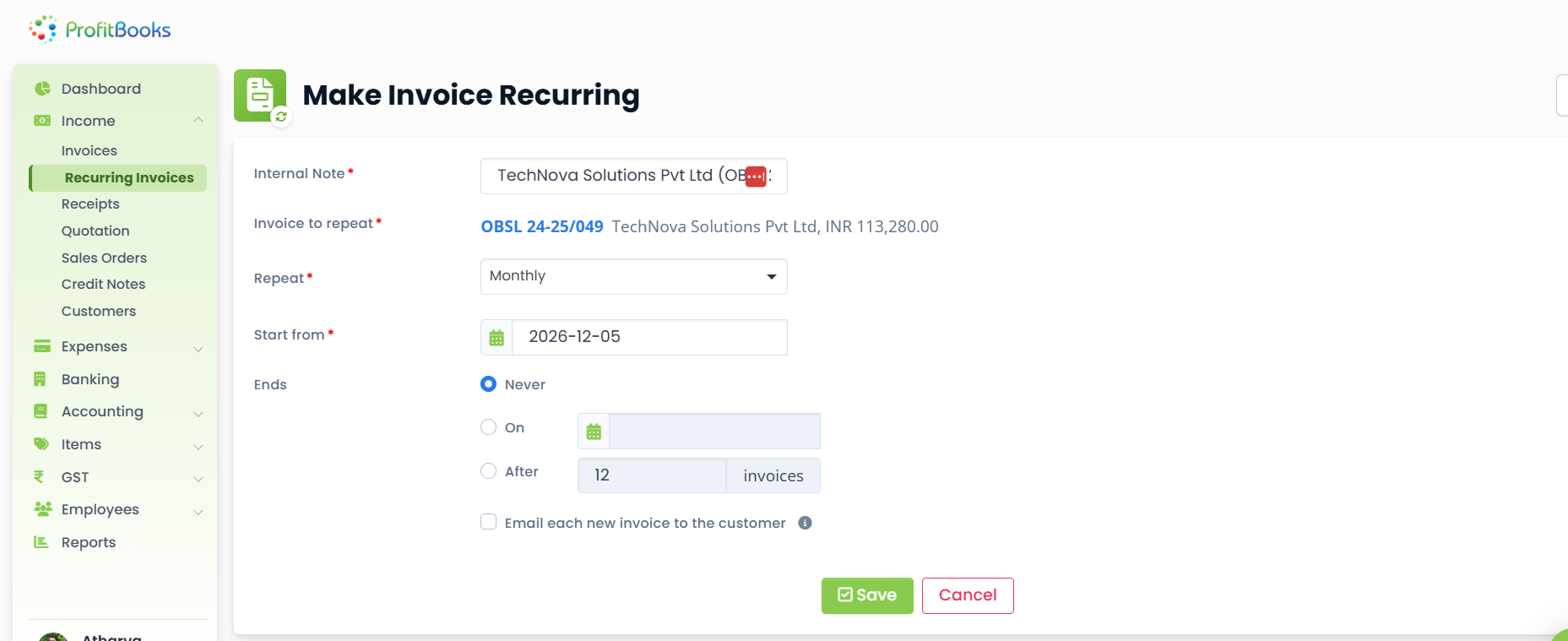
On the setup screen, set each of the following before you save.
| Setting | What you do |
|---|---|
| Internal Note | Add an internal reference or note for your own records. |
| Invoice to repeat | Review the selected invoice details. |
| Repeat | Select Weekly, Every 2 weeks, Monthly, Every 3 months, Every 6 months, or Yearly. |
| Start from | Select the date when the schedule should begin. |
| Ends | Select no end date, a specific end date, or a fixed number of invoices. |
| Email each new invoice to the customer | Enable this if each generated invoice should be emailed automatically. |
Check the invoice details and the schedule, then click Save.
What happens after you save a recurring invoice?
- ProfitBooks automatically creates a new invoice on each scheduled date.
- The generated invoice keeps the original customer details, items, prices, and taxes.
- A new invoice number is generated for each invoice.
- If automatic email delivery is enabled, the generated invoice is emailed to the customer with its PDF.
Automatic invoice creation and automatic payment collection are different things. A generated or emailed invoice does not mean the customer has paid.
How to view and manage upcoming recurring invoices
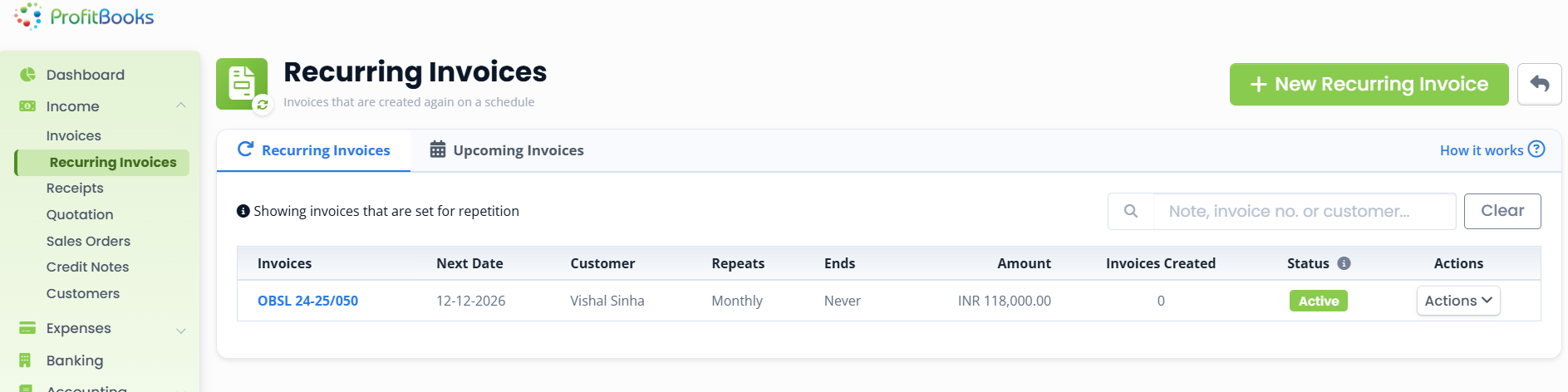
Two tabs help you keep track:
- Recurring Invoices: shows the invoices you have configured to repeat.
- Upcoming Invoices: shows invoices scheduled to be created, filtered by the next 30 days, the next three months, or all upcoming invoices.
You can manage a recurring invoice through its Actions menu, which includes Edit, Pause, Resume, Stop, and Delete. Pausing stops new invoices without deleting the schedule, and resuming starts it again. Keeping a consistent invoice numbering approach across the series keeps your records clean.
Common Recurring Invoice Mistakes and How to Avoid Them
1. Selecting the wrong billing frequency
A monthly service should not be scheduled quarterly by mistake. Always check the frequency against the customer agreement.
2. Using outdated prices
If the service fee changes, review the recurring invoice details before the next cycle so old pricing does not repeat.
3. Forgetting to set an end date
A schedule with no end can keep generating invoices after the agreement has finished. Choose the right end condition.
4. Ignoring tax and customer details
Incorrect customer or tax information carries over into every generated invoice. Review the saved details when anything changes.
5. Assuming invoice generation means payment collection
An invoice being generated or emailed does not mean it has been paid. Track payment status separately and watch your days sales outstanding and outstanding customer payments.
6. Not reviewing upcoming invoices
Check the upcoming schedule and generated invoices regularly to catch anything that needs attention.
When Should a Business Use Recurring Invoices?
Recurring invoices are useful when:
- The business provides the same service regularly.
- The customer has agreed to a repeat billing arrangement.
- The invoice amount and details are reasonably predictable.
- The billing frequency is established in advance.
- The business wants to reduce repetitive invoice creation.
They may not be suitable when:
- Every project has a different price and scope.
- The amount depends on variable usage or quantities.
- Each transaction needs individual approval before billing.
- The customer is charged only after a specific milestone or delivery.
In short, recurring invoices work best when billing terms are agreed and predictable.
Simplify Recurring Invoicing With ProfitBooks
Preparing the same invoices month after month takes time and creates avoidable administrative work. ProfitBooks lets businesses create recurring invoices from an existing or new invoice, schedule them using the six supported billing frequencies, define when a schedule starts and ends, generate invoices automatically on their dates, email each one to the customer when that option is enabled, review upcoming invoices, and edit, pause, resume, stop, or delete a schedule at any time.
Spend less time preparing repeat invoices
Set up recurring invoicing with ProfitBooks and organise your regular customer billing, so each cycle's invoice is created on schedule while you stay in control.
Explore recurring invoicing →
Frequently Asked Questions About Recurring Invoices
What is a recurring invoice?
A recurring invoice is an invoice generated at predefined intervals for repeat customer billing. The business sets up the invoice and schedule once, and the software creates each new invoice on its scheduled date instead of someone raising it by hand.
What is an example of a recurring invoice?
A common example is a monthly SEO retainer, where an agency bills a client the same fixed fee every month, or an IT maintenance contract billed on a set monthly or quarterly cycle.
How often can recurring invoices be generated?
Common schedules are weekly, biweekly, monthly, quarterly, half-yearly, and yearly. ProfitBooks supports six repeat options: Weekly, Every 2 weeks, Monthly, Every 3 months, Every 6 months, and Yearly.
Are recurring invoices generated automatically?
Yes. Once the schedule is saved, the invoicing software creates a new invoice on each scheduled date using the saved invoice details, with a new invoice number for each one.
Can recurring invoices be emailed automatically?
It depends on the software setting. ProfitBooks provides an option to email each newly generated invoice to the customer automatically, with its PDF, when that option is enabled.
Can a recurring invoice be stopped or paused?
Yes. In ProfitBooks, a recurring invoice can be edited, paused, resumed, stopped, or deleted from its Actions menu. Pausing stops new invoices without removing the schedule, and resuming starts it again.
Are recurring invoices the same as recurring payments?
No. A recurring invoice is a billing document generated on a schedule. A recurring payment is a repeated charge under an authorised payment arrangement. Generating an invoice does not collect the payment on its own.
Can recurring invoices be used for monthly retainers?
Yes. Monthly retainers are one of the most common use cases, because the customer, service, and fee stay the same each month, which is exactly what a recurring schedule is designed for.