Accounting software for businesses with multiple revenue streams: how to track income by source
On this page 35 sections
Multiple revenue streams are good for growth, until your books stop showing where the money comes from
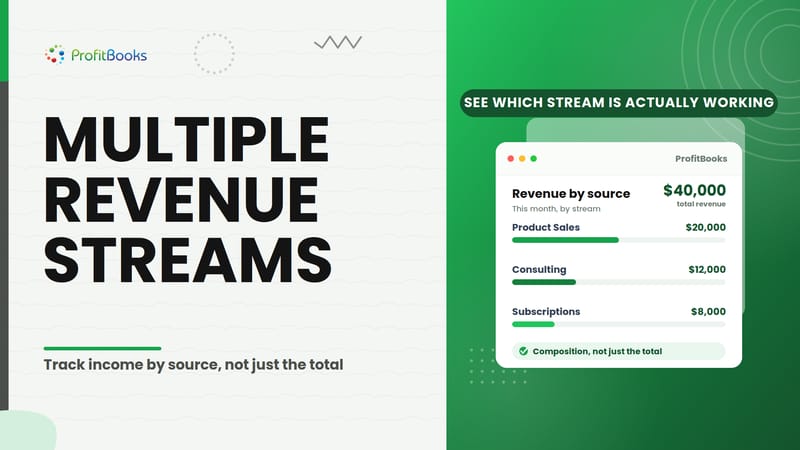
A business I was advising last year pulled in $40,000 in a single month. Solid number. Product sales accounted for $20,000, consulting brought in $12,000, and recurring service contracts added another $8,000. The P&L showed $40,000 in total revenue. Clean, tidy, useless.
The owner couldn't tell me which of those three sources had grown since the prior quarter. She didn't know whether consulting margins were better or worse than product margins. She had no idea that her recurring contracts, the smallest line, were actually the most stable and fastest-growing part of the business.
Total revenue alone doesn't explain revenue composition. And revenue composition is where the actual business decisions live.
This is the gap I see repeatedly. The accounting system records income just fine. Every dollar lands somewhere. But when the owner asks "which part of my business is actually working?", the books go quiet.
This article covers what accounting software needs to do if your business earns from several sources, the specific features that separate useful revenue tracking from basic income recording, a practical framework for evaluating any platform, and where ProfitBooks fits for businesses with multiple revenue streams. I also walk through the mistakes that create accounting chaos when businesses try to track multiple income streams without a clear structure.
What is a revenue stream?
A revenue stream is a distinct, identifiable source through which a business earns income. It can be defined by what is sold (product vs service), how it is sold (subscription vs one-time), or where it is sold (online vs wholesale vs retail). Businesses use revenue streams to understand which parts of the business generate money and how those parts perform relative to each other.
Revenue and revenue stream are related but different. Revenue is the total. A revenue stream is a category within that total, one that is meaningful enough to track separately because it behaves differently from the others.
A consulting firm's retainer income and its one-off project fees are both revenue. But they have different economics, different sales cycles, and different implications for cash flow. That's why they deserve separate tracking.
Common types of revenue streams
| Revenue type | Example |
|---|---|
| Product sales | Selling physical goods online or in-store |
| Service revenue | Consulting, professional services |
| Subscription revenue | Monthly software access, memberships |
| Retainer revenue | Agency retainer agreements |
| Project revenue | One-time implementation or build projects |
| Channel revenue | Marketplace sales vs direct website sales |
Why businesses with multiple revenue streams need better revenue tracking
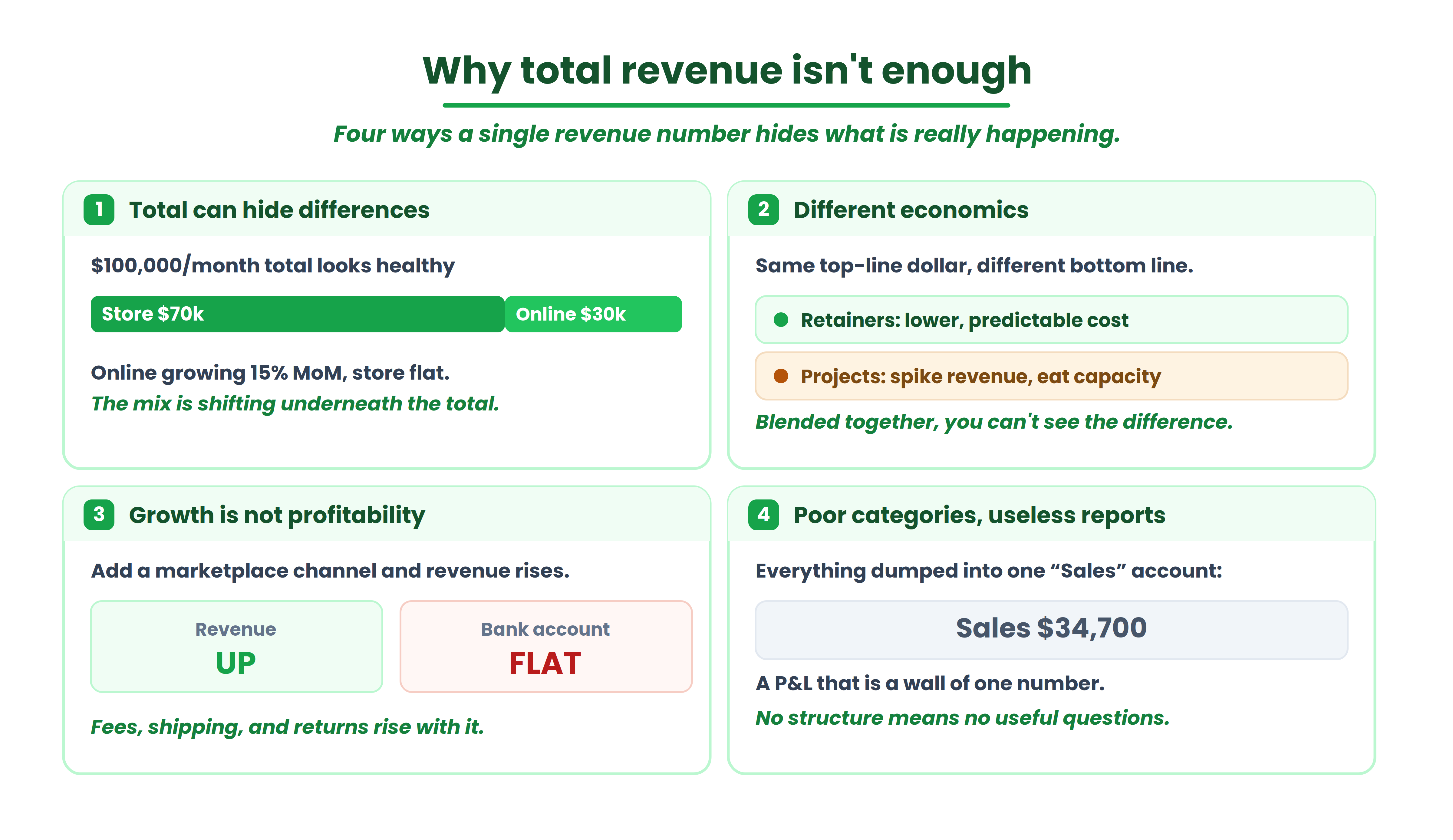
Total revenue can hide important differences
A retailer doing $100,000/month might be earning $70,000 from store sales and $30,000 from online orders. If online is growing 15% month over month and store sales are flat, the blended total looks healthy while the composition is shifting underneath. Without separation, the owner is flying blind.
Different revenue streams can have different economics
An agency earning from retainers and project work might assume both contribute equally. But retainers often carry lower delivery costs because the scope is predictable. Project work can spike revenue in a given month while consuming disproportionate team capacity. Same top-line dollar, very different bottom-line impact.
Revenue growth doesn't automatically mean profitability
I often see this with ecommerce businesses that add marketplace channels. Revenue goes up. So do marketplace fees, shipping costs, and return rates. The P&L shows growth. The bank account tells a different story.
Poor categorization makes reports less useful
If a business dumps consulting revenue, training revenue, and product sales into a single "Sales" account, the Profit & Loss statement becomes a wall of one number. You can't ask useful questions of data that was never structured to answer them.
What does "track income by source" actually mean?
There's a difference between recording income and being able to analyze income by source. Every accounting system records transactions. The question is whether those transactions carry enough structure to be filtered, grouped, and compared later.
Tracking income by source means tagging or categorizing each sale so you can later pull a report that shows revenue broken down by a dimension that matters to your business. Those dimensions might include product line, service type, project, customer, sales channel, or geographic location.
Not every business needs every dimension. A solo consultant with two service offerings doesn't need channel-level reporting. An ecommerce company selling across Amazon, Shopify, and wholesale absolutely does.
The right structure depends on what decisions the business needs to make. If you never compare consulting revenue to product revenue, separating them creates work without payoff. If you regularly ask "how much did we earn from marketplace vs direct?", that dimension needs to exist in your accounting data.
When should a business separate revenue streams?
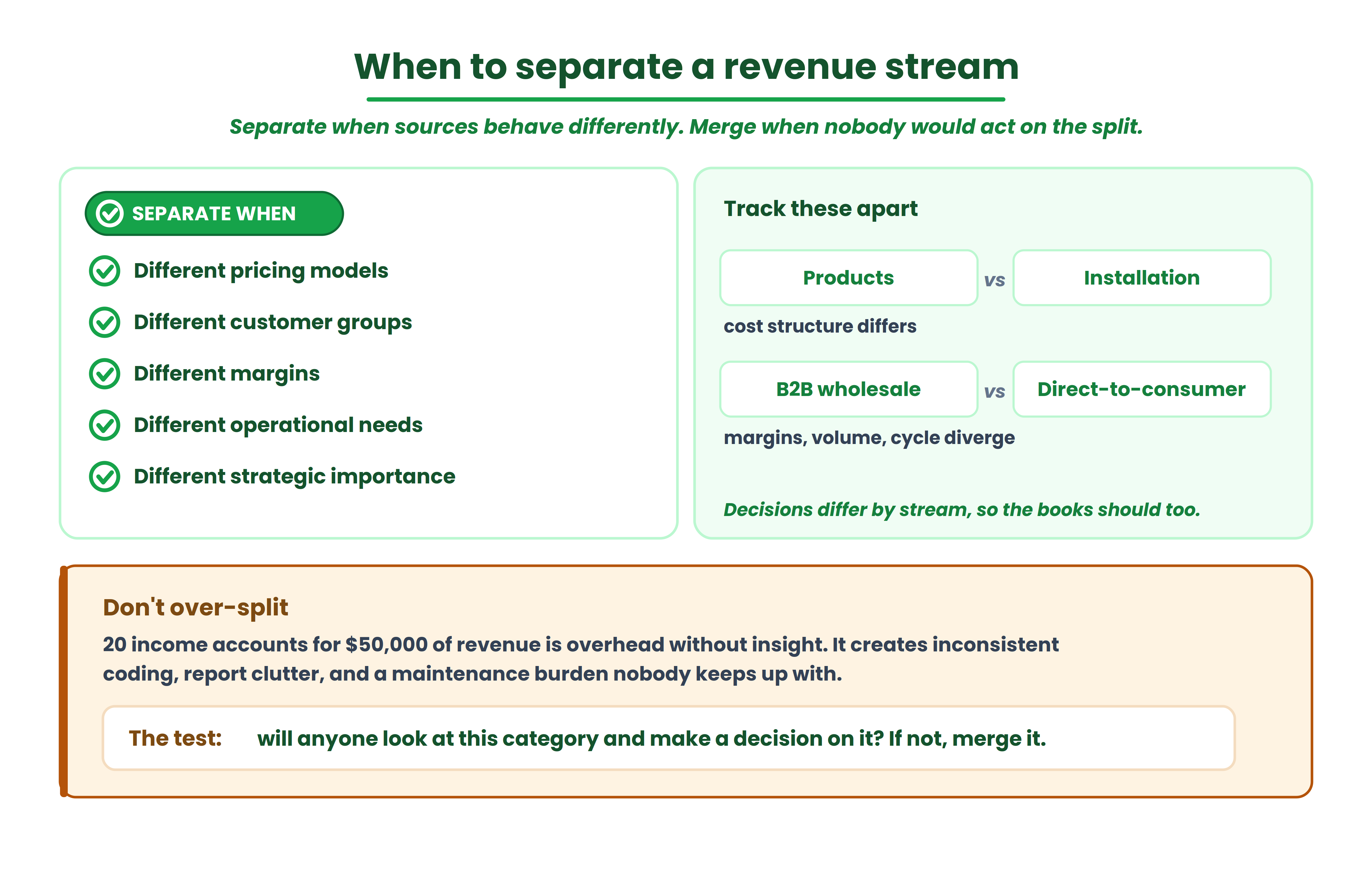
Separate tracking makes sense when revenue sources have materially different characteristics. Different pricing models, different customer groups, different margins, different operational requirements, or different strategic importance.
A business selling both products and installation services should track those separately because the cost structure is completely different. A distributor handling both B2B wholesale and direct-to-consumer sales should separate those because the margins, volumes, and sales cycles diverge.
Separation also matters when management decisions differ by stream. If you're deciding whether to invest more in consulting or training, you need to see each one clearly.
When separate tracking may be overkill
Creating 20 income accounts for a business with $50,000 in annual revenue is overhead without insight. Excessive categorization leads to inconsistent bookkeeping (does this invoice go under "Consulting" or "Advisory Services"?), reporting clutter, and a maintenance burden that nobody keeps up with.
The test is simple: will anyone actually look at this category in a report and make a decision based on it? If no, merge it with something broader.
10 features to look for in accounting software for multiple revenue streams
1. Flexible revenue categorization
The software should let you create income categories that match your actual business structure. This means a customizable chart of accounts where you can add, rename, or reorganize income accounts without breaking your reporting. Check whether you can create meaningful categories without the system forcing a rigid hierarchy.
2. Revenue tracking by product or service
A business selling three products and two services should be able to pull a report showing revenue per item. If I were evaluating software for a product-plus-service company, this is the first thing I'd test. Can I see that Product A generated $45,000 last quarter while maintenance contracts generated $12,000?
3. Sales source or channel reporting
For businesses selling through multiple channels (website, marketplace, retail, distributor), channel-level visibility matters. An ecommerce business might discover that Amazon sales are high-volume but low-margin, while direct website sales produce better unit economics. Without channel reporting, that insight stays buried.
4. Project-wise or business-activity tracking
Agencies, consultants, and contractors often need to see revenue by project or engagement. This is different from creating more income accounts. Project tracking associates invoices and payments with a specific job, letting you see total revenue per project without restructuring your chart of accounts.
5. Customizable chart of accounts
Your chart of accounts is the skeleton of your financial reporting. A good chart of accounts should make reporting clearer, not merely more detailed. Look for software that lets you add income accounts, organize them hierarchically, and rename them without losing historical data.
6. Profit & Loss reporting
The P&L remains the central financial report for understanding revenue composition. You need to see total revenue, cost of goods sold or service delivery costs where applicable, gross profit, and net profit. More importantly, you need the ability to see how revenue breaks down within that report.
7. Sales reports and revenue trends
Period-over-period comparison is where revenue tracking becomes genuinely useful. Can you compare Q1 to Q2? Can you see which product's sales grew and which declined? This is the difference between a bookkeeping system and a business intelligence tool.
8. Multi-currency support
If your business receives revenue in multiple currencies, the software needs to handle conversion, record the original currency, and report in your base currency. This is a binary requirement: you either need it or you don't. But if you do, it's non-negotiable.
9. Integration and data consolidation
Businesses using ecommerce platforms, payment processors, POS systems, or CRM tools need their accounting software to receive data from those systems. The important distinction is between integration availability (does the connection exist?) and useful accounting data flow (does the data arrive structured in a way that supports your revenue categories?).
10. Exportable and accountant-friendly reports
Your accountant, bookkeeper, or auditor will eventually need to review the books. Exportable reports, accountant access with appropriate permissions, and a clear audit trail matter. If the data is locked inside the system with no way to extract it, that's a problem at tax time and during any financial review.
A practical structure for tracking multiple revenue streams
Here's an illustrative chart of accounts structure for a business with four revenue sources:
That's four accounts. Simple. Each sales invoice or payment gets recorded against the appropriate account. Your P&L then shows revenue broken down into these four lines.
When should you add more dimensions instead of more accounts? When the same revenue account needs to be viewed from multiple angles. If consulting revenue comes from three different client industries, you might use tags or dimensions (where the software supports them) rather than creating "Consulting Revenue, Healthcare" and "Consulting Revenue, Finance" as separate accounts. Tags keep the chart of accounts clean while still enabling filtered reporting.
The mistake I would avoid is building the most detailed structure you can imagine on day one. Start with the categories you actually need for decision-making. Add granularity when you have a specific reporting question that the current structure can't answer.
Revenue stream vs product vs sales channel: don't mix these categories
This trips up a lot of businesses. A company sells shoes. Those shoes are sold through a website, through Amazon, and through a retail store. The revenue category is "Product Sales." The product is "Shoes." The channel is "Website" or "Amazon" or "Retail."
REVENUE CATEGORY
Product Sales
PRODUCT
Shoes
CHANNEL
Website / Amazon / Retail
These are three different dimensions. Mixing them creates accounts like "Amazon Shoe Sales" and "Website Shoe Sales" and "Retail Shoe Sales," which bloats the chart of accounts and makes it harder to answer simple questions like "how much total shoe revenue did we earn?" or "what percentage of all revenue comes from Amazon?"
Keep revenue categories clean. Use separate dimensions or tags for channel, product, and customer segment where the software supports it. If it doesn't, pick the dimension that matters most for your decisions and structure around that.
How to compare revenue streams once you can track them
Tracking is step one. Comparison is where the value appears.
Revenue tells you how much each source generates. But growth matters too: is consulting revenue increasing or declining quarter over quarter? Margin analysis asks whether a high-revenue stream is actually profitable after delivery costs. Customer concentration reveals whether one client accounts for most of a stream's revenue, which is a risk signal.
The distinction between recurring and one-time revenue affects forecasting. A business with $30,000/month in retainers and $20,000 in project work has more predictable cash flow than one earning $50,000 entirely from projects.
Cash conversion, how quickly revenue turns into collected cash, also varies by stream. Product sales might collect at point of sale. Consulting invoices might sit in accounts receivable for 45 days. Same revenue, very different cash flow timing.
The Revenue Visibility Test: a ProfitBooks editorial framework
This is an editorial framework we developed at ProfitBooks. It isn't an industry standard. It's a practical way to evaluate whether accounting software will actually give you visibility into multiple revenue streams.
Five questions:
If the software passes the first three but fails on four and five, you have a bookkeeping system. You don't have a decision-support tool.
Example: a retailer with store sales, online sales, and B2B orders sets up three income accounts. The software produces a P&L showing all three. But there's no way to compare Q1 to Q2 by stream, and no way to filter by customer type within a stream. That retailer passes Separate and Report but fails Compare and Attribute.
Worked example: a business with three revenue streams
BrightPath Services (fictional) earns from three sources:
| Stream | Month 1 revenue | Month 2 revenue | Change |
|---|---|---|---|
| Consulting | $18,000 | $19,500 | +8.3% |
| Retainers | $12,000 | $12,000 | 0% |
| Training | $5,000 | $3,200 | -36% |
| Total | $35,000 | $34,700 | -0.9% |
Total revenue barely moved. But the composition shifted significantly. Consulting grew. Retainers held steady. Training dropped by more than a third.
Without stream-level visibility, the owner sees a flat month and moves on. With it, she sees that training needs attention: was it a seasonal dip, a lost client, or a pricing problem? She also sees that consulting growth is compensating for the training decline, which might not continue.
This is exactly the kind of insight that a single "Revenue" line on a P&L will never provide.
Common mistakes when tracking multiple revenue streams
Accounting software vs spreadsheets for multiple revenue streams
| Requirement | Spreadsheet | Accounting software |
|---|---|---|
| Basic categorization | Possible with discipline | Built into the structure |
| Financial statements | Manual setup and formulas | Generated from transaction data |
| Transaction recording | Manual entry | Structured with validation |
| Multiple users | Possible but version control is painful | Usually supported with permissions |
| Audit trail | Limited unless manually maintained | Often available by default |
| Reporting | Manual, breaks when the spreadsheet grows | Built-in, depending on the platform |
| Scalability | Becomes fragile past a few hundred transactions/month | Depends on the platform's capacity |
A spreadsheet might still be enough if the business has low transaction volume, one or two revenue streams, and a single person managing the books. Once you pass any of those thresholds, the maintenance cost of a spreadsheet starts exceeding the subscription cost of accounting software.
Questions to ask before choosing accounting software for multiple revenue streams
Print this list. Bring it to every software demo.
Best accounting software for businesses with multiple revenue streams
| Software | Best for | Standout feature | Notes and pricing |
|---|---|---|---|
| ProfitBooks | Owners who want structured accounting without accounting expertise | Customizable chart of accounts with project-wise and sales-source reporting, plus 45+ exportable reports | Free Startup plan; SMB plan at $20/month. Keeps revenue separated by product, project, and source without added complexity. |
| Digits | Teams wanting an AI-forward finance workflow | Modern interface designed for finance team collaboration | Newer product with less market proof than established platforms. Core at $100/month (Digits pricing page). |
| Leapfin | SaaS/subscription businesses needing a revenue sub-ledger | Purpose-built for revenue recognition and subscription billing reconciliation | Too specialized to replace general accounting software. Pricing not published. |
What didn't make the list
Sage (small business tier) was excluded because its current small-business positioning has shifted and pricing structures vary significantly by region, making a clean global comparison difficult. Kashoo was excluded because its feature set targets very simple bookkeeping without the revenue-source reporting depth this article requires. NetSuite and Sage Intacct were excluded because their pricing and complexity targets mid-market and enterprise businesses, not the small-business and founder audience this article serves.
If you're running a business with several income sources and want accounting software that keeps your financial data structured enough to actually report on, ProfitBooks handles invoicing, sales reports, project-wise categorization, and 45+ exportable reports at a price point ($20/month for the SMB plan, free for the Startup plan) that won't add to the cost problem you're trying to solve.
Where ProfitBooks fits for businesses with multiple revenue streams
ProfitBooks was built for business owners who need structured accounting without accounting expertise. For the multiple-revenue-stream question specifically, the relevant capabilities include: a customizable chart of accounts where you can create separate income accounts for each revenue source, project-wise categorization for businesses that need to see revenue by engagement or job, product-wise and sales source reporting that lets you see which products and which channels are generating revenue, and a full P&L, balance sheet, and cash flow report suite.
The system supports multi-currency transactions, inventory management across multiple warehouses, and vendor/customer tracking. There are 45+ reports, and they're exportable. Your accountant or auditor can get access with appropriate permissions.
What ProfitBooks does well for this use case is keep the accounting structure simple enough that a non-accountant can maintain it, while still producing reports that separate revenue by product, project, and source. It passes the first four steps of the Revenue Visibility Test for most small businesses with two to five revenue streams.
Where it may not fit: if you need a dedicated revenue sub-ledger for complex subscription billing, or if you need the depth of class tracking and a custom report builder that heavier, enterprise-tier accounting tools offer, ProfitBooks isn't trying to be that tool. It's designed for businesses that want clarity without complexity.
Frequently asked questions about accounting software for multiple revenue streams
Can accounting software track multiple revenue streams?
Yes. Most modern accounting software can track multiple revenue streams through separate income accounts in the chart of accounts, product or service categories on invoices, and filtered sales reports. The real question is whether the software lets you report on and compare those streams meaningfully, not just record them.
How should I categorize multiple revenue streams?
Match your categories to how you actually earn and manage money. A consulting firm might use "Retainers," "Projects," and "Training." An ecommerce business might use "Direct Sales," "Wholesale," and "Marketplace." Keep categories consistent over time so you can compare periods.
Should every revenue stream have a separate account?
No. Only create separate accounts for revenue sources that have meaningfully different economics or that you need to track for decision-making.
Can accounting software track revenue by product and service?
Most accounting platforms let you create product and service items that appear on invoices. When you run a sales report filtered by item, you see revenue per product or service. ProfitBooks and most major accounting platforms support this.
Can I track revenue by sales channel?
Some platforms support this through tags, dimensions, or dedicated source fields. Others require you to create separate income accounts per channel. Check whether the software distinguishes channel from revenue category, because these are different dimensions.
What is the difference between revenue tracking and revenue recognition?
Revenue tracking is categorizing and reporting when and where income was earned by source. Revenue recognition is the accounting principle governing when revenue should be recorded under frameworks like IFRS 15 or ASC 606. This article focuses on tracking and reporting, not on recognition standards.
Is accounting software better than Excel for multiple revenue streams?
For businesses past the earliest stage, yes. Accounting software provides structured transaction recording, built-in financial statements, audit trails, and multi-user access. Spreadsheets work for very small operations but become fragile as volume and complexity increase.
What reports should I review for multiple revenue streams?
Start with the Profit & Loss statement for overall revenue composition. Add sales reports filtered by product, service, or source for granular analysis. Period comparison reports show trends. If you track projects, review project-wise revenue reports to see which engagements are generating the most income.
Final takeaway: don't just track revenue. Make it explain your business.
A business with multiple revenue streams doesn't necessarily need complicated accounting software. It needs a system that reflects the way the business actually earns money, and that produces reports clear enough to act on.
The Revenue Visibility Test comes back to five steps: Separate your sources. Attribute income to the right dimension. Report on it. Compare across periods. Decide what to do next.
If your current system can do the first two but not the last three, you have a bookkeeping tool, not a business tool. And the difference between those two things is the difference between knowing your total revenue and knowing which part of your business is actually working.
The next problem you'll hit after setting up revenue tracking is figuring out whether each stream's costs are allocated correctly, because revenue without cost attribution is just half the picture. That's a chart of accounts design problem, and it's worth solving before your next quarter closes.
See every revenue stream clearly, without the accounting headache
ProfitBooks keeps income separated by product, project, and source, and turns it into 45+ exportable reports, so you always know which part of the business is actually working. Free Startup plan, SMB plan at $20/month.