Accounting software buyer’s guide: 25 questions to ask before you buy
On this page 44 sections
The demo looked great. Then you started using the software.
The dashboard was clean. Invoicing looked automatic. The mobile app worked. Integrations? Dozens listed. Pricing? Reasonable. So you signed up.
Week one: your CA needed an accounts receivable aging report filtered by customer. The software had "reporting," sure, but not that filter on the plan you purchased. Week two: adding a second user triggered an upgrade. Week three: migrating your chart of accounts from the old system required a manual CSV cleanup that took your office manager an entire afternoon because the mapping broke twice. The bank feed connected, but transaction descriptions came through garbled, so reconciliation meant rebuilding bank rules from a clean 30-day sample before anything matched properly.
I've watched this happen enough times to know the pattern. The hardest part of choosing accounting software isn't finding a platform with enough features. It's discovering whether those features actually work for your specific business before you commit your financial data to them.
This accounting software buyer's guide gives you 25 questions you can copy, print, and ask every vendor the same way. They're designed to surface hidden costs, reporting gaps, migration friction, user limitations, integration failures, and data lock-in before you sign anything.
The short version
Before buying accounting software, ask questions across ten areas: business fit, core accounting and reporting, ease of use, users and permissions, integrations, data migration, implementation, total cost over multiple years, security and support, and data ownership. Test real workflows in the demo instead of reading feature lists, and calculate the full cost of ownership before you commit.
- Define your requirements before you compare any product.
- Ask all 25 questions to every vendor the same way.
- Test real transactions in the demo, not the vendor's polished sample data.
- Calculate total cost over year one, two, and three, not the sticker price.
- Check your data-export and exit options before you buy, not when you leave.
What should you ask before buying accounting software?
Before purchasing accounting software, ask questions across ten categories: business fit, core accounting and reporting, ease of use, users and permissions, integrations, data migration, implementation, total cost over multiple years, security and support, and data ownership. Testing actual workflows during a demo matters more than reviewing feature lists, and calculating the full cost of ownership (subscription, users, add-ons, migration, onboarding, support, and renewal pricing) prevents cost surprises after purchase.
Start with your business, not the software
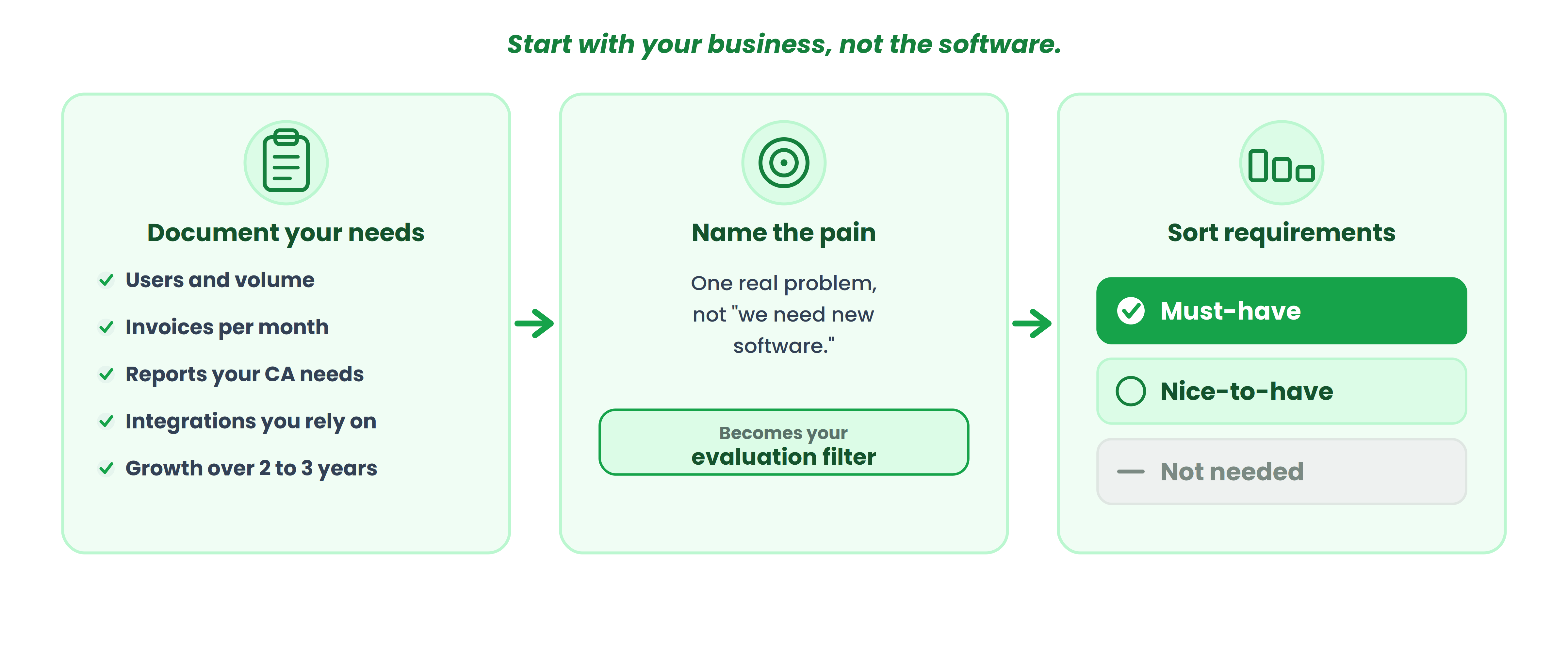
Most buyers start by comparing products. That's backwards. Before you schedule a single demo, document what your business actually needs.
Write down your number of users, monthly transaction volume, invoices per month, customer and vendor count, inventory requirements (SKUs, warehouses, locations), currencies, current software, the reports your CA asks for every month, the integrations your workflow depends on, and your expected growth over two to three years.
What problem are you trying to solve?
This sounds obvious. It isn't. "We need new accounting software" is not a problem statement. These are:
- Replacing spreadsheets that break every quarter-end
- Replacing old desktop software that your CA can't access remotely
- Getting receivables visibility without calling the office manager
- Managing inventory across two warehouses without a separate system
- Reducing the manual entry that eats four hours every week
- Handling growth from 50 to 500 invoices per month
Name the actual pain. That becomes your evaluation filter.
What must the new system do?
Before feature overload takes over, split your requirements into three columns: must-have, nice-to-have, and not needed. A service business doesn't need inventory. A retailer doesn't need project accounting. A freelancer doesn't need multi-warehouse management. If you don't do this exercise first, you'll buy features you pay for but never use, or worse, you'll choose a system optimized for a business model that isn't yours.
25 questions to ask before buying accounting software
These are organized into eight buyer categories. For each question, I've included why you should ask it, what a good answer looks like, and what should worry you.
Business fit
1. Does the software actually fit my type of business?
Why ask it? A platform built for professional services handles job costing well but may lack inventory. One built for retail may not support project-wise categorization. Service, ecommerce, wholesale, distribution, manufacturing, and agency businesses have different accounting workflows.
2. Which accounting workflows does it handle natively?
Ask about invoicing, expense capture, bill management, receivables, payables, bank reconciliation, inventory, and financial reporting. Distinguish what's built in from what requires a third-party add-on. Native functionality syncs automatically. Add-ons can break.
3. Can it handle my current transaction volume?
Don't ask "can your software handle my business?" Ask for actual limits: monthly transactions, invoices, bills, customers, vendors, inventory SKUs. Some platforms throttle performance or restrict counts on lower tiers.
Accounting and reporting
4. Can it produce the financial reports I actually use?
P&L, balance sheet, cash flow, trial balance, general ledger, receivables aging, payables, sales reports, expense breakdowns. Don't ask whether "reporting" exists. Ask the vendor to show you the exact report your CA requests every month, inside the software, without exporting to Excel. For a deeper look at what each financial report tells you,
5. Can I customize or filter those reports?
Ask whether you can filter by date range, product, customer, project, location, or revenue source. A report that shows total revenue is different from one that shows revenue by product by quarter.
6. Can I answer my three most important financial questions without exporting to Excel?
This is one question I'd never skip. Give the vendor three real questions: "Which products generated the most revenue last quarter?" "Who owes us money right now?" "What was our operating expense last month?" If the software can't answer those inside the platform, the reporting isn't ready for your business. A Clutch survey found 74% of small businesses now use accounting software, but adoption alone doesn't prove the reporting actually works for the buyer's needs.
Ease of use
7. Can a non-accountant use it confidently?
Your office manager, operations lead, or sales team may need to create invoices or record expenses. That doesn't mean accounting software should replace your CA. It means routine transactions shouldn't require accounting training.
8. How many steps does a routine transaction take?
Ask the vendor to demonstrate creating an invoice, recording an expense, entering a bill, receiving a payment, and reconciling a bank transaction. Count the clicks. Don't accept a verbal walkthrough.
9. Can I test the actual workflow before buying?
Free trial, sandbox environment, sample data. The person who will use the software daily should test it, not just the owner watching a sales demo.
Users, access, and collaboration
10. How many users are included, and what counts as a user?
Employees, your CA, an external auditor, read-only users. Per-user pricing changes total cost dramatically. A platform that looks affordable at one user can double in cost at three.
11. Can I control what each user can see or change?
Role-based permissions matter. Your sales team shouldn't see payroll data. Your office manager may need invoice access but not journal entry permissions.
12. Can my accountant or CA work directly in the system?
Ask whether your CA gets a dedicated login with appropriate permissions, can access reports and the audit trail, and can make journal entries without you forwarding exports. This is where I've seen small businesses waste the most time: emailing spreadsheets back and forth because the software didn't support proper accountant collaboration.
Integrations and data
13. Does it integrate with the tools I already use?
Don't ask "how many integrations do you have?" Ask: "Does it connect to my bank, my payment processor, my ecommerce platform, and my payroll system?" A few relevant integrations beat a long generic list.
14. What happens when an integration stops working?
This is the question competitors skip. Ask about error notifications, retry logic, reconciliation gaps, and whether support helps fix broken syncs. Because bank feed imports that connect but produce inconsistent transaction descriptions will slow down reconciliation every single month until someone rebuilds the matching rules.
15. Can I import my existing data?
Customers, vendors, opening balances, historical transactions, products, inventory records. Chart of accounts mapping is where migration breaks most often. I've seen teams spend an entire day recreating a COA mapping in a staging file and reconciling opening balances before go-live because the import tool silently mismatched account categories.
Migration and implementation
16. Who handles the migration?
Vendor, your team, your accountant, a third party? And what exactly is included? "We help with migration" can mean anything from a full-service transfer to a PDF guide.
17. How much historical data can I migrate?
Don't assume "data migration" means your entire history. Ask: how many years of transactions, what level of detail, whether attachments transfer, and whether customer and vendor history carries over.
18. What does onboarding actually include?
Separate software access from implementation support. Setup, chart of accounts configuration, opening balances, user creation, training, and migration are different things. Some vendors include all of them. Some include none.
Cost and contract
19. What is the total cost in year one, two, and three?
This should be the section you spend the most time on. A low monthly subscription does not necessarily mean a low total cost of ownership. Calculate: subscription + additional users + add-ons + integrations + onboarding + migration + support tier + renewal pricing. The global accounting software market is projected to reach USD 11.8 billion by 2026 according to Mordor Intelligence, and that growth is partly fueled by add-on revenue that buyers don't calculate upfront.
20. Which features require a higher-tier plan?
Ask specifically about inventory, advanced reports, additional users, automation rules, integrations, multi-currency, payroll, and priority support. The feature that convinced you to buy may not exist on the plan you can afford.
21. What happens to the price after the promotional period?
Renewal price, annual increase caps, promotional lock-in period, contract length, cancellation fees. A 50% introductory discount that expires after year one changes your total cost calculation entirely.
Security, support, and exit
22. How is my financial data protected?
Ask about encryption (in transit and at rest), access controls, backup frequency, two-factor authentication, and hosting location. Don't accept a list of certifications without verifying them.
23. What happens if something goes wrong?
Support channels, response time commitments, support hours, escalation process, and whether your plan includes human support. "24/7 support" sometimes means a chatbot at 2 AM.
24. What happens to my data if I leave?
Can you export all data? In what format? How much history? Are attachments included? Is there an export fee? How long can you access the account after cancellation? Data export should be evaluated before purchase, not after you decide to leave.
25. Will this still work for my business three years from now?
Ask about user limits, transaction volume ceilings, multi-location support, additional currencies, reporting depth, and integration capacity at scale. The point isn't to buy the biggest system. It's to avoid buying one you'll outgrow in 18 months.
Run your own workflows through ProfitBooks
If the 25 questions above point toward a small business that needs accounting, invoicing, inventory, and reporting without enterprise complexity, ProfitBooks is worth running through the same evaluation. Start with a free account and test your actual workflows against it.
Don't just ask questions. Make the vendor show you.
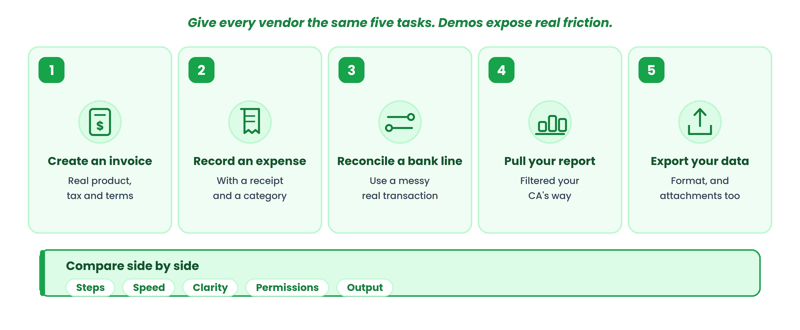
Questions get polished answers. Demonstrations expose real friction. Give every vendor the same five tasks and compare the results side by side.
Test 1: Create an invoice for a real product or service you sell, with your actual tax rate and payment terms.
Test 2: Record an expense with a receipt attachment and assign it to a category.
Test 3: Reconcile a bank transaction. If the vendor uses sample data with clean descriptions, ask them to use a messy real-world transaction instead.
Test 4: Generate your most-used financial report. Filter it the way your CA actually needs it.
Test 5: Export your data. Check the format, the completeness, and whether attachments come with it.
Compare: number of steps, speed, clarity of the interface, whether permissions work as described, and whether the output matches what you'd actually use. A software demo should test your workflow, not the vendor's presentation.
 How to compare accounting software after the demo
Use a weighted scorecard. These weights are illustrative; adjust them to your business.
| Criteria | Weight | Vendor A | Vendor B | Vendor C |
|---|---|---|---|---|
| Core accounting | 20% | |||
| Reporting | 15% | |||
| Ease of use | 15% | |||
| Integrations | 10% | |||
| Pricing / TCO | 15% | |||
| Security | 10% | |||
| Support | 5% | |||
| Migration | 5% | |||
| Scalability | 5% |
Score each vendor 1 to 5 per category after the demo. Multiply by the weight. The totals won't make the decision for you, but they'll make the comparison honest.
10 red flags to watch for during an accounting software demo
How ProfitBooks fits into the buying decision
The right software depends on the workflows your business actually needs. ProfitBooks is accounting software designed for small businesses, with capabilities in invoicing, accounting, inventory management, financial reporting (45+ reports), expense tracking, receivables and payables, project-wise categorization, multi-currency support, and multi-warehouse management. It offers role-based user access including accountant collaboration, and runs two plans: a free Startup plan and a $20/month SMB plan.
Frequently asked questions about buying accounting software
What is the most important question to ask before buying accounting software?
Ask whether the software can handle your actual accounting workflow, not just whether it lists the right features. Test the transactions, reports, integrations, and user permissions your business relies on during a live demo rather than judging the platform by its marketing page. The gap between "feature exists" and "feature works for my business" is where most buying mistakes happen.
How do I compare accounting software prices?
Calculate total cost of ownership over two to three years: subscription, additional users, add-ons, integrations, onboarding, migration, support, and post-promotional renewal pricing. Comparing monthly sticker prices alone is misleading.
Should I choose cloud or desktop accounting software?
Cloud software allows remote access, automatic updates, and easier CA collaboration. Desktop may suit businesses with poor internet or strict data-locality requirements. Most small businesses benefit from cloud.
How do I test accounting software before buying?
Request a free trial or sandbox. Have the person who'll use it daily (not just the owner) complete real tasks: create an invoice, reconcile a transaction, generate a report, and export data.
How much does accounting software cost?
Entry-level plans range from free to $30/month. Actual costs increase with users, payroll, inventory, advanced reporting, and integrations. Always calculate the 12-to-24-month total.
Can I switch accounting software later?
Yes, but migration involves chart-of-accounts mapping, opening balance reconciliation, and historical data transfer. Evaluate data export options before you buy, not when you're leaving.
Should my accountant have access to the software?
Yes. Direct access to the ledger, journal entries, reports, and audit trail eliminates manual exports and email-based workflows that waste time and introduce errors.
How important are integrations?
The number of integrations matters less than whether the software connects to the specific systems your business uses: your bank, payment processor, payroll, and ecommerce platform.
What should I ask about data security?
Ask about encryption, two-factor authentication, backup frequency, access controls, and hosting location. Verify any claimed certifications independently.
How do I know if accounting software will scale with my business?
Ask about user limits, transaction volume ceilings, multi-currency and multi-location support, and whether growth requires migrating to a different product entirely.
Don't buy the feature list. Buy the workflow.
A vendor can show you 100 features in a 30-minute demo. What matters is whether the ten workflows you perform every week actually work: sending invoices, recording expenses, reconciling bank feeds, pulling the reports your CA needs, and managing the users who touch your financial data daily.
The process: define your requirements first, ask the 25 questions to every vendor the same way, test with real transactions during the demo, calculate total cost over multiple years, check your exit options before you need them, and compare using a weighted scorecard instead of gut feeling.
Test your own workflows, not a feature list
If you're evaluating accounting software for a small business, start with a free ProfitBooks account and run your own workflows through it. That tells you more than any feature list.