
You have two browser tabs open. Wave on the left, ProfitBooks on the right. Both say “free plan.” Both promise invoicing, expense tracking, and financial reports. Both look clean enough. So you almost pick the one with the nicer landing page, which is exactly how businesses end up with accounting software that fights them six months later.
The real question is not which one has more features. It is whether the software fits the way your business actually works: where you operate, what you sell, how you handle taxes, and who else needs access.
The short version
Wave is a strong option for freelancers and service businesses in North America who need straightforward accounting without inventory. ProfitBooks is built for small businesses that sell products, track stock, or operate within India’s GST framework. Neither is universally better. The right pick depends on your workflows, your geography, and what your business looks like 18 months from now.
- Choose Wave for North American service businesses that need clean, automated bookkeeping without inventory.
- Choose ProfitBooks for product businesses, inventory tracking, and Indian GST compliance.
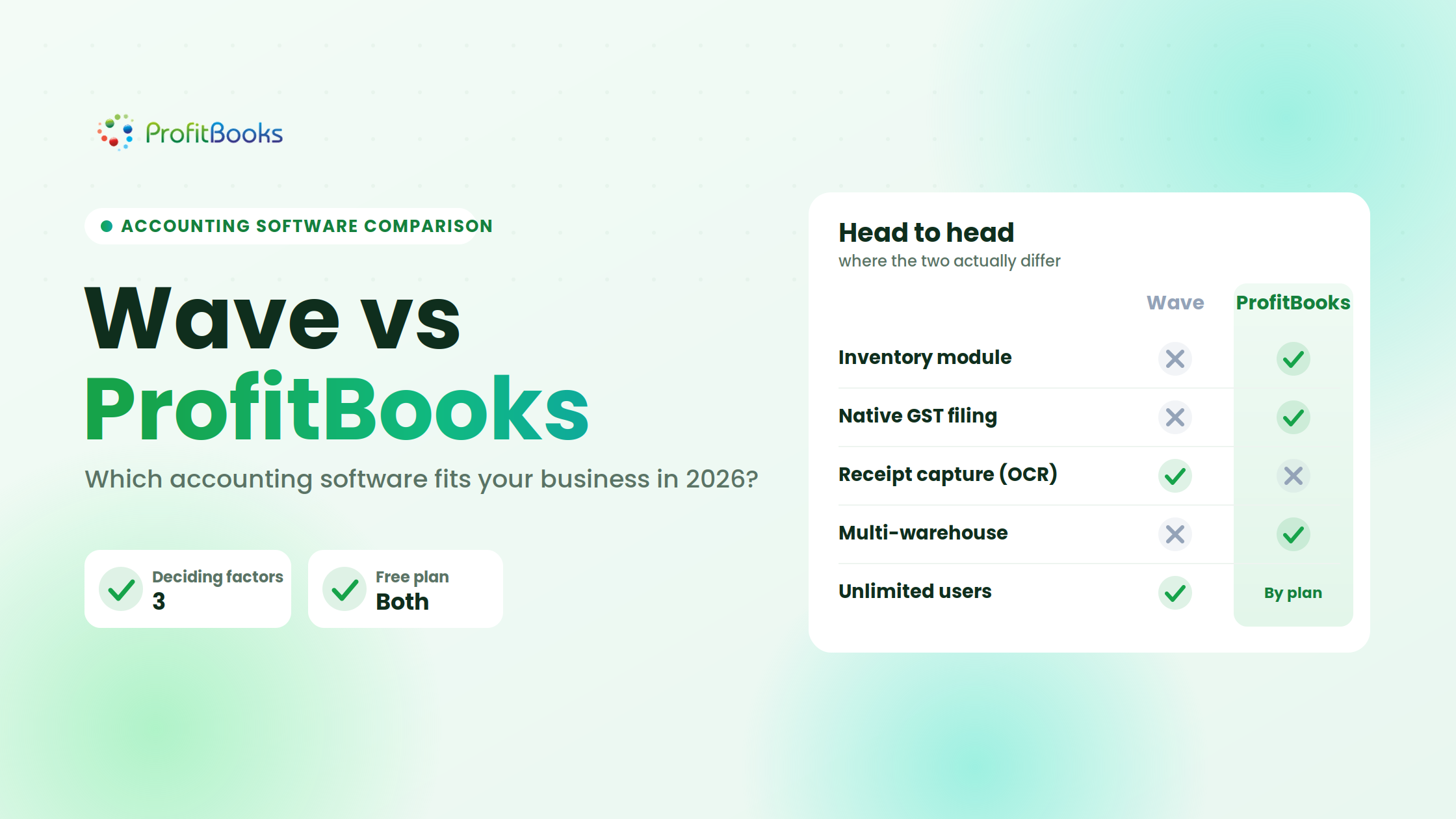
- The three deciding factors are inventory capability, GST support, and geographic fit.
- Match the tool to your workflows and your next 18 months, not to the feature count.
Wave vs ProfitBooks at a glance
| Category | Wave | ProfitBooks |
|---|---|---|
| Core accounting | Double-entry bookkeeping, journal entries, reconciliation | Double-entry bookkeeping, journal entries, reconciliation |
| Free plan | Starter (manual transaction entry, limited reports) | Startup (1 user, 10 invoices/month) |
| Paid plans | Pro at $19/month ($190/year) | Essential $9.95/mo, Growth $20/mo, SMB Pro $35/mo |
| Invoicing | Unlimited invoices, estimates, recurring billing | Invoices, estimates, recurring invoices (limits vary by plan) |
| Expenses | Manual entry on Starter; receipt capture and auto-categorization on Pro | Expense recording across all paid plans |
| Bank transactions | Automatic import and categorization on Pro only | Bank statement import; direct feeds vary by region |
| Inventory | No dedicated inventory module | Product tracking, stock quantities, multi-warehouse (Growth+) |
| Tax / GST | Sales tax on invoices; no native GST filing | GST invoicing, GST reports, Indian tax compliance tools |
| Payroll | Separate add-on, US and Canada only | Available on higher-tier plans for Indian payroll |
| Multi-currency | Supported on Pro | Supported on Growth and SMB Pro |
| Users | Unlimited on Pro | 1 (Startup) to 25 (SMB Pro) |
| Financial reports | P&L, balance sheet, cash flow, AR/AP, sales tax | 45+ reports including inventory, GST, P&L, balance sheet |
| Best suited to | North American freelancers, service businesses | Indian SMEs, product-based businesses, inventory-heavy operations |
The three differences that matter most: inventory capability, GST support, and geographic fit. Everything else is close enough that it rarely tips the decision on its own.
What is Wave?

Wave is a cloud accounting platform targeting freelancers, consultants, and small service businesses. Its Starter plan offers manual bookkeeping and invoicing at no cost. The Pro plan at $19/month adds automatic bank transaction imports through Plaid, receipt scanning, and automated expense categorization.
Wave’s payment processing (credit cards, ACH/bank payments) carries per-transaction fees on top of the subscription. Payroll is a separate product available only in the US and select Canadian provinces.
One thing worth noting: Wave’s bank connectivity depends entirely on whether your financial institution is supported through Plaid. If your bank is not in Plaid’s network, you are back to manual entry or CSV uploads even on the Pro plan.
What is ProfitBooks?
 ProfitBooks is an accounting and inventory platform built primarily around Indian small-business requirements. It handles invoicing, expense tracking, purchase orders, inventory management, and GST-compliant reporting.
Its pricing runs from a free Startup plan (1 user, 10 invoices per month) through SMB Pro at $35/month, with separate INR pricing for Indian customers. The Growth and SMB Pro tiers add multi-warehouse inventory, multi-currency accounting, and expanded user seats.
ProfitBooks is not trying to be everything to everyone. It is specifically useful for businesses that sell physical products, need stock tracking tied to their accounting records, or operate under India’s GST regime.
Pricing: what you actually pay
Wave pricing
Starter: $0. Manual transaction entry, invoicing, basic reports.
Pro: $19/month or $190/year. Adds bank feeds, receipt capture, auto-categorization, unlimited users.
Payments: Additional per-transaction fees (2.9% + $0.60 for credit cards, 1% for ACH per Wave’s current pricing page).
Payroll: Separate subscription, varies by state/province.
ProfitBooks pricing
Startup: Free. 1 user, 10 invoices/month, basic accounting.
Essential: $9.95/month or $99/year. 1 user, up to 1,000 invoices/year.
Growth: $20/month or $199/year. 10 users, inventory, multi-warehouse, multi-currency, and payroll.
SMB Pro: $35/month or $349/year. 25 users with custom roles, unlimited invoices and warehouses, priority support.
Which is actually cheaper?
For a solo freelancer sending invoices and tracking expenses, Wave Starter costs nothing and ProfitBooks Startup costs nothing. Genuine tie.
For a growing service business with three team members, Wave Pro at $19/month includes unlimited users. On ProfitBooks, covering three users means the Growth plan at $20/month, since Essential is a single-user plan, so the two land within a dollar of each other. Wave includes bank feeds and receipt capture at that price; ProfitBooks Growth instead brings inventory, multi-warehouse, and multi-currency, which are features Wave has no answer for.
For a five-person product business needing inventory, Wave Pro at $19/month has no inventory module. ProfitBooks Growth at $20/month includes inventory, warehouses, and up to ten users. The $1/month difference is irrelevant; the inventory capability is the real cost variable, because bolting third-party inventory onto Wave adds complexity and expense that never shows up in the subscription price.
See how ProfitBooks handles products, stock, and GST
If your business sells products or files GST, the fastest way to know if ProfitBooks fits is to run your own invoices and stock through it. Start free and test your real workflow.
Accounting features
Both platforms handle double-entry bookkeeping, journal entries, and standard financial statements. Reconciliation workflows differ: Wave Pro auto-matches imported bank transactions against recorded entries, which saves time if your bank connects through Plaid. ProfitBooks supports bank statement imports, but the matching process is more manual depending on your bank.
Where ProfitBooks pulls ahead is in purchase accounting. If your business buys raw materials or finished goods for resale, ProfitBooks connects purchase orders directly to inventory and expense records. Wave treats purchases as expenses without tying them to stock levels, which means a product business on Wave is maintaining inventory counts somewhere else.
Invoicing
Wave’s invoicing is polished. Unlimited invoices on every plan, recurring billing, customizable templates, and integrated payment collection (at per-transaction fees). The invoice-to-payment flow is smooth for North American businesses.
ProfitBooks offers invoices, estimates, and recurring invoices with GST fields built into the invoice template. For an Indian business, this matters: you do not need to manually calculate CGST, SGST, and IGST or force them into a generic tax field. The friction point on ProfitBooks is that the free Startup plan caps invoices at 10 per month, so a business with steady billing can reach the ceiling well before it is ready to pay for a higher tier.
Expense management
Wave Pro’s receipt capture is genuinely useful. Snap a photo, and the system extracts vendor, amount, and date, then matches it to a bank transaction. On Starter, expense entry is entirely manual.
ProfitBooks records expenses across paid plans but does not currently offer the same OCR-style receipt scanning. Expense entry is functional but requires more manual input. For a consultant who accumulates 30 receipts a week, Wave Pro’s automation saves real time here.
Inventory management
This is where the comparison stops being close.
Wave has no dedicated inventory module. You can create products and track income by item, but there is no stock-quantity tracking, no purchase-order-to-inventory flow, no warehouse management, and no inventory valuation reports.
ProfitBooks Growth and SMB Pro include product-level stock tracking, purchase orders that update inventory automatically, multi-warehouse support, and inventory management reports that tie directly to accounting entries.
A retailer managing 200 SKUs across two locations cannot evaluate these platforms the same way a freelance designer would. If inventory is central to your business, this single category changes the entire comparison.
GST, tax, and local compliance
Wave lets you add sales tax rates to invoices and generates a sales tax report. It does not offer native GST filing, Indian tax compliance, or country-specific tax workflows beyond basic rate application.
ProfitBooks builds GST invoicing and compliance directly into the platform: GSTR-ready reports, HSN/SAC codes on invoices, and tax computation that follows Indian GST rules. For a business registered under GST, this is not a convenience feature. It is a compliance requirement that Wave simply does not address.
If your business operates in the US or Canada and needs standard sales tax, Wave handles that fine. If your business files GST in India, ProfitBooks is solving a problem Wave was not designed for.
Users and permissions
Wave Pro includes unlimited users, which is generous for a $19/month plan. However, Wave’s permission controls are relatively simple: you can add collaborators and accountants, but granular role-based access is limited.
ProfitBooks caps users by plan (1 to 25) but offers role-based permissions so you can control who sees financial data versus who only enters invoices. For a business where the owner, a bookkeeper, and a sales manager all need different levels of access, ProfitBooks’ permission structure is more practical despite the lower user count on entry tiers.
Reporting
Wave provides core financial reports: P&L, balance sheet, cash flow, aged receivables, aged payables, sales tax, and account transactions. Clean and functional for service businesses.
ProfitBooks advertises 45+ reports, including inventory valuation, stock summaries, GST reports, purchase summaries, and product-level sales analysis. The financial reporting depth matters most for product businesses that need to answer: “Which products are profitable?” and “How fast is inventory turning?”
If your reporting needs stop at “How much did we earn and spend?”, both work. If you need to see stock movement alongside financial performance, ProfitBooks has the reporting structure for it.
Integrations
| Area | Wave | ProfitBooks |
|---|---|---|
| Banking | Plaid-based bank feeds (Pro) | Bank statement import |
| Payments | Wave Payments (cards, ACH) | Payment recording; gateway integrations vary |
| Payroll | Wave Payroll (US/Canada) | Payroll on higher plans (India-focused) |
| Ecommerce | Limited native integrations | Not published |
Neither platform is an integration powerhouse like QuickBooks or Xero. If your business depends heavily on connecting accounting to Shopify, Stripe, or a CRM, check the current integration pages for both before committing.
For different businesses
Freelancers: Wave Starter is hard to beat. Free invoicing, free basic accounting, no user limits on Pro. Unless you need GST or inventory, Wave covers the core workflows.
Retail and product businesses: ProfitBooks Growth or SMB Pro. Inventory tracking, purchase orders, warehouse management, and accounting that stays connected to stock movement.
Indian SMEs: ProfitBooks, primarily because of GST compliance, INR pricing, and Indian payroll. Wave was not built around Indian tax law.
North American service businesses: Wave Pro. Bank feeds through Plaid, receipt capture, unlimited users, and a clean invoicing flow.
Growing multi-user teams: Depends on the user count. Wave’s unlimited seats win on volume; ProfitBooks’ role-based permissions win on access control.
Where Wave fits better
Wave is a practical choice for service-based businesses in the US and Canada that need clean bookkeeping, professional invoicing, and automated bank reconciliation without paying for inventory features they will never use. The unlimited-user Pro plan is unusually generous at $19/month.
Where ProfitBooks fits better
ProfitBooks is built for businesses that sell things: products, goods, materials. The combination of accounting with inventory tracking, GST compliance, and multi-warehouse support solves problems that Wave’s architecture does not address. For Indian businesses specifically, ProfitBooks removes the friction of forcing a North American tool into an Indian compliance framework.
Where neither is the right fit
If your business needs advanced manufacturing cost accounting, multi-entity consolidation, or deep ERP-level workflow automation, both platforms will feel too small. At that point, you are looking at Zoho Books, Tally, or an industry-specific ERP, not a lightweight accounting tool.
Frequently asked questions
Is Wave better than ProfitBooks?
Wave is a stronger fit for North American service businesses that need simple, automated bookkeeping without inventory management. ProfitBooks is a stronger fit for product-based or Indian businesses that need stock tracking and GST compliance. Neither is categorically better; the answer depends on what your business actually does and where it operates.
Does Wave support inventory?
No. Wave tracks products for invoicing purposes but has no stock-quantity tracking, purchase-order flow, or inventory reports.
Does ProfitBooks have a free plan?
Yes. The Startup plan is free for 1 user with up to 10 invoices per month.
Which is better for Indian businesses?
ProfitBooks, in most cases. GST invoicing, GSTR-ready reports, INR pricing, and Indian payroll are built in. Wave does not offer native Indian tax compliance.
Can I switch from Wave to ProfitBooks?
You can export your Wave data (CSV) and import transactions into ProfitBooks. There is no automated migration tool, so expect manual mapping of your chart of accounts and open balances.
Final verdict: choose based on your workflow, not the feature count
The best accounting software is not the one with the longest feature list or the lowest price tag. It is the one that fits the way your business actually operates today and where it is heading next year.
If you run a service business in North America, Wave’s Pro plan delivers automated bookkeeping, bank feeds, and unlimited users at a fair price. If you sell products, manage inventory, or operate under Indian GST, ProfitBooks solves accounting problems that matter to product businesses in ways Wave was not designed to handle.
Start with your requirements. Match them against current capabilities. Then pick the tool that creates the least friction between your daily operations and your financial records. That is always a better decision than comparing checkboxes.
Run your own numbers through ProfitBooks
If you sell products, track stock, or file GST, a free ProfitBooks account lets you test invoicing, inventory, and reporting on your real data before you commit.