Best Accounting Software for Service Based Businesses (2026): Compare Features, Pricing & Choose the Right Solution
On this page 39 sections
Last Tuesday, I watched a 12-person marketing agency's founder spend four hours cross-referencing three spreadsheets, a project management tool, and a shoebox of receipts—just to figure out whether a single client account was profitable. Four hours. That's half a workday gone, not on client work, not on strategy, but on stitching together financial data that should have been in one place from the start.
I've seen this pattern repeat across hundreds of service businesses: consultants chasing overdue invoices manually, architects reconciling bank feeds on weekends, IT firms unable to answer "which project actually made us money last quarter?" And every time, the root cause is the same—they either picked accounting software designed for product businesses, or they outgrew their tools and didn't realize it until the mess was already expensive.
This guide isn't another "Top 10" list. I'm going to walk you through how to evaluate accounting software based on the way service businesses actually operate, give you a decision framework you can apply to any tool on the market, and help you identify exactly what your business needs right now—and what it'll need 18 months from now.
The Quick Verdict Matrix
| Category | Top Priority | One Reason Why |
|---|---|---|
| Solo Consultants & Freelancers | Recurring billing + payment reminders | Cash flow depends entirely on invoice speed and follow-up |
| Agencies (5–25 people) | Project accounting + multi-user access | Profitability is invisible without job costing across teams |
| IT & Professional Services Firms | Milestone billing + approval workflows | Revenue recognition tied to deliverables, not calendar dates |
| Growing SMEs (25+ people) | Automation + financial dashboards | Manual processes break at scale; leadership needs real-time visibility |
Why Service Businesses Have Fundamentally Different Accounting Needs
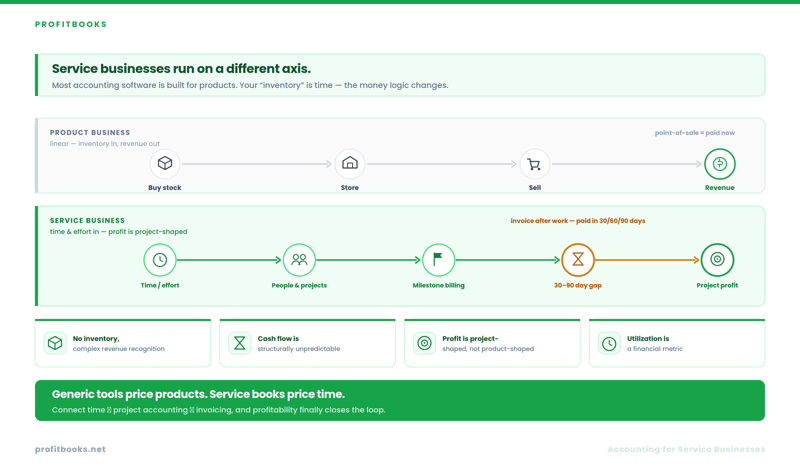
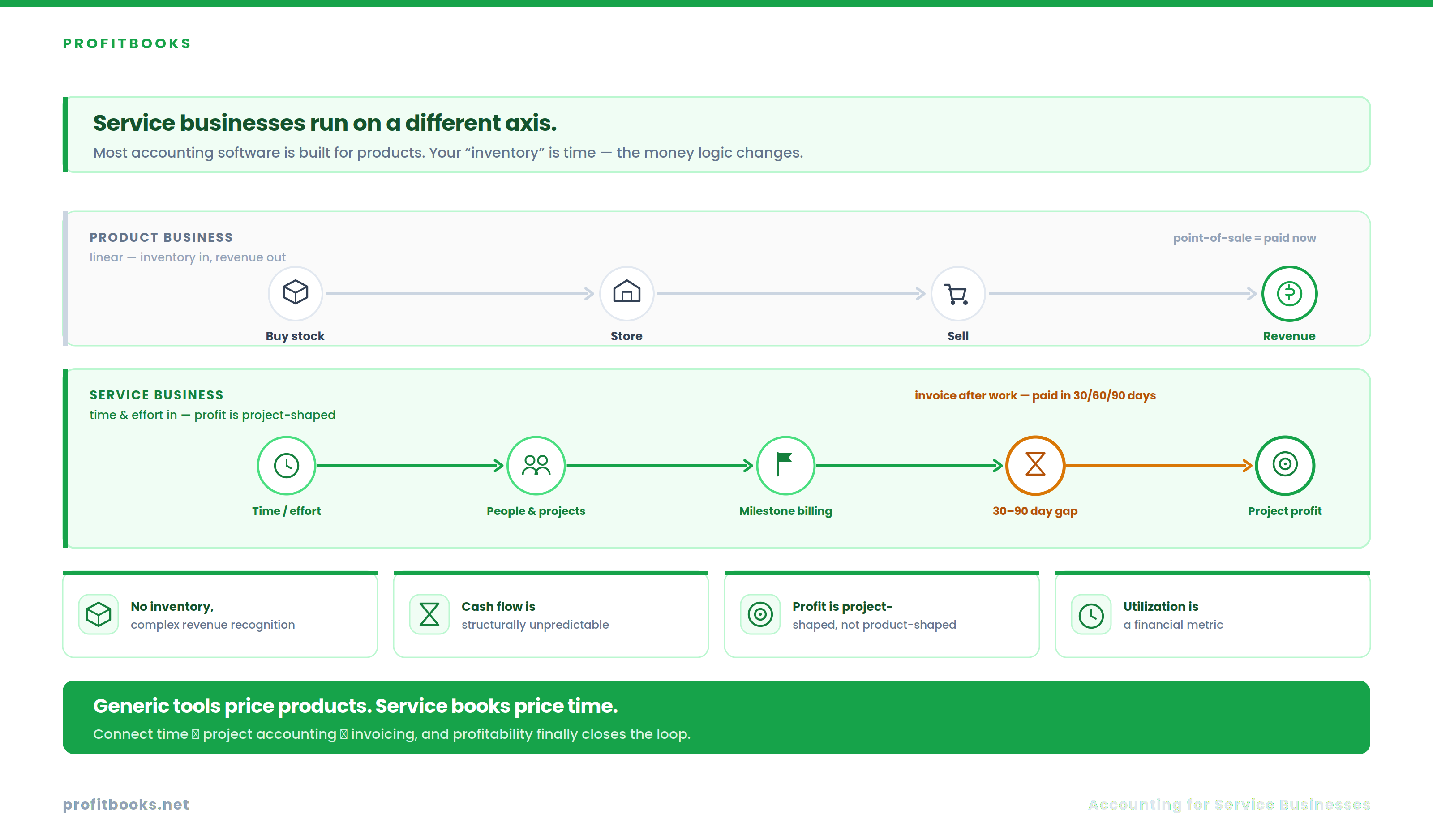
Most accounting software was built for businesses that buy things, store them, and sell them. Inventory in, revenue out. The financial logic is relatively linear.
Service businesses operate on a completely different axis. Your "inventory" is time. Your revenue is tied to human effort, project milestones, or retainer agreements. And your biggest cost center—people—doesn't sit on a balance sheet the way physical goods do.
Here's what that means in practice:
No inventory, but complex revenue recognition.
A consulting firm doesn't track SKUs. But it does need to track whether a $50,000 project billed at milestones has actually been invoiced correctly against work delivered. Most generic accounting tools handle the first scenario well and the second one poorly.
Cash flow is structurally unpredictable.
Product businesses collect payment at the point of sale. Service businesses invoice after work is done—sometimes 30, 60, or 90 days after. That gap between delivering value and receiving payment is where service businesses live or die. Your accounts receivable aging report isn't a nice-to-have; it's a survival dashboard.
Profitability is project-shaped, not product-shaped.
You don't need to know your margin on Widget A. You need to know whether Client X's retainer is profitable after accounting for the three team members, the subcontractor, and the travel expenses allocated to it. That's project/job costing, and it's the single most undervalued feature in service-business accounting.
Employee utilization is a financial metric.
If your team bills 60% of their available hours, that's a finance problem as much as an operations problem. Software that connects time tracking to project accounting to invoicing closes this loop. Software that treats these as separate modules doesn't.
 The Practitioner's Evaluation Framework
Forget brand names for a moment. Here are the six factors I use to evaluate any accounting tool for a service business, weighted by how much they actually affect your day-to-day operations and your 3-year total cost of ownership.
Essential Features: What They Actually Solve
Most comparison articles list features like items on a menu. That's not useful. What matters is which business problem each feature solves and who actually needs it.
Invoice Automation & Recurring Billing
Problem it solves: Manual invoice creation eats 3–5 hours per week for a typical 10-person agency. Recurring billing for retainer clients should happen automatically on the 1st of each month without anyone remembering to click "send."
Who needs it most: Consultants with monthly retainers, agencies with ongoing client relationships, coaching businesses with subscription models.
The reality check: Many tools offer "recurring invoices" but don't let you customize line items per cycle or automatically adjust for scope changes. Verify whether recurring billing is truly flexible or just a copy-paste of the same invoice.
Bank Reconciliation
Problem it solves: Matching bank transactions to invoices and expenses manually is where weekends disappear. Automatic bank feeds with smart categorization reduce this from hours to minutes.
Who needs it most: Every service business processing more than 30 transactions per month.
The scaling penalty: Some tools limit bank connections to one or two accounts on lower-tier plans. If your business operates multiple bank accounts or currencies, check whether multi-currency invoicing and multi-bank reconciliation are included or gated behind higher pricing tiers.
Project Accounting & Job Costing
Problem it solves: "Are we making money on this client?" If you can't answer that question in under 60 seconds, you don't have project accounting—you have a reporting gap.
Who needs it most: Agencies, IT companies, architecture firms, event management companies—anyone whose revenue is project-shaped.
The sticker-vs-reality gap: Some tools advertise "project tracking" but only let you tag invoices to projects. True project accounting means allocating expenses, time costs, and subcontractor fees to a project and generating a profitability report per job.
Time Tracking (Connected to Billing)
Problem it solves: Employee utilization and billable-hour accuracy. Standalone time trackers create data that lives in a separate system. Time tracking inside your accounting software means tracked hours can flow directly into invoices.
Who needs it most: Law firms, consulting practices, IT service companies, any business billing by the hour.
Approval Workflows & Role-Based Permissions
Problem it solves: As teams grow, you can't have everyone creating invoices or approving expenses without oversight. Approval workflows prevent unauthorized spending. Role-based permissions keep sensitive financial data visible only to the right people.
Who needs it most: Any service business with more than 5 users. This is where the jump from "freelancer tool" to "business-grade software" happens.
Financial Dashboards & Reporting
Problem it solves: Decision-making without real-time data is guesswork. A dashboard that shows cash flow position, outstanding receivables, monthly revenue trends, and expense breakdowns gives founders and finance managers the visibility they need without running manual reports.
The ghost error nobody talks about: Some dashboards look impressive but update on a 24-hour delay. If your bank feed syncs overnight but your dashboard says "real-time," you're making decisions on yesterday's data. Confirm sync frequency before relying on dashboard numbers.
Expense Receipt Capture & Document Attachment
Problem it solves: Lost receipts at tax time. Mobile receipt capture—snap a photo, attach it to the expense entry—creates an audit trail without the shoebox.
Who needs it most: Businesses with employee expense reimbursement, frequent travel, or client-billable expenses.
The Feature-Priority Matrix: Match Your Business Type
Instead of telling you which brand to buy, this matrix tells you which capabilities to prioritize based on your business type.
| Business Type | Must-Have Features | High-Value Add-Ons | Can Wait |
|---|---|---|---|
| Freelancer | Invoicing, expense tracking, bank reconciliation | Mobile app, receipt capture | Multi-user, approval workflows |
| Consultant | Recurring billing, payment reminders, GST/VAT compliance | CRM integration, client portal | Project accounting, inventory |
| Marketing Agency | Project profitability, client-wise invoicing, multi-user access | Expense reimbursement, approval workflows | Inventory, manufacturing modules |
| IT Company | Milestone billing, retainer invoicing, financial dashboards | API integrations, revenue recognition | POS, warehouse management |
| Law Firm | Client-wise billing, document attachments, audit trail | Trust account support, time tracking | Inventory, e-commerce |
| CA / Accounting Firm | Client management, GST compliance, multi-entity support | Document storage, white-label options | Project billing, CRM |
| Architecture / Design Firm | Project accounting, expense allocation, team cost tracking | Mobile invoicing, client portal | Payroll, inventory |
| Event Management | Project-based billing, vendor payments, expense categorization | Multi-currency, budget vs. actual reports | Manufacturing, inventory |
| Healthcare Services | Recurring billing, payment reminders, compliance reporting | Patient/client portal, mobile app | Job costing, inventory |
| Coaching / Training | Recurring invoices, payment gateway integration, GST | Course/package billing, automation | Multi-warehouse, complex reporting |
Service-Business Accounting Software, Compared
Frameworks are only useful if you can map them to real tools. Below are accounting platforms that fit service businesses well—matched to the way you actually operate rather than ranked by marketing budget. Start with the one whose strengths line up with your stage and business type, then run your shortlist through the Buying Checklist further down.
| Software | Best For | Where It Stands Out |
|---|---|---|
| ProfitBooks | Stage 1–2 service businesses, non-accountants | GST-compliant invoicing, expense tracking, and bank reconciliation out of the box—plus a white-label option for CA firms |
| FreshBooks | Consultants and small agencies | Polished invoicing, time tracking, and client-friendly payment flows |
| Xero | Growing teams that need integrations | Deep app marketplace, multi-user access, and strong bank-feed reconciliation |
| Wave | Freelancers and solopreneurs on a budget | Free core invoicing and accounting for very small operations |
| Bonsai | Independent freelancers and creatives | Contracts, proposals, and invoicing bundled into one freelancer workflow |
| Harvest | Teams billing by the hour | Time tracking tightly connected to project budgets and invoicing |
ProfitBooks
Built for business owners rather than accountants, ProfitBooks covers the service-business essentials—GST-compliant invoicing, recurring billing, expense tracking, and bank reconciliation—without the setup friction of enterprise tools. It's a natural fit for Stage 1 and Stage 2 businesses making the jump off spreadsheets, and its white-label option makes it especially useful for CA and accounting firms serving their own clients. The free Startup plan lets you test it against your real workflows before committing.
FreshBooks
FreshBooks leans into the consultant and small-agency use case with clean invoicing, built-in time tracking, and a client-friendly payment experience. If your priority is looking professional to clients and getting paid faster, it's an easy tool to adopt—though project accounting depth is lighter than what a larger agency eventually needs.
Xero
Xero suits growing teams that live inside a stack of other tools. Its app marketplace, solid multi-user access, and reliable bank-feed reconciliation make it a strong Stage 3 option when integrations become non-negotiable. The trade-off is a steeper learning curve than the simpler tools on this list.
Wave
Wave covers free core invoicing and accounting, which makes it attractive to freelancers and solopreneurs watching every rupee or dollar. It handles the basics well; just confirm it supports your tax jurisdiction and the payment and reporting depth you'll need as you grow past the earliest stage.
Bonsai
Bonsai bundles contracts, proposals, and invoicing into a single workflow aimed squarely at independent freelancers and creatives. If your admin pain is as much about agreements and getting projects started as it is about the books, that all-in-one approach saves real time.
Harvest
Harvest is built around time tracking connected to project budgets and invoicing, which makes it a fit for teams that bill by the hour and need to watch utilization. Pair it with a full accounting tool if you need deeper compliance and reporting—its strength is the time-to-billing loop.
The Service Business Accounting Readiness Model
This is a framework I've developed after working with service businesses at every stage. Find where you are, and you'll know what to look for next.
Stage 1 — Manual Operations
What it looks like: Excel spreadsheets, Word document invoices, manual bank checking. Maybe a basic invoicing app.
When to move on: When you're sending more than 15 invoices a month, or when you've missed a tax filing because the data wasn't organized.
What to look for next: Cloud-based invoicing with bank reconciliation and basic expense categorization.
Stage 2 — Growing Business
What it looks like: You have accounting software, but it handles invoicing and expenses only. GST/VAT is semi-automated. You're still manually tracking project profitability in a separate spreadsheet.
When to move on: When you hire your third team member, or when you can't answer "which client is most profitable?" without a 2-hour data exercise.
What to look for next: Project accounting, recurring billing automation, multi-user access.
Stage 3 — Scaling Team
What it looks like: 8–25 people. Multiple active projects. You need approval workflows, role-based permissions, and dashboards that update without manual input. Integration with your project management and CRM tools becomes non-negotiable.
When to move on: When financial reporting takes more than a day to prepare, or when you're considering a second business entity.
What to look for next: Automation, API integrations, advanced reporting, multi-entity support.
Stage 4 — Operational Excellence
What it looks like: Finance workflows are integrated end-to-end. Invoicing triggers automatically from project milestones. Cash flow forecasting informs hiring decisions. The accounting system feeds business intelligence dashboards.
What to look for: Forecasting, analytics, custom reporting, and BI integrations. At this stage, your accounting software is a strategic asset, not just a compliance tool.
Where does your business sit today?
If you're in Stage 1 or Stage 2 and want to skip the complexity of enterprise tools, ProfitBooks is built specifically for this transition—simple enough for non-accountants, with GST-compliant invoicing, expense tracking, and bank reconciliation out of the box. Start with ProfitBooks' free Startup plan and scale when you're ready.
The Buying Checklist (Before You Commit)
Run through these before signing up for anything:
The Seven Mistakes That Cost Service Businesses the Most
Industry-Specific Feature Priorities
Digital Marketing Agencies
Prioritize project profitability tracking above almost everything else. You need to see revenue, team cost, and expenses per client per campaign. Client-wise invoicing with GST compliance and expense reimbursement workflows round out the must-haves.
IT Companies & Software Firms
Milestone billing is non-negotiable—you're delivering in phases, not all at once. Retainer invoicing for ongoing support contracts, multi-user permissions for distributed teams, and financial dashboards for leadership visibility are the critical stack.
Independent Consultants
Keep it simple: recurring invoices, automated payment reminders, mobile invoicing for on-the-go billing, and bank reconciliation. You don't need project accounting if you're billing flat monthly retainers. You do need your accounts receivable aging report front and center.
Law Firms
Client-wise billing with detailed time tracking. Document attachments on every transaction for audit trail purposes. Trust account support where applicable. The chart of accounts setup matters more here than in most industries—get it right during implementation.
Architecture & Interior Design Firms
Project accounting with expense allocation across long-running projects. Team cost tracking to understand profitability per project phase. Mobile expense capture for site visits. Multi-currency support if you work with international material suppliers.
CA & Accounting Firms
Client management with multi-entity support. GST compliance tools that generate filing-ready reports. Consider tools offering white-label solutions so you can provide branded financial access to your own clients. ProfitBooks, for example, offers a white-label solution designed specifically for this use case.
Event Management Companies
Project-based billing with vendor payment tracking. Budget vs. actual reporting per event. Expense categorization that separates venue costs, talent fees, logistics, and client-billable items. Multi-currency if you operate internationally.
Freelancers & Solopreneurs
You need invoicing, expense tracking, and a mobile app. That's it to start. Don't pay for 15 features you won't touch. As you grow, look for tools that let you add capabilities without migrating to a completely different platform.
Concise Answers for Quick Reference
What is the best accounting software for service businesses?
The best accounting software for service businesses depends on your size and billing model. Prioritize recurring invoicing, project accounting, bank reconciliation, and GST compliance. Solo operators need simplicity; agencies need multi-user access and job costing. Evaluate based on 3-year TCO, not monthly price.
Which accounting software is best for consultants?
Consultants should prioritize recurring billing, automated payment reminders, mobile invoicing, and bank reconciliation. Avoid tools with complex inventory or manufacturing modules you won't use. ProfitBooks and similar lightweight cloud tools are strong fits for consultants who want fast setup without accounting expertise.
What features should service businesses look for?
Focus on invoice automation, recurring billing, bank reconciliation, expense categorization, project/job costing, GST or VAT compliance, multi-user access with role-based permissions, financial dashboards, and mobile access. Match feature depth to your current business stage and team size.
Is cloud accounting better for service companies?
Yes, for most service businesses. Cloud accounting provides real-time access from anywhere, automatic bank feeds, multi-user collaboration, and automatic backups. It eliminates the need for local installations and IT maintenance. Verify that your chosen tool supports your region's tax requirements natively.
How do I choose accounting software?
Start with your business type and stage. Identify must-have features using a priority matrix. Evaluate 3-year total cost including per-user fees and add-ons. Test the setup process—if you can't send an invoice within an hour, adoption will suffer. Check integration depth with your existing tools.
What to Do Next
If you've read this far, you probably already know your current setup isn't working—or won't work for much longer. Here's the honest move: go back to the Readiness Model, identify your stage, cross-reference with the Feature-Priority Matrix, and run two or three tools through the Buying Checklist.
Don't start with brand names. Start with your workflows.
And if you're a service business in Stage 1 or 2 looking for something that handles GST-compliant invoicing, expense tracking, and clean financial reports without requiring an accounting degree, ProfitBooks is worth a serious look. It's built for business owners, not accountants—and the free Startup plan means you can test it against your actual workflows before spending anything.
Ready to simplify your accounting?
Sign up for ProfitBooks free and send your first invoice today. No accounting knowledge required.