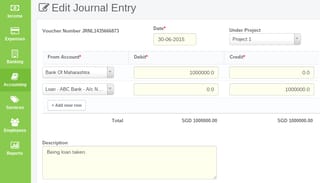
How to Pass a Manual Journal Entry in ProfitBooks
On this page 34 sections

To pass a manual journal entry in ProfitBooks, open Accounting > Journal Entries, click + New Journal Entry, set the date, pick the account and amount for each line (each line is either a debit or a credit), add more rows until total debits equal total credits, write a clear narration, review the entry and Save. Manual journal entries are for adjustments and corrections, not for routine transactions that already have their own workflow.
By CA Mohnish Katre, Co-founder, ProfitBooks
Last reviewed: 27 November 2026. Practical guidance for small businesses in India. Screens and options follow the current ProfitBooks interface; verify the live app before you rely on exact steps.
Most of what a business records goes in through a regular workflow: an invoice, a purchase, a payment, an expense. Each of those posts the right accounting entry behind the scenes. But some things do not fit any of those forms. Month-end depreciation, an accrual for a bill not yet received, a correction to an account, an opening balance adjustment. For these you pass a manual journal entry.
A journal entry lets you record a transaction directly between accounting accounts, debiting one and crediting another, when no dedicated form does the job. This guide explains what a manual journal entry is, when you actually need one, the debit and credit rules behind it, and exactly how to pass, balance, review and save one in ProfitBooks, with real screenshots from the app.
What Is a Manual Journal Entry in Accounting?
A journal entry is a record of a financial transaction that affects one or more accounts, following the double-entry principle. A manual journal entry is one you record directly through the journal workflow, rather than letting an invoice or payment form create it for you. It is the tool accountants reach for when a transaction or adjustment has to be posted straight to the accounts.
How double-entry accounting works
Every journal entry touches at least two accounts, and it follows one unbreakable rule:
- One or more accounts are debited.
- One or more accounts are credited.
- Total debits must equal total credits.
For example, a business records ₹10,000 of office rent paid from its bank account:
| Account | Debit | Credit |
|---|---|---|
| Rent Expense | ₹10,000 | ₹0 |
| Bank Account | ₹0 | ₹10,000 |
| Total | ₹10,000 | ₹10,000 |
The rent expense increases (a debit), and the bank balance decreases (a credit). The two sides match, so the entry balances.
When Do Businesses Need to Pass Manual Journal Entries?
Routine transactions should go through their own workflow wherever one exists. Manual journal entries are for the cases that do not, typically adjustments made by an accountant. Common situations include:
Accounting adjustments
Some adjustments have to be posted directly to the accounts to reflect the correct position, where no standard form applies.
Corrections to accounting records
When an earlier entry is found to be wrong, a correcting journal entry can set it right, following a sensible correction approach rather than simply deleting history.
Period-end adjustments
Accruals, prepayments and similar period-end adjustments are commonly recorded through journal entries so the period reflects what actually belongs in it.
Depreciation entries
Depreciation is usually recorded as a journal entry, debiting a depreciation expense account and crediting accumulated depreciation. The amount depends on the asset and the method you follow. See our guide to depreciation for how it is calculated.
Opening balance adjustments
When you set up your books or review balances, certain opening or balance adjustments may need a journal entry.
Other accounting adjustments
Accountants also use journal entries for adjustments that do not fit neatly into a transaction form. The guiding rule stays the same: if a dedicated workflow exists, such as an invoice, a bill, a payment or an expense, use it instead of a manual entry.
Understanding Debits and Credits in Journal Entries
You do not need to be an accountant to pass a correct entry, but you do need the basic rules of debit and credit.
What is a debit?
A debit is an entry on the left side of an account. For assets and expenses, a debit increases the balance. For liabilities, equity and income, a debit decreases it.
What is a credit?
A credit is an entry on the right side of an account. For liabilities, equity and income, a credit increases the balance. For assets and expenses, a credit decreases it. Every debit in an entry is matched by a credit somewhere else.
Debit and credit rules
| Account type | Increase | Decrease |
|---|---|---|
| Assets | Debit | Credit |
| Expenses | Debit | Credit |
| Liabilities | Credit | Debit |
| Equity | Credit | Debit |
| Revenue | Credit | Debit |
Why journal entries must balance
Total debits must equal total credits. If they do not, the entry is not balanced and ProfitBooks will not save it. A simple balanced entry for buying office supplies in cash looks like this:
| Account | Debit | Credit |
|---|---|---|
| Office Supplies | ₹5,000 | ₹0 |
| Cash | ₹0 | ₹5,000 |
| Total | ₹5,000 | ₹5,000 |
How to Pass a Manual Journal Entry in ProfitBooks
Have your transaction details and the accounts you will debit and credit ready before you start. The example below records month-end depreciation.
Before you start: make sure the accounts exist
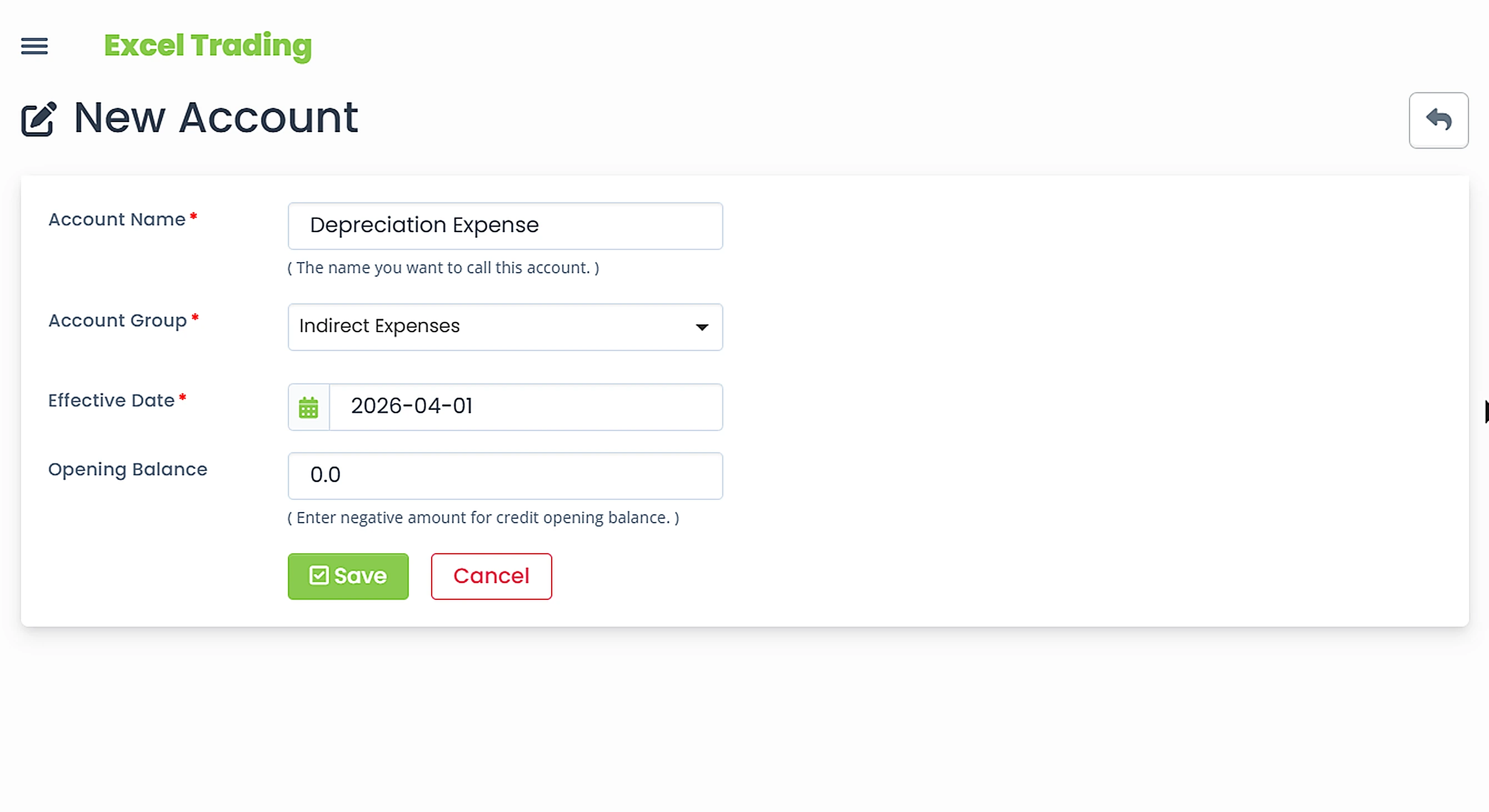
The journal form lets you pick accounts but not create them on the spot, so any account you need must already be in your chart of accounts. If it is missing, open Accounting > Chart of Accounts, add it with + New Account (give it an Account Name and an Account Group, such as Depreciation Expense under Indirect Expenses, or Accumulated Depreciation under Fixed Assets), then return to the journal. For more on account structure, see the chart of accounts guide.
Step 1: Open the Journal Entries section
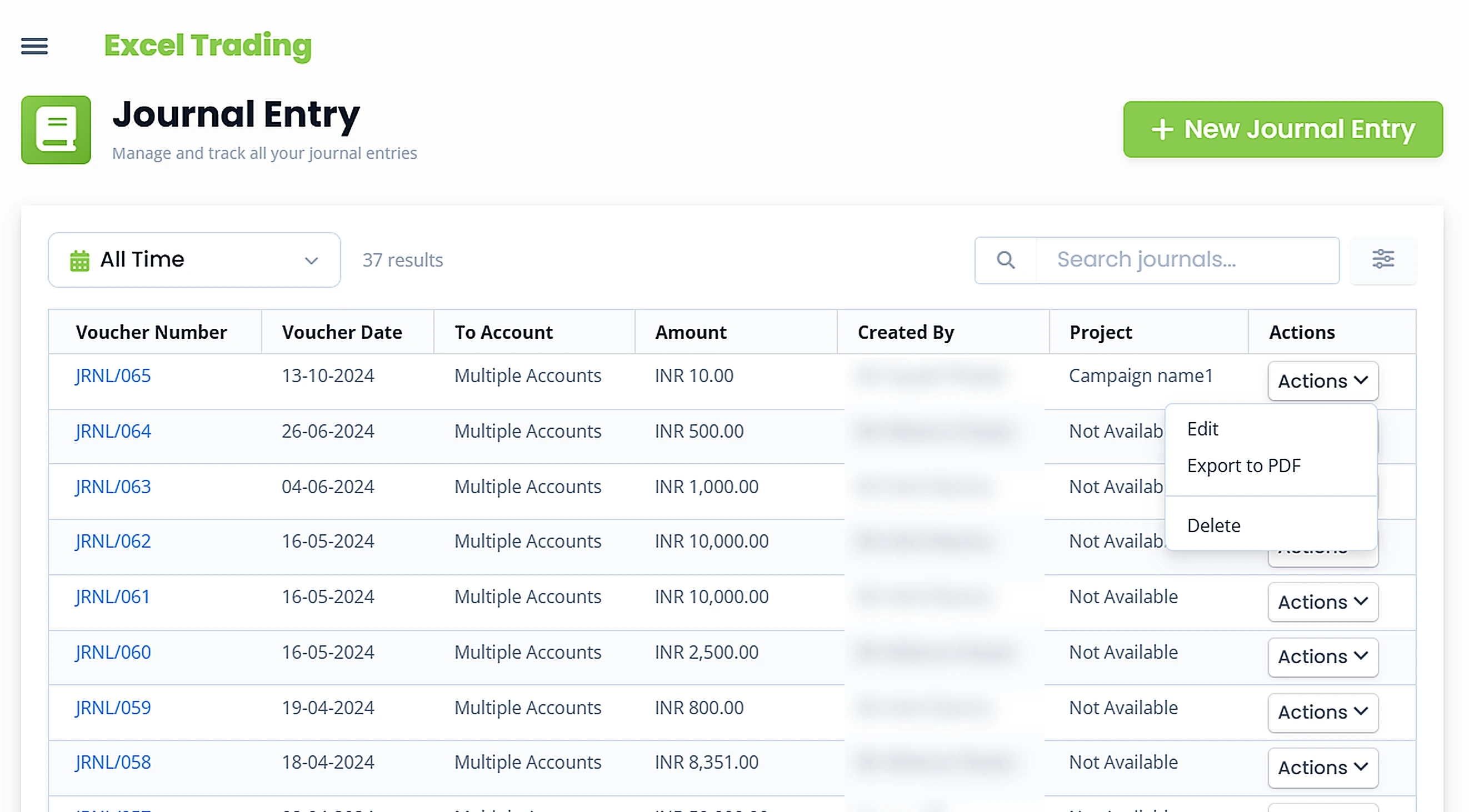
From the left menu, open Accounting and select Journal Entries. The list shows every journal voucher with its Voucher Number, Voucher Date, To Account (shown as Multiple Accounts), Amount, who created it and any project. Click + New Journal Entry to start.
Step 2: Open a new journal entry
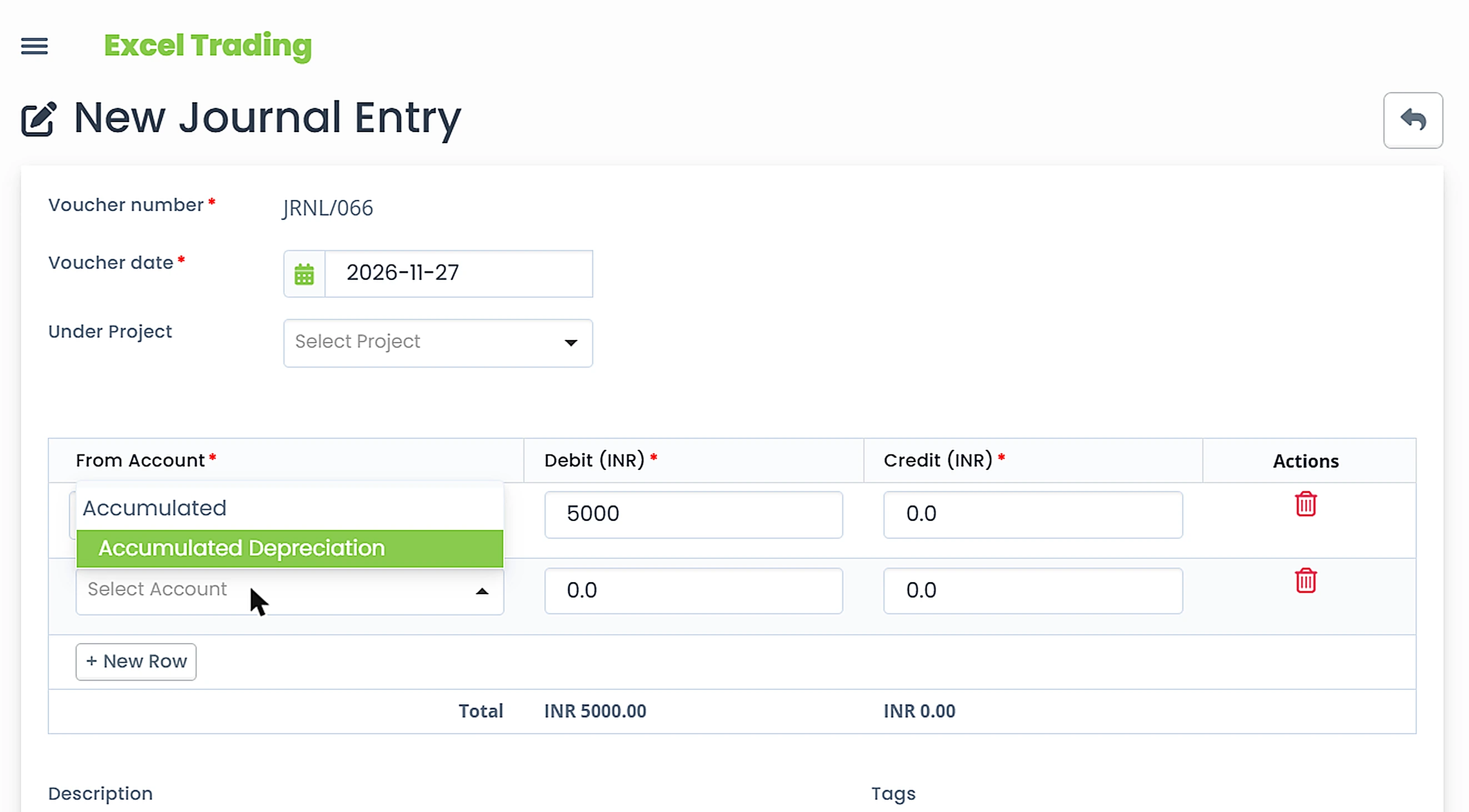
The New Journal Entry form opens with an auto-generated Voucher number (JRNL series), which is not editable. The form starts with one blank line, ready for your first account.
Step 3: Set the date
Set the Voucher date, which defaults to today. Use the date the transaction or adjustment belongs to, and make sure it falls in the period you intend. If you track projects, Under Project lets you tag the entry, though it is optional.
Step 4: Select the accounts
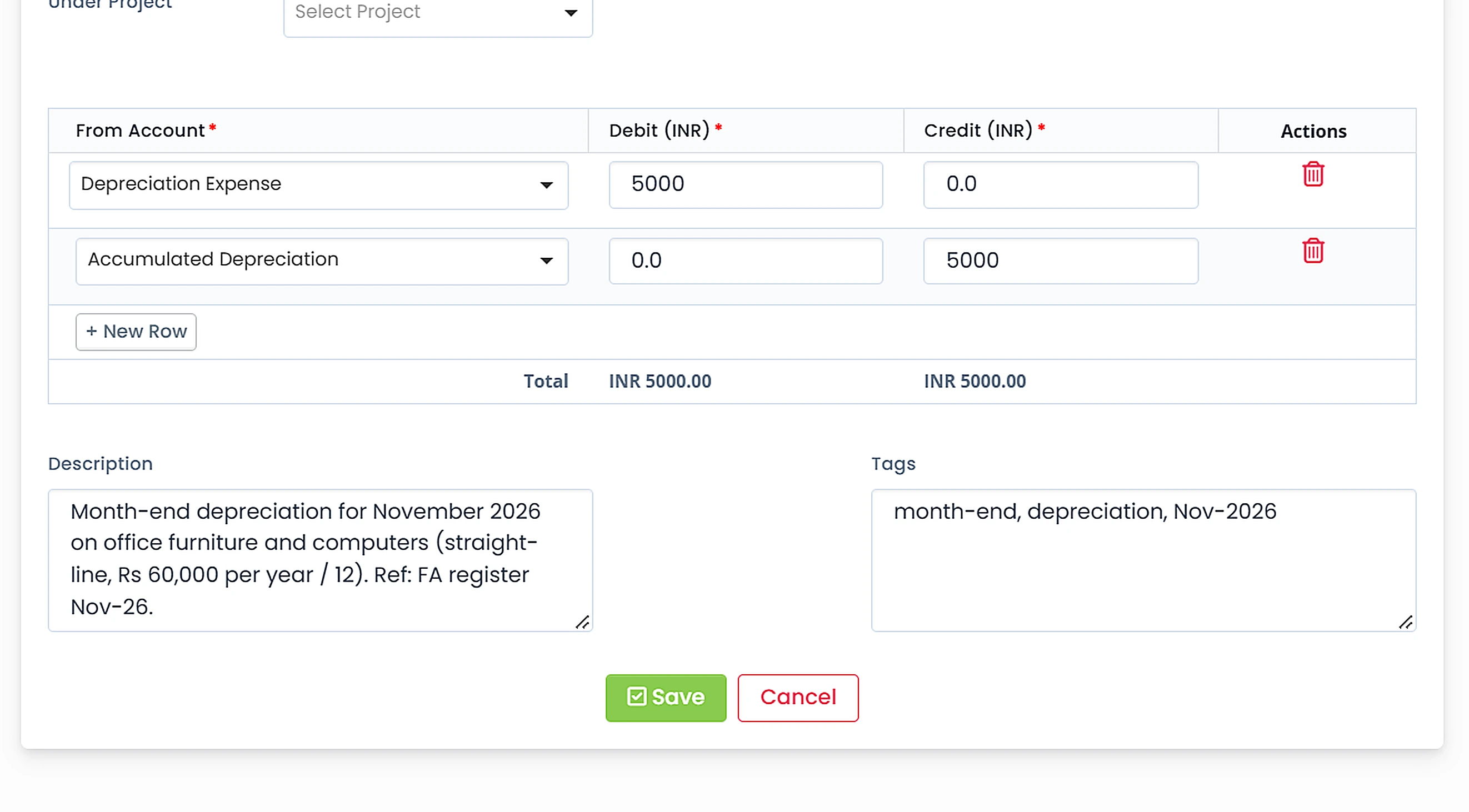
On each line, choose the account in From Account. The selector searches your whole chart of accounts, so start typing the account name. The accounts you pick depend on the transaction: for depreciation, that is Depreciation Expense on one line and Accumulated Depreciation on the other.
Step 5: Enter the debit and credit amounts
Each line is either a debit or a credit. Enter the amount in the Debit (INR) or the Credit (INR) column and leave the other at zero. Use + New Row to add more lines. The Total row adds up each side as you go, and the two totals must match before you can save. For the depreciation example, Depreciation Expense is debited ₹5,000 and Accumulated Depreciation is credited ₹5,000.
Step 6: Add a narration
Use the Description field to explain why the entry was passed. A clear narration such as "Month-end depreciation for November 2026 on office furniture and computers" is far more useful later than a vague "adjustment". You can also add Tags to group related entries.
Step 7: Review before saving
Check the accounts, the date, each debit and credit amount, that the two totals are equal, and that the narration makes sense. If you click Save with no lines, or with debits that do not equal credits, ProfitBooks blocks the save and shows an error, so an unbalanced entry cannot slip through.
Step 8: Save the entry
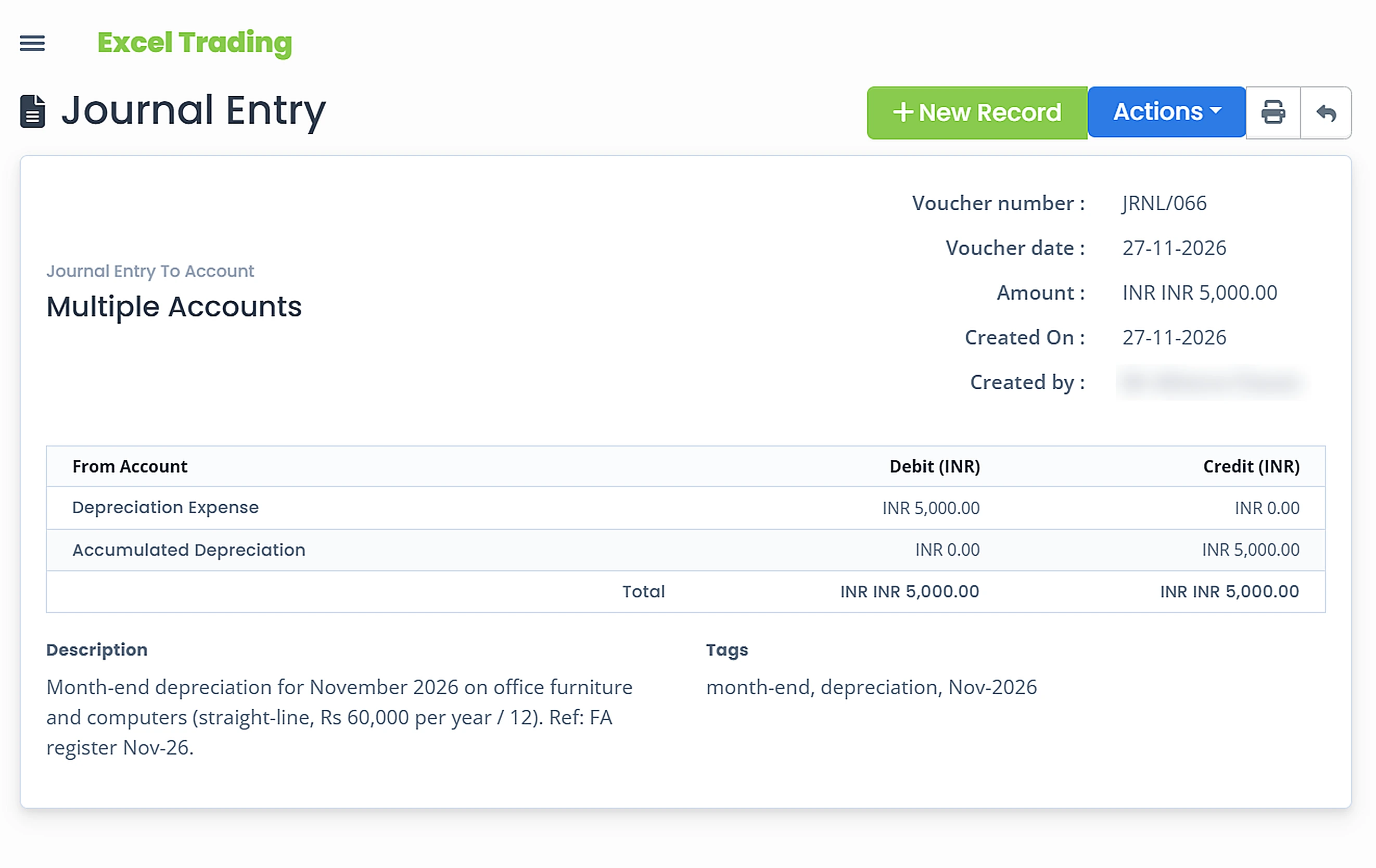
Click Save. ProfitBooks confirms the entry was created and opens the saved voucher, with options to add a new record, edit, delete or print. The entry is now part of your accounts.
Where the entry posts
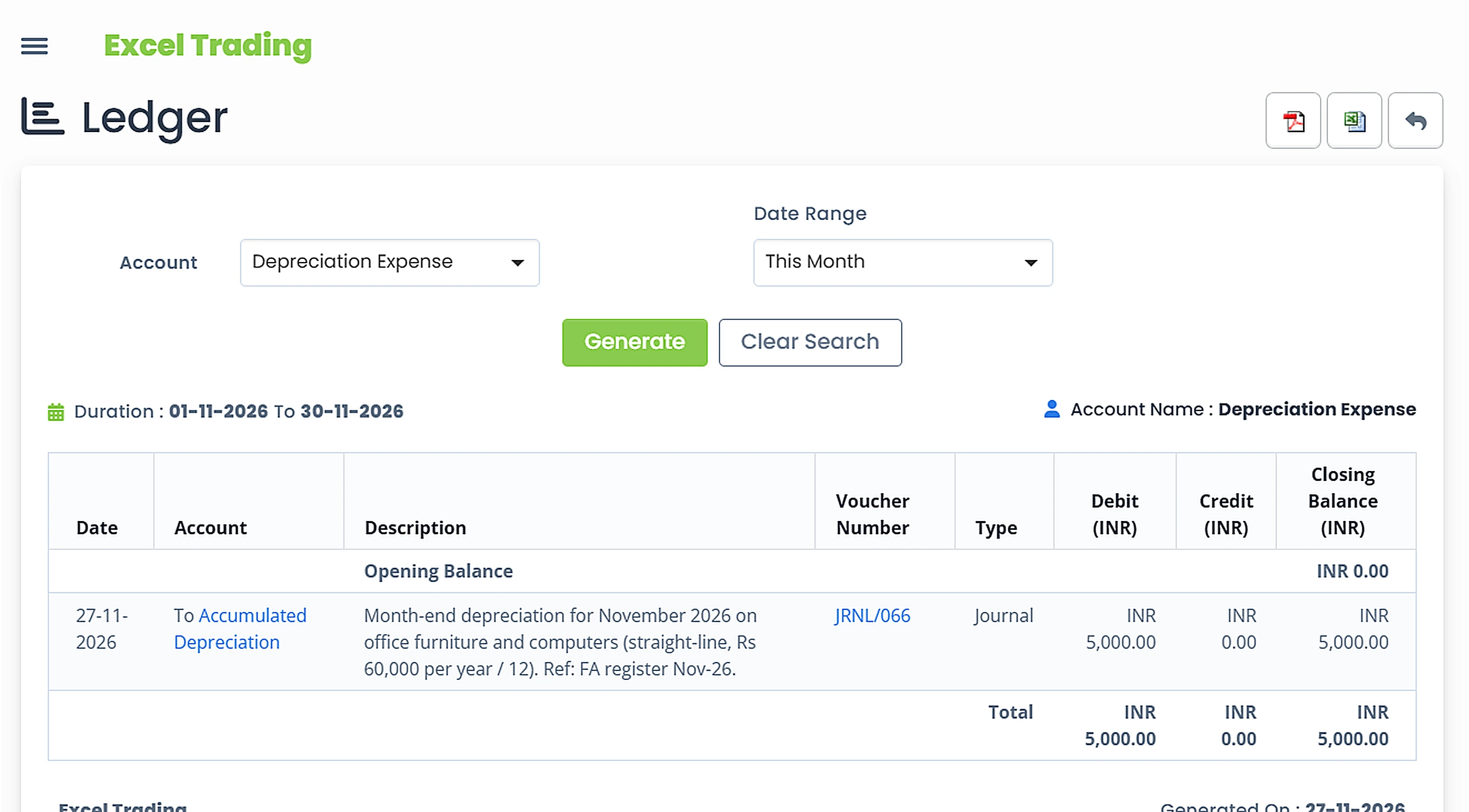
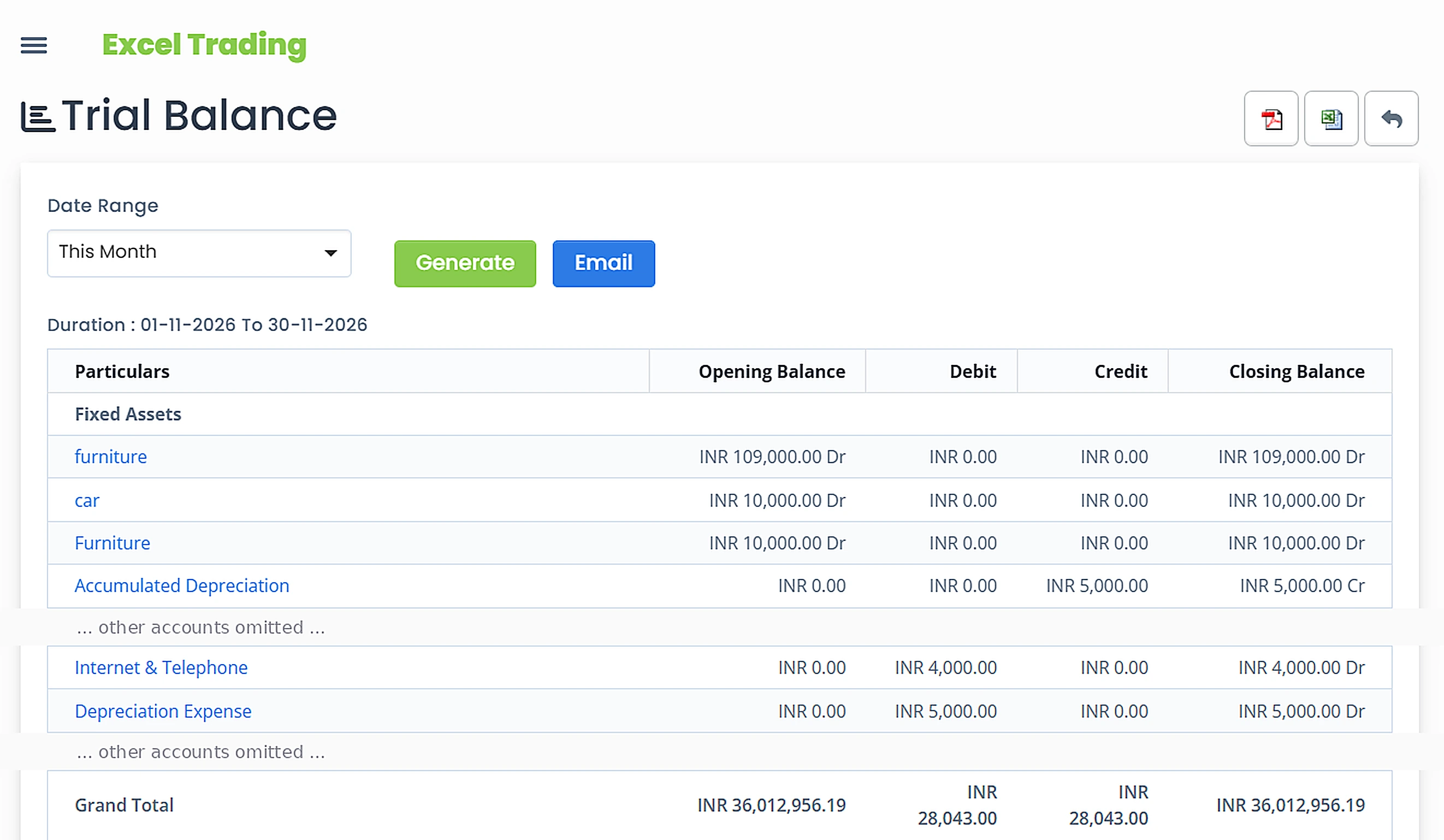
A saved journal entry flows straight into your reports. In Reports > Transaction Reports > Ledger, the debited account shows the debit and the credited account shows the credit. In the Trial Balance, both accounts appear on their respective sides and the grand total of debits still equals the grand total of credits. You can read more about reading a trial balance in our guide.
Examples of Manual Journal Entries
A few worked examples make the logic clearer. Each one balances, and each is illustrative; the exact amount and treatment depend on your business and accounting policy.
Example 1: Recording depreciation
| Account | Debit | Credit |
|---|---|---|
| Depreciation Expense | ₹5,000 | ₹0 |
| Accumulated Depreciation | ₹0 | ₹5,000 |
| Total | ₹5,000 | ₹5,000 |
Depreciation Expense is debited and Accumulated Depreciation (a contra-asset) is credited. This spreads the cost of an asset across the periods that use it.
Example 2: Recording an accrued expense
A business has incurred ₹8,000 of an expense it has not yet paid or been billed for:
| Account | Debit | Credit |
|---|---|---|
| Relevant Expense | ₹8,000 | ₹0 |
| Accrued Expenses Payable | ₹0 | ₹8,000 |
| Total | ₹8,000 | ₹8,000 |
The expense is recognised now, and a liability (accrued expenses payable) records what is owed, so the period reflects the cost even though no payment has moved.
Example 3: A compound entry (more than two lines)
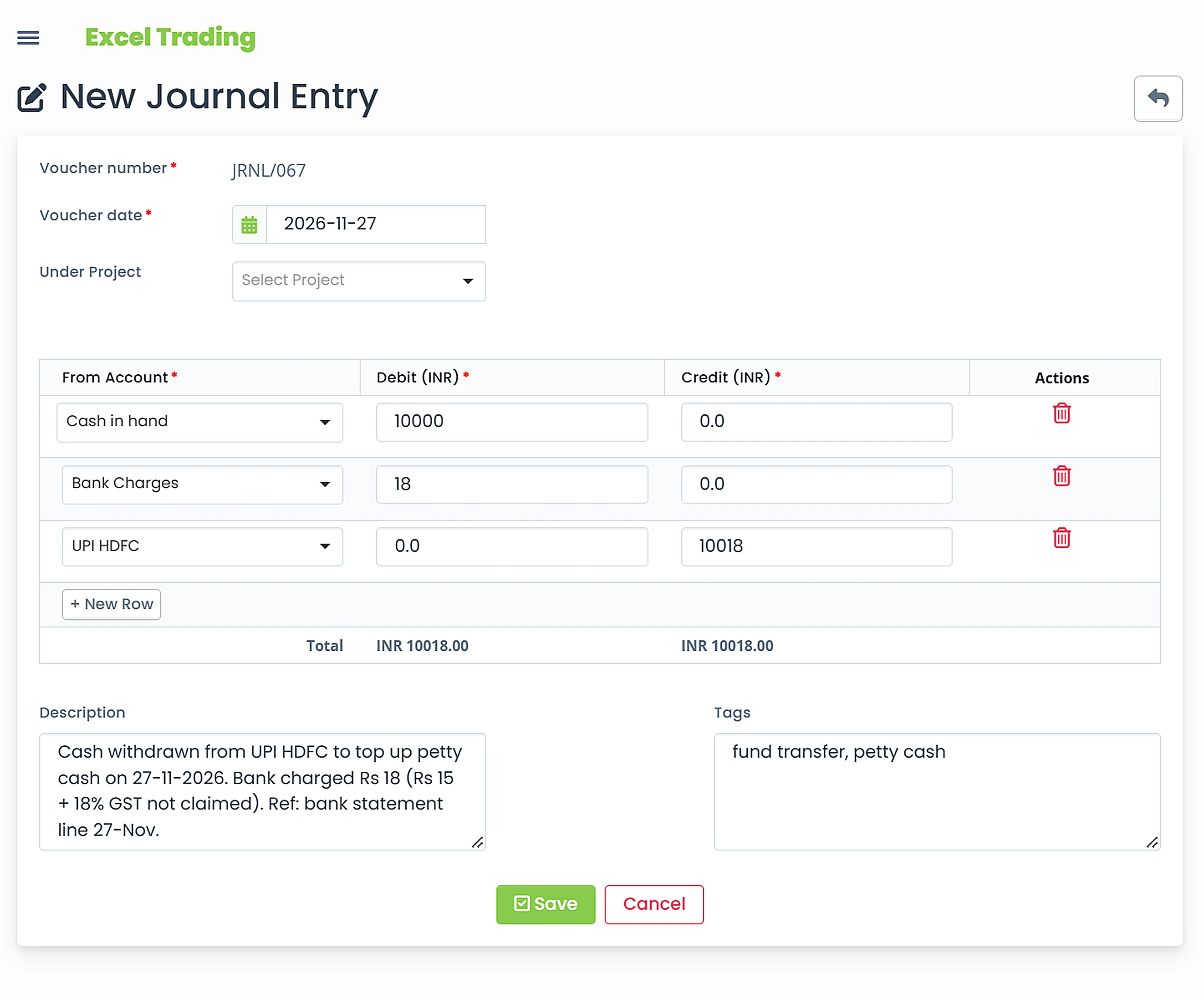
Journal entries can have more than two lines, as long as the two sides still balance. Here a business withdraws cash to top up petty cash, and the bank deducts a small charge:
| Account | Debit | Credit |
|---|---|---|
| Cash in hand | ₹10,000 | ₹0 |
| Bank Charges | ₹18 | ₹0 |
| UPI HDFC (bank) | ₹0 | ₹10,018 |
| Total | ₹10,018 | ₹10,018 |
Two debits and one credit, and the totals still match. Add as many rows as the transaction needs with + New Row.
Example 4: Correcting an entry
If a cost was posted to the wrong account, a correcting journal entry moves it: debit the account it should have been in and credit the account it was wrongly posted to, for the same amount. Because the entry is reversible by its nature, your records keep a clear trail of the correction rather than losing the original.
Common Mistakes to Avoid When Passing Journal Entries
- Selecting the wrong account. The wrong account distorts your reports. Double-check each account against what the transaction is really about.
- Debits and credits that do not match. An entry must balance. Use the Total row to confirm both sides are equal before saving.
- Using the wrong date. Record the entry in the period it belongs to, not simply today.
- Vague narration. A description like "adjustment" tells you nothing in six months. Say what the entry is for.
- Using journal entries for routine transactions. Invoices, bills, payments and expenses have their own workflows. Use those instead of bypassing them.
- Incorrect adjustment treatment. Base adjustments on sound accounting and supporting information, and check with your accountant when unsure.
- Duplicate entries. Recording the same adjustment twice distorts the accounts. Check the list before re-entering.
- No supporting documentation. Keep the working or reference behind each entry so it can be reviewed later.
Best Practices for Recording Manual Journal Entries
- Write clear narrations that describe the actual transaction.
- Select accounts carefully and reuse existing ones.
- Verify that total debits equal total credits.
- Record entries in the correct accounting period.
- Keep the supporting working or reference for each entry.
- Review your journal entries periodically.
- Avoid unnecessary manual entries where a workflow exists.
- Follow a consistent process, and consult an accountant for complex adjustments.
Journal entry review checklist
- Correct transaction date
- Correct accounts selected
- Debit amounts entered correctly
- Credit amounts entered correctly
- Total debits equal total credits
- Narration clearly describes the entry
- Supporting information available
- Accounting treatment reviewed
Related reading: What Is a Ledger in Accounting?, Advanced Accounting Using Journal Entry and free accounting software for small businesses.
Frequently Asked Questions
How do I pass a manual journal entry in ProfitBooks?
Open Accounting > Journal Entries, click + New Journal Entry, set the date, choose the account and amount on each line as a debit or a credit, add rows until debits equal credits, write a narration, review and Save. The entry then posts to your ledgers and trial balance.
What is a manual journal entry?
It is an accounting entry you record directly, debiting one or more accounts and crediting others, to capture a transaction or adjustment that does not have its own dedicated form, such as depreciation, an accrual or a correction.
Why must journal entries balance?
Double-entry accounting requires that every debit is matched by an equal credit. If total debits do not equal total credits, the books would not tie out, so ProfitBooks will not save an unbalanced entry.
Can I record depreciation through a journal entry?
Yes. Depreciation is commonly recorded by debiting a depreciation expense account and crediting accumulated depreciation. The amount depends on the asset and the method you follow.
What is the difference between a journal entry and an expense entry?
An expense entry records a specific expense transaction through the expense form, including payment details. A journal entry posts directly between accounts and is used for adjustments and corrections rather than routine spending.
Can I correct an accounting mistake using a manual journal entry?
Often yes. A correcting entry can move an amount to the right account. The correction should reflect the nature of the original transaction and sound accounting practice, rather than simply deleting records.
What should I write in the narration?
A short, clear description of why the entry was passed, for example the adjustment it records and the period it relates to. Avoid vague words like entry or adjustment on their own.
Are manual journal entries suitable for every transaction?
No. Routine transactions such as invoices, purchases, payments and expenses should go through their own workflows. Manual journal entries are for adjustments and other entries those forms do not handle.
Record Journal Entries Accurately in ProfitBooks
Manual journal entries are how you record the adjustments and corrections that keep your accounts accurate when no standard form fits. Get the debit and credit rules right, pick the correct accounts, enter matching amounts, write a clear narration, and review before you save. Used well, and kept for adjustments rather than routine transactions, journal entries keep your books clean and your reports trustworthy.
ProfitBooks gives you a simple, balanced journal workflow alongside the invoicing, purchase, payment and expense tools that handle everything else.
Keep your accounting records accurate and in one place
Try ProfitBooks for your accounting →