For bookkeepers and accountants

Accounting Software Built for Bookkeepers

ProfitBooks is online accounting software for bookkeepers who manage the books of small businesses. Reconcile client bank accounts in minutes, share 50+ reports and give clients their own login, without paying QuickBooks prices. It has the full bookkeeping toolkit and none of the features built for enterprise finance teams.

Trusted by 1,00,000+ businesses · Rated 4.5/5 on Capterra · Costs far less than QuickBooks
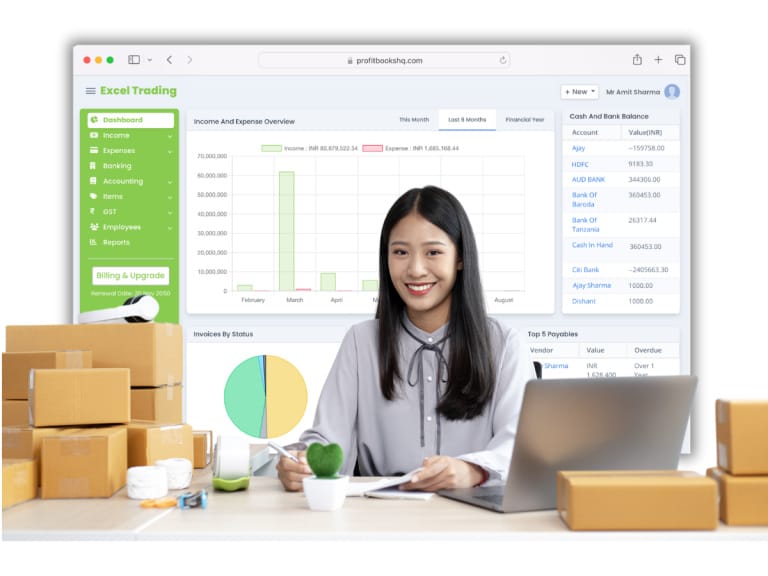
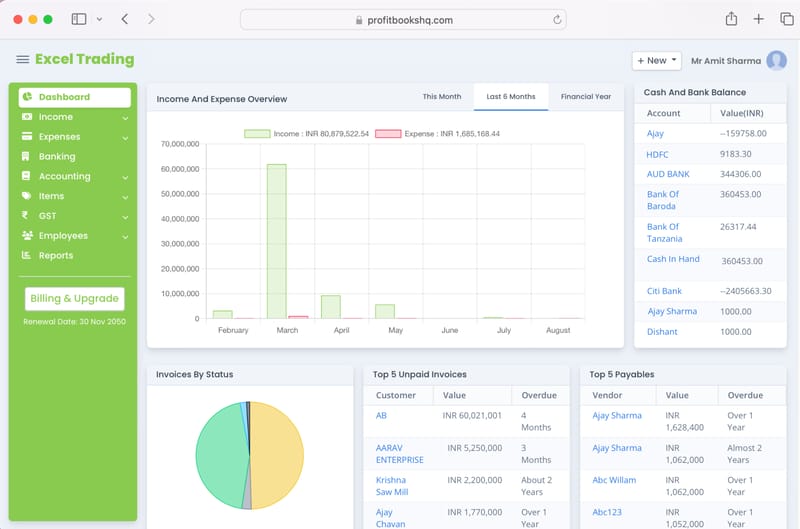
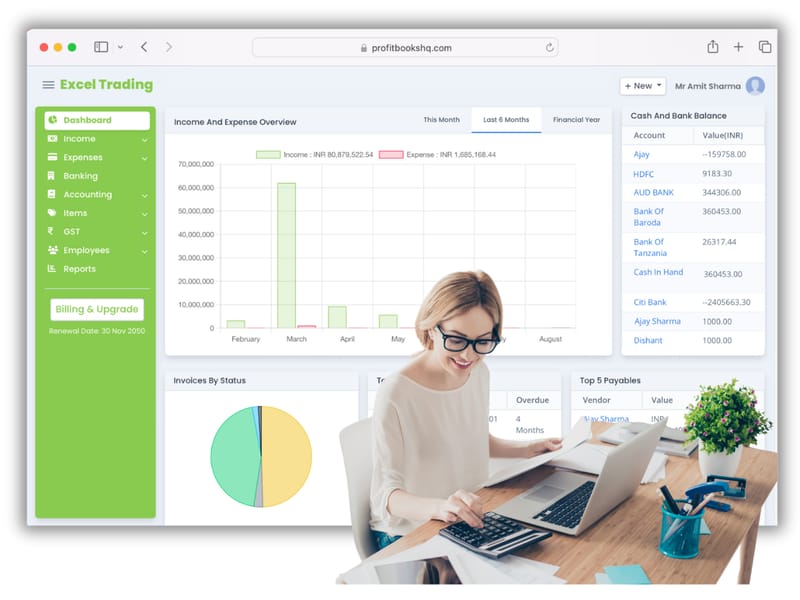
ProfitBooks accounting software dashboard for bookkeepers
Simple bookkeeping software for accountants

Accounting software that works the way bookkeepers think

ProfitBooks is designed for bookkeepers and accountants who manage the books of small businesses, not for enterprise finance teams. You won't pay for features you never use.

Simple bookkeeping software for accountants

ProfitBooks is cloud accounting software that bookkeepers like using. Double-entry bookkeeping, bank transaction categorisation, invoicing, tax compliance and client-ready reports all sit in one dashboard you can open from anywhere.

Run a handful of small business clients or a growing bookkeeping practice with the full accounting toolkit, without the learning curve of QuickBooks or the limits of Excel.

  • Complete double-entry accounting engine
  • Invite your clients with role-based access
  • Starts free, paid plans from $9.95/month
  • No accounting degree needed to get started
Try ProfitBooks free →
Simple bookkeeping software interface in ProfitBooks — designed for accountants
“I manage books for 8 small business clients. ProfitBooks is the first software where I can give each client their own login, run their books, and share reports — all without paying per user. It's saved me hours every single week.”
Shreya KapoorIndependent Bookkeeper, Bangalore · on Capterra
Cloud bookkeeping with bank reconciliation

Reconcile your clients' bank accounts in minutes, not hours

Stop spending half your day on bank rec. Import the statement, match transactions and close the month.

Cloud bookkeeping with bank reconciliation

Bank transactions matched for you

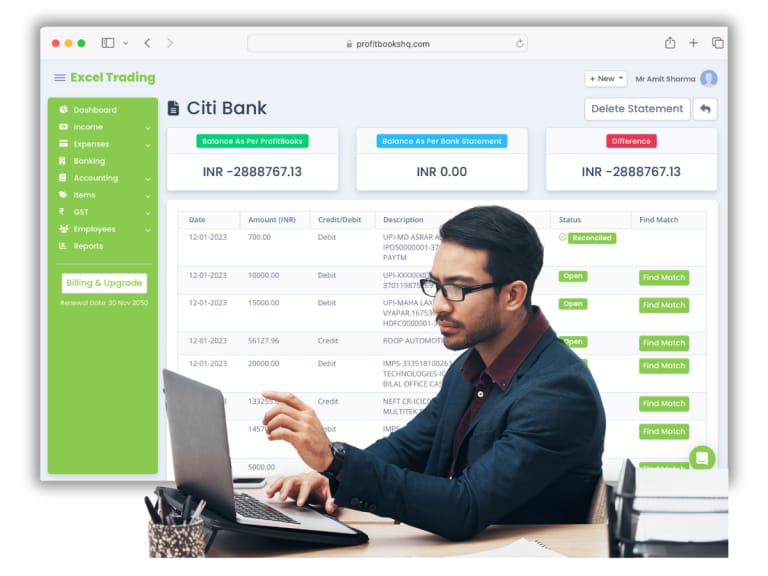
Import your client's bank statement in seconds. ProfitBooks matches transactions against the invoices, purchase bills and expenses already in the books, so you don't work line by line. Unmatched items are flagged for your review.

Close the month faster

Every transaction stays in sync across the chart of accounts, P&L and balance sheet. There's no spreadsheet bridge and no copying between tabs. When the bank rec is done, the books are done.

  • Import bank statements in CSV or OFX format
  • Record deposits, withdrawals and contra entries
  • Full audit trail for every reconciled transaction
Bank reconciliation screen in ProfitBooks accounting software for bookkeepers
Financial reporting software for bookkeepers

50+ reports your clients will understand

From balance sheets to VAT summaries, every report can be filtered, exported and shared in one click.

Financial reporting software for bookkeepers

Every bookkeeping report in one place

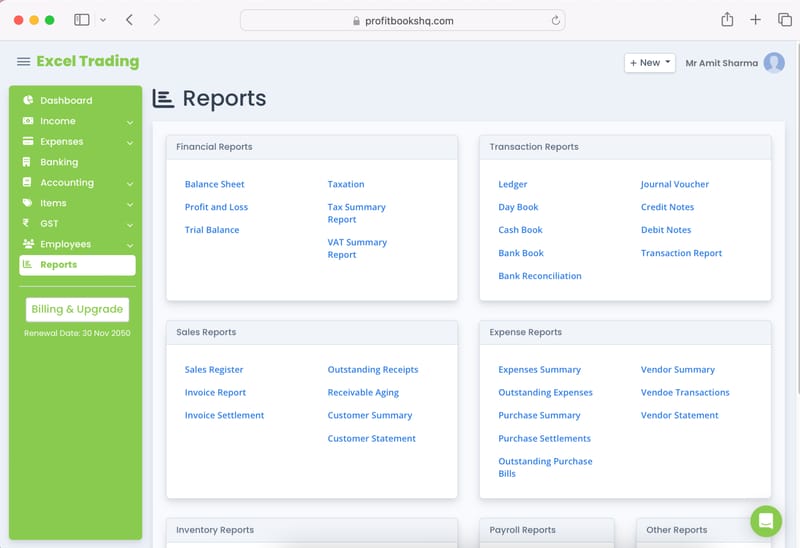
Your clients need Balance Sheets, P&L statements and cash flow reports. You need the day book, ledger, trial balance and audit trail. ProfitBooks has all of them. Filter by date, account or category, and export to PDF or Excel in one click.

Tax and VAT reports for global clients

ProfitBooks tracks tax collected and paid across all transactions, whether your clients handle GST, VAT or sales tax. Tax summary reports are always ready, so there are no manual calculations and no rush before a filing deadline.

  • Balance Sheet, P&L and Cash Flow
  • Sales, expense and vendor reports
  • Audit trail and ledger for compliance review
Financial reports dashboard in ProfitBooks — P&L, balance sheet, tax reports
Online accounting software with client collaboration

Invite clients in and keep control of the books

Give your clients visibility without giving up control. Role-based access shows each person only what they need.

Online accounting software with client collaboration

Role-based access keeps you in charge

Add your client as a limited user so they can enter expenses or check their own invoices but can't touch the core books. Add a CA or auditor with read-only access to reports. You decide who sees what, and every change is logged with a timestamp.

A customer portal that cuts the back-and-forth

Your client's customers can view invoices, check payment history and pay outstanding bills themselves, without emailing you. That means fewer "can you resend that invoice?" messages and faster collections.

  • Invite clients, auditors and CA with custom roles
  • Client self-service portal for invoice access
  • Every action logged in the audit trail
ProfitBooks multi-user access — client and bookkeeper collaboration dashboard
Affordable accounting software: a QuickBooks alternative

The features you need at a fraction of the cost

QuickBooks charges $38–$275/month. ProfitBooks gives bookkeepers what they need, starting free.

Affordable accounting software: a QuickBooks alternative

Free to start, affordable as you grow

The free plan covers invoicing, expense tracking, bank imports, double-entry accounting and 50+ reports. If your client needs multi-user access or advanced inventory, paid plans start at $9.95/month, against $38 for QuickBooks Simple Start.

No per-user fees for your team

QuickBooks charges more every time you add a user. In ProfitBooks you add your bookkeeping team and your client without the bill climbing. One flat plan covers the access you need.

  • Free plan with no time limit
  • Paid plans from $9.95/month, far below QuickBooks
  • No surprise add-on fees for reports or users
Start your free account →
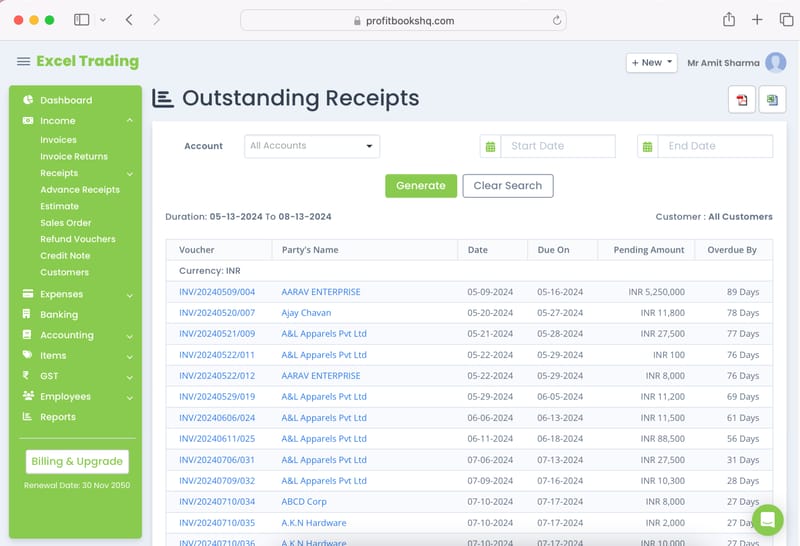
ProfitBooks outstanding receivables and accounts payable report for bookkeepers
“I switched from QuickBooks after my renewal hit $275/month for features I used maybe 20% of. ProfitBooks does everything I actually need — bank rec, P&L, client access — and costs me a fraction of that. I can't believe I waited so long.”
Rajesh IyerBookkeeper & Accounting Consultant, Chennai · on G2

Watch how ProfitBooks works for bookkeepers

A quick walkthrough of bank reconciliation, financial reports, client access and invoicing.

ProfitBooksWatch how ProfitBooks works for bookkeepers Watch the demo Watch on YouTube ↗
Try ProfitBooks For Free →
More than accounting

Invoicing, stock and reports in the same app

The same account runs your clients' invoicing, inventory and GST reports.

Create GST invoices in minutes

Create and send professional GST invoices with correct tax rates in minutes. Customise templates, track payments and manage your entire sales pipeline from one place.

  • GST Invoices with Auto Tax Calculation
  • Estimates, Quotations & Sales Orders
  • Invoice Reminders & Customer Portal
  • Templates & Customisation
  • Sales Reports & Analytics

See GST accounting software →

Track every rupee in and out

Track your whole financial cycle, from purchase to sale, with 50+ filterable reports. Know your outstanding receivables and payables at any time.

  • Outstanding Receivables Tracking
  • Vendor Payment Management
  • Advance Payment Allocation
  • Customer Statements in 1-Click
  • Customer Portal Access

See receivables and payables →

GST invoicing with payment links

Create 100% GST-compliant invoices in seconds. Collect payments through links on the invoice and cut manual data entry errors.

  • Estimates & Sales Orders
  • Invoice Reminders
  • Templates & Customisation
  • Multi-currency & Multi-User
  • Sales Reports

See invoicing software →

Inventory across warehouses

Track stock across multiple warehouses, record production and wastage, and create purchase orders.

  • Purchase Orders in GST Format
  • Production, Wastage & Stock Transfer
  • Multiple Warehouses
  • Vendor & Outstanding Management
  • In-depth Inventory Reports

See inventory management →

Accounting that runs in the background

ProfitBooks handles complete financial accounting in the background while you focus on billing. Chart of accounts, journal entries, project tracking and auditor access, all included.

  • Chart of Accounts
  • Journal Entries
  • Invite Your Auditor / CA
  • Project-wise Categorisation

See business accounting →

50+ financial and GST reports

Get every report you need, from Balance Sheet and P&L to detailed GST reports and audit trails, and decide with up-to-date numbers.

  • Balance Sheet, P&L & Cashflow
  • GST Reports (GSTR-1, GSTR-3B)
  • Sales & Expense Reports
  • Ledger, Day Book & Transaction Reports
  • Audit Trail & Employee Reports

See financial reporting →

Complete suite

Everything ProfitBooks does

One GST-compliant accounting suite for small and medium businesses.

GST invoicing

  • Estimates & Quotations
  • Sales Orders & Delivery Challans
  • CGST, SGST & IGST Auto-Calculation
  • Payment Gateway Integrations

Inventory management

  • Record Raw Material Consumption
  • Record Production of Finished Goods
  • Stock Transfer Within Warehouses
  • Record Inventory Wastage

Banking

  • Import Bank Statements
  • Easy Reconciliation
  • Record Deposits & Withdrawals
  • Contra Entries

Receipts and payments

  • Record Receipts Against GST Invoices
  • Record Advance Receipts
  • Allocation to Invoices
  • Record Non-Invoice Income

Customers and vendors

  • Customer Statement In 1-Click
  • Store Customer GSTIN & Details
  • Record Vendor Payments
  • Track Vendor Advances

GST compliance

  • GSTR-1 & GSTR-3B Return Filing
  • HSN / SAC Code Management
  • Credit Notes & Debit Notes
  • Place of Supply Tracking

Expense management

  • Record Business Expenses
  • GST-Compliant Purchase Bills
  • Create Purchase Orders
  • Vendor Management

User management

  • Create Multiple Users
  • Role-based Access
  • Special Role For Sales Team
  • Invite Your Accountant or CA

50+ reports

  • Balance Sheet, P&L, Cashflow
  • GST & Taxation Reports
  • Sales Reports
  • Audit Trail

Invoice at the client's office. Get paid before you leave.

The ProfitBooks app for iOS and Android puts invoicing, expenses and your dashboard on your phone, always in sync with the web app.

  • Create and send invoices and estimates from your phone
  • Record expenses and payments as they happen
  • Check your dashboard and outstanding dues anywhere

Your success is our success.

We only win when you do. From the day you sign up, real people and practical resources are on your side.

Real peoplenot bots 3 languagesin-app chat Mon–Fri5 days a week

Start free. Upgrade when you grow.

Every new account starts with a free 15-day SMB Pro trial, then moves to the free Startup plan unless you upgrade.

Startup

For trying it out or very small volumes

₹0forever
Start free
  • 1 user
  • 10 invoices a month
  • 10 journal vouchers a month
  • Basic financial reports
  • 1 warehouse

Essential

For solopreneurs filing GST

₹2,499per year
Start free trial
  • 1 user
  • 1,000 invoices a year
  • GSTR-1 and GSTR-3B
  • Invoice reminders and signature
  • WhatsApp integration add-on
Most popular

Growth

For growing teams and service firms

₹4,999per year
Start free trial
  • Everything in Essential, plus
  • 10 users
  • 5,000 invoices a year
  • Payroll and multi-currency
  • 3 warehouses

SMB Pro

For established businesses

₹7,500per year · or ₹750/month
Start free trial
  • Everything in Growth, plus
  • 25 users with custom roles
  • Unlimited invoices
  • Unlimited warehouses
  • Projects and auditor access

Prices exclude GST. Pay by card, net banking, American Express or PayPal. Compare every feature →

Trusted by 1,00,000+ businesses worldwide

What independent bookkeepers and growing businesses say about ProfitBooks.

“ProfitBooks has completely transformed how I manage my clients' books. Bank reconciliation used to take me half a day — now it's done in 20 minutes. The reports are clean, the interface is intuitive, and the price makes it an easy sell to my clients.”
Ananya DesaiIndependent Bookkeeper, Pune · on Capterra
“I was paying $185/month for QuickBooks and using maybe 30% of the features. Switched to ProfitBooks, pay a fraction of that, and have everything I need — double-entry accounting, multi-user access, financial reports. My bookkeeping practice runs better now.”
Meera NambiarAccounting Consultant, Kochi · on G2
“Invoicing is very straightforward and the insights/analytics for this is very good. I use it for my main company and consultancy business.”
Ankush JainFounder & CEO · on Capterra

Frequently asked questions

What is the best accounting software for bookkeepers?

ProfitBooks is accounting software built for bookkeepers and accountants who manage books for small businesses. It covers double-entry accounting, bank reconciliation, invoicing, expense tracking, tax compliance and 50+ financial reports in one cloud platform that costs far less than QuickBooks or Zoho Books. You can start on the free plan and invite clients and auditors with role-based access.

How does bookkeeping software help accountants manage multiple clients?

ProfitBooks lets you manage separate books for each client under one account. Give a client a limited login to enter expenses or view their own invoices, while you keep full control of the ledger, reports and reconciliation. With role-based access, each person sees only what they need, so there are no accidental edits and no data mixed up between clients.

Is ProfitBooks a good alternative to QuickBooks for bookkeepers?

Yes, especially if cost and simplicity matter to you. QuickBooks Online starts at $38/month for its most basic plan and charges more as you add users. ProfitBooks starts free and covers bank reconciliation, double-entry accounting, invoicing and full financial reporting at a fraction of the price.

Can I use ProfitBooks to do bank reconciliation automatically?

Yes. Import your client's bank statement in CSV or OFX format and ProfitBooks matches transactions against the invoices, purchase bills and expenses already in your books. Matched transactions are cleared automatically. Unmatched items are flagged so you can review and categorise them. The whole reconciliation, including the closing balance confirmation, is logged in the audit trail.

Does ProfitBooks support VAT and tax compliance for global clients?

Yes. ProfitBooks tracks tax collected and paid across all transactions, whether your clients handle GST, VAT or sales tax. Tax summary reports show total output tax, input tax credit and net tax payable for any date range. For Indian businesses, ProfitBooks supports full GST compliance, including GSTR-1 and GSTR-3B filing directly from the platform.

How much does accounting software for bookkeepers cost?

ProfitBooks has a free plan with no time limit that covers invoicing, expense tracking, bank imports, double-entry accounting and 50+ reports. Paid plans start at $9.95/month and add multi-user access, advanced inventory and priority support. By comparison, QuickBooks Simple Start is $38/month, and Zoho Books starts at $15/month with significant feature limits on lower tiers.

What financial reports can I generate for clients in ProfitBooks?

ProfitBooks has 50+ reports you can filter. They include Balance Sheet, Profit & Loss, Cash Flow Statement, General Ledger, Trial Balance, Day Book, Audit Trail, sales and expense reports, receivable ageing, payables, GST and tax summaries, and inventory reports. Filter any report by date range, account or category, and export it as PDF or Excel in one click.

Does ProfitBooks support double-entry accounting?

Yes. ProfitBooks runs on a full double-entry accounting engine. Every invoice, purchase bill, bank receipt, expense or journal entry creates its debit and credit entries automatically. Your chart of accounts, trial balance and financial statements stay balanced and up to date without manual journal entries.

How is ProfitBooks different from using Excel for bookkeeping?

Excel needs manual formulas and a separate tab for each ledger, and it has no bank import or shared access, so every client update means emailing files back and forth. ProfitBooks matches transactions, posts the double entries, imports bank statements and gives your clients a secure login, with no formulas or pivot tables.

Is my clients' financial data safe in ProfitBooks?

Yes. ProfitBooks encrypts data in transit and at rest, uses role-based access controls and keeps an audit trail of every action. Each client's data is kept separate from other accounts and is never shared between clients. You decide who has access and at what permission level, and you can revoke access instantly.
Run your clients' books in ProfitBooks

Bank reconciliation, double-entry accounting, 50+ reports and client access in one affordable platform. Start free today.

Try ProfitBooks For Free →
  • Bank reconciliation & transaction import
  • Full double-entry accounting engine
  • 45+ filterable financial reports
  • Invite clients and auditors with custom roles
  • GST/VAT invoicing and tax compliance
  • Outsource accounting to experts

Your books could be up to date before the day ends.