How to Create an Accounting Workflow for a Growing Small Business
On this page 17 sections

You started with a spreadsheet, a folder of email receipts, and a pretty good memory. You knew who owed you money. You knew which bills were coming up. For a while, that was enough.
Then the business grew. More customers, more invoices, more suppliers, more expense categories, more people touching the money. And somewhere in that growth, the spreadsheet stopped being a system and started being a liability.
The fix isn't hiring a full accounting department or spending every Friday doing bookkeeping. It's building an accounting workflow for your small business: a defined, repeatable process that tells every transaction where to go, who handles it, and how it gets checked.
This article explains what that workflow actually looks like, who should own each piece, where the process typically breaks down, and how to tell whether yours is working.
What is a small business accounting workflow?
A small business accounting workflow is a defined sequence of steps that every financial transaction follows: from initial capture through recording, classification, reconciliation, and reporting. It assigns ownership, timing, and a verification method to each stage.
→
Record
→
Review
→
Reconcile
→
Report
→
Act
The mechanism behind a workflow (and why it matters more than the tasks themselves)
Most accounting guides give you a list of tasks. Record sales. Reconcile your bank. Review your reports. That's fine as far as it goes. But a list of tasks isn't a workflow. A workflow defines five things:
A customer buys something. An invoice is created. The due date is tracked. Payment arrives. That payment gets matched to the invoice. The bank transaction confirms it. Each step hands off cleanly to the next.
Skip any single step and the downstream data becomes unreliable. One of the easiest workflow gaps to miss is the handoff between invoicing and payment tracking: an invoice goes out, payment arrives weeks later, and nobody matches the two, so the books show an outstanding balance that was actually settled.
That's not an accounting error in the traditional sense. It's a workflow error. And workflow errors compound.
Why the real problem is handoffs, not volume
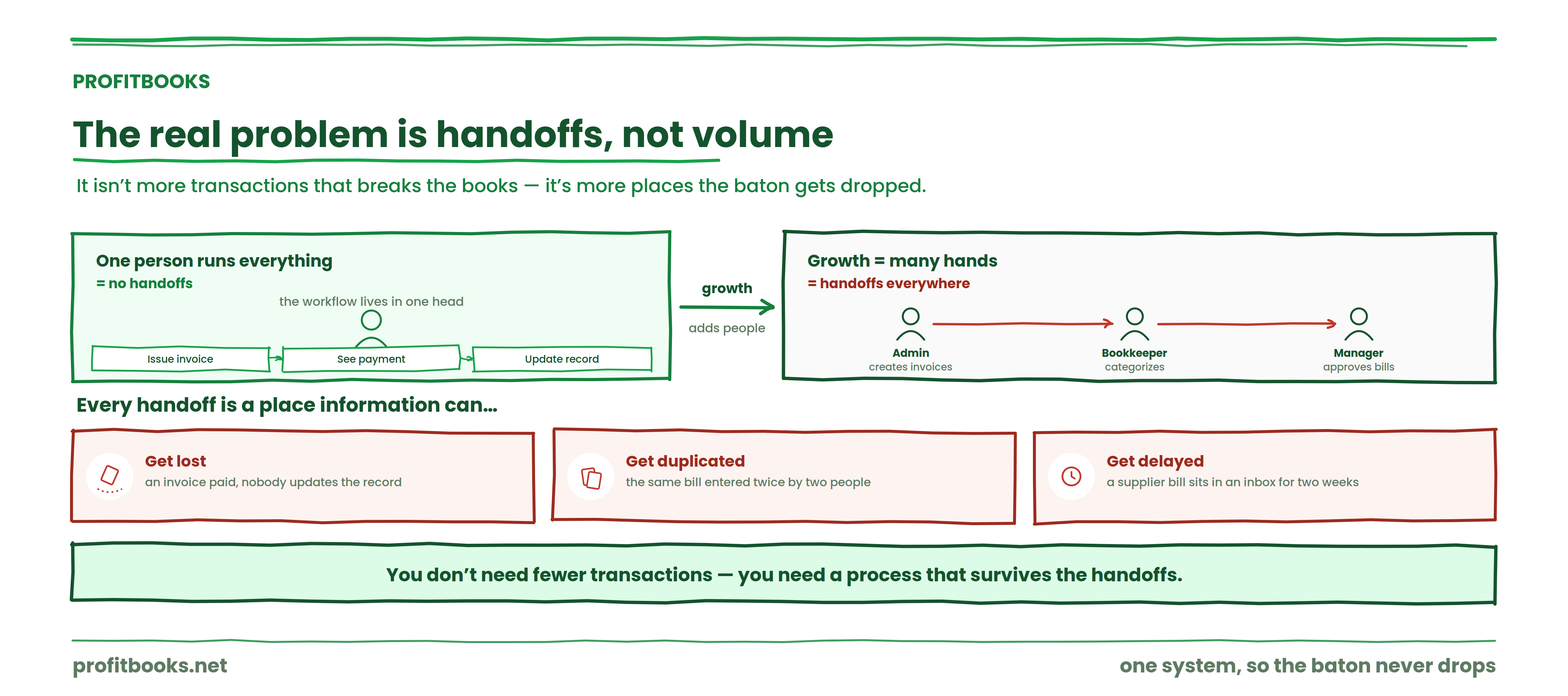
When one person runs everything, there are no handoffs. You issue the invoice, you see the payment, you update the record. The workflow exists entirely in one head.
Growth changes that. You hire an admin who creates invoices. A bookkeeper categorizes expenses. A manager approves supplier bills. Suddenly the same transaction passes through several hands, and every handoff is a place where information can get lost, duplicated, or delayed.
The same is true for the meetings where these handoffs get discussed. Using a meeting note taker ensures decisions made in those review sessions are captured automatically, so nothing gets lost between the call and the follow-through.
The problem isn't simply more transactions. It's more handoffs. And when one person stops doing everything, the business needs a process that survives the transition between people.
The core stages of the workflow
Capture
Every financial transaction needs a defined entry point. Sales, purchases, expenses, supplier bills, receipts, bank transactions, inventory movements. If a transaction doesn't have a clear place to land, it ends up in someone's memory or a stray email, and that's where the gaps begin.
Same-day receipt capture prevents the most common version of this problem. Pick five random expenses from last month. If two or more lack attached backup, capture is where your workflow is leaking.
Classification
Once a transaction enters the system, it needs to be recorded under the right customer, supplier, account, or category. This is where chart-of-accounts discipline pays off, and where drift quietly corrupts your reports.
The distinction between purchases (money spent acquiring products, services, or inventory) and operating expenses (ongoing costs like software, rent, utilities) matters here, because mixing them distorts both your margins and your expense reporting.
Confirmation
Review and reconciliation. Bank reconciliation is the process of comparing the transactions recorded in your accounting system with your bank activity to confirm they match. It's the step that catches what capture and classification missed.
If bank and card accounts can't be reconciled within your scheduled close window, the workflow is either too manual or too late. That's a signal, not a nuisance.
Communication
This is where accounting stops being bookkeeping and starts being useful. A completed workflow should give you reliable information about revenue, expenses, receivables, payables, and cash position, in a form you can actually act on.
The purpose of the workflow isn't tidy books. It's making reliable financial information available when you need to make a decision about hiring, pricing, spending, or growth.
The 4C framework
We use a simple framework at ProfitBooks to think about the accounting cycle:
→
Classify
→
Confirm
→
Communicate
Capture gets the transaction in. Classify puts it in the right place. Confirm verifies it against external records. Communicate turns it into something you can use.
The cycle repeats continuously. It's not a one-time setup. Every new transaction re-enters the loop.
This is an editorial framework for understanding the workflow, not an established accounting standard.
Who owns what
Ownership is where most small-business workflows quietly fail. If staff can't name the person responsible for invoices, approvals, and reconciliation, the workflow has a gap.
| Task | Typical owner | Review |
|---|---|---|
| Create invoices | Sales or Admin | Owner or Finance |
| Record expenses | Admin or Staff | Bookkeeper |
| Record supplier bills | Admin or Bookkeeper | Manager |
| Reconcile bank | Bookkeeper | Owner or Accountant |
| Review receivables | Finance or Admin | Owner |
| Review payables | Finance or Admin | Owner |
| Prepare reports | Bookkeeper or Accountant | Owner |
| Tax and compliance | Qualified professional | Business owner |
Responsibilities vary depending on the size, structure, and requirements of your business. The point isn't to match this table exactly. It's that every task has a named owner and a named reviewer.
Where practitioners actually disagree
There's a live debate about how frequently small businesses should reconcile. One camp says monthly is fine. The other says weekly (or even daily, using bank feeds) is the only way to catch problems before they compound. I land on the weekly-review side for any business processing more than about fifty transactions a month, because a monthly reconciliation that fails sends you digging through four weeks of data instead of one. But plenty of experienced bookkeepers will tell you that monthly is perfectly adequate if the upstream capture is clean. Neither side is wrong; it depends on transaction volume and how reliable your data entry is.
A workflow only works if the tools connect
When invoicing, expenses, reconciliation, and reporting live in one system, the handoffs between people stop leaking. That's the difference between a list of tasks and a workflow that survives growth.
The problems nobody warns you about
| Problem | Root cause | The community fix |
|---|---|---|
| Books are always "almost done" | No fixed close cadence | Schedule the same cleanup block weekly and monthly (source: practitioner guidance, multiple small-business accounting forums) |
| Reconciliation keeps failing | Missing receipts or misclassified spend | Create a shared bills inbox and attach source documents immediately |
| Reports look wrong despite correct entries | Chart-of-accounts drift or bad automation rules | Standardize vendor and customer records; refine auto-categorization rules |
| Invoice follow-up is inconsistent | No escalation policy | Set fixed reminders and overdue triggers at 30, 60, and 90 days on the aging report |
| Approvals sit in inboxes indefinitely | No SLA or owner assignment | Define who approves what and how long they have before escalation |
| Cash flow is a surprise every month | No weekly review of collections and payables | Use a weekly cleanup plus a rolling cash view instead of relying only on month-end |
That last row is worth sitting with. If cash position is a surprise at month-end, the workflow isn't producing information fast enough. A financial close calendar with daily, weekly, and monthly tasks, visible to everyone involved, prevents reconciliation from becoming reactive.
What to automate and what to keep human
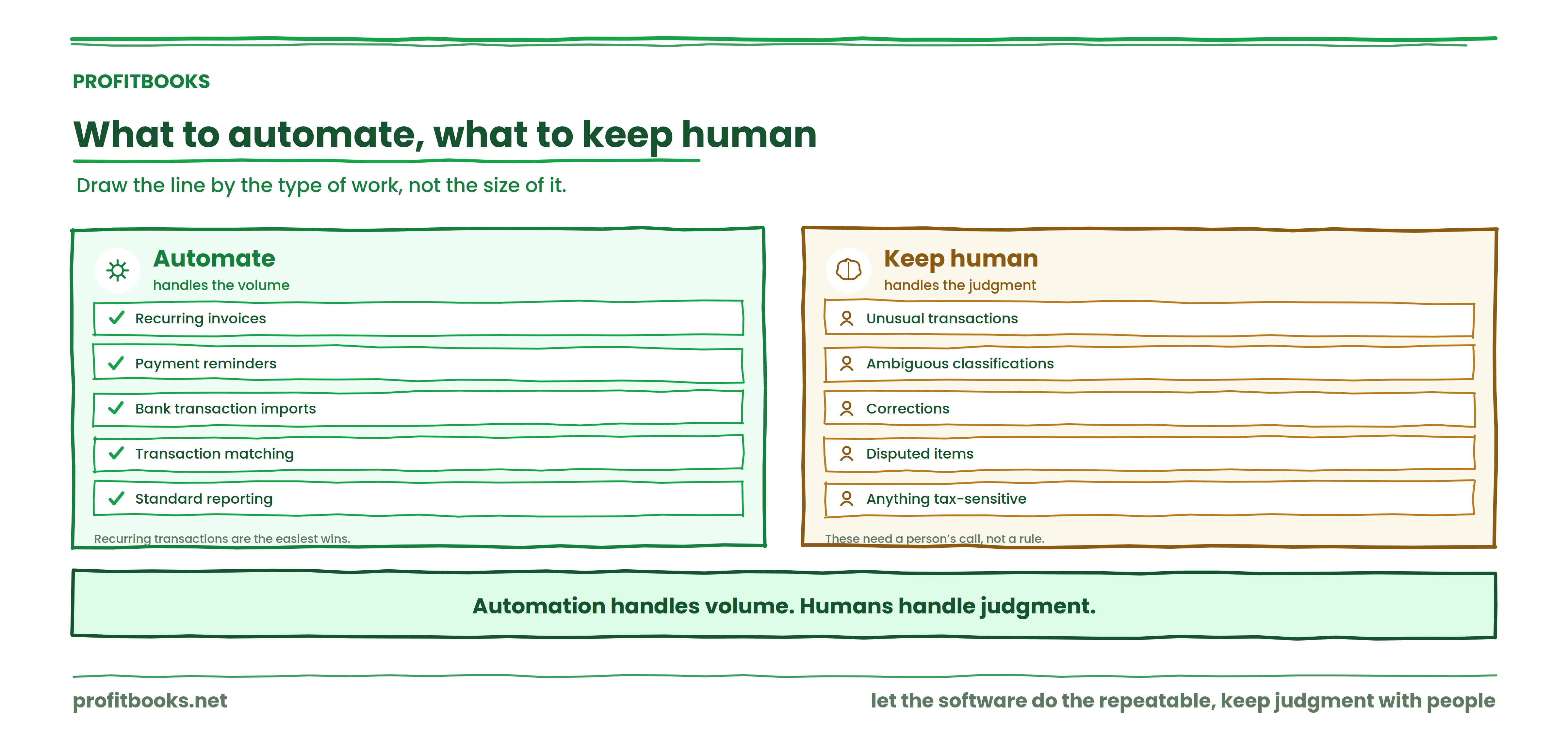
Recurring invoices, payment reminders, bank transaction imports, transaction matching, and standard reporting are strong candidates for automation. Recurring transactions are the easiest wins, and 2026 workflow-software reviews confirm that structured approvals, timestamped records, recurring deadlines, and integrations are now baseline capabilities in modern accounting systems.
Human review still matters for unusual transactions, ambiguous classifications, corrections, disputed items, and anything tax-sensitive. Automation handles volume. Humans handle judgment.
When complexity outgrows your current tools
There isn't one revenue number at which every business needs accounting software. The better indicator is whether the workflow has become too complex to manage reliably by hand.
Signs: several people need access to the same records. Invoices are tracked manually and reconciliation takes too long. Reports require consolidating multiple spreadsheets. Customer balances are hard to track. Supplier payments slip through. Expenses live in different places.
If three or more of those sound familiar, the workflow has outgrown spreadsheets.
How ProfitBooks supports the workflow
Once the workflow outgrows spreadsheets, the job of the software is to hold the whole cycle in one place so the handoffs stop leaking. ProfitBooks is cloud accounting software built for exactly that, and it maps onto the 4C cycle stage by stage.
Capture
Create professional invoices and estimates (including recurring invoices), record day-to-day expenses with receipts attached, and raise purchase orders and supplier bills, so every transaction has a defined entry point instead of living in an inbox.
Classify
Transactions are recorded against the right customer, supplier, and account, with tax calculated automatically on invoices. Because one entry syncs across invoices, expenses, and reports in real time, there's no manual re-linking and less chart-of-accounts drift.
Confirm
Connect bank feeds and reconcile transactions against your accounting records, so bank and card accounts tie out inside your close window. Role-based access lets staff record entries while the owner, accountant, or auditor reviews with read-only access at filing time.
Communicate
Get 45+ financial reports, including profit & loss, balance sheet, ledger, and receivables and payables aging, so you can see cash position, what customers owe, and which supplier payments are due without rebuilding anything from scratch.
Because everyone works from the same real-time data, the workflow survives the handoffs between people as the team grows, which is the exact failure point this article keeps returning to. It runs in any browser and on iOS and Android, so the owner can review reports without waiting for month-end.
Is your workflow actually working?
Five questions:
Four or five yes answers: your workflow is likely reasonably structured. Two or three: you probably have process gaps. Zero or one: it may be time to formalize the entire accounting process.
This is a practical self-assessment, not an accounting standard or a scientific score.
A workflow that connects the pieces
If your accounting tasks are scattered across spreadsheets, email, and manual tracking, ProfitBooks brings invoicing, expense tracking, receivables and payables, bank reconciliation, and reporting into a single system. You can start with a free account and build the workflow described in this article without switching between tools.
Frequently asked questions
What is an accounting workflow?
An accounting workflow is a defined sequence of steps that every financial transaction follows, from initial capture through recording, classification, reconciliation, and reporting. It assigns ownership, timing, and a verification method to each stage so that no transaction falls through the gaps between people or systems.
How do you create an accounting workflow for a small business?
Map every type of transaction your business handles. For each one, define who captures it, where it gets recorded, who reviews it, and how often. Start with the highest-volume transactions and expand from there.
What should a small business accounting workflow include?
Transaction capture, invoicing, expense recording, accounts receivable tracking, accounts payable tracking, bank reconciliation, regular review, and financial reporting.
How often should a small business update its accounting records?
Daily capture, weekly review, monthly reconciliation. That cadence appears consistently across practitioner guidance and works for most businesses processing a moderate transaction volume.
What accounting tasks should a small business automate?
Recurring invoices, payment reminders, bank-feed imports, transaction matching, and standard report generation. Keep human review on exceptions, corrections, and anything requiring judgment.
When should a small business use accounting software?
When multiple people need access to financial records, when reconciliation takes longer than it should, or when producing a basic report requires consolidating data from several sources. Complexity is a better trigger than revenue.
Who should manage accounting in a small business?
It depends on size. Early on, the owner often handles everything. As the business grows, a bookkeeper or admin takes over daily tasks while the owner reviews reports. Tax and compliance work should involve a qualified professional. The key is that every task has a named owner.
What is the difference between bookkeeping and accounting?
Bookkeeping is the recording and organizing of financial transactions. Accounting includes bookkeeping but extends to analysis, reporting, tax planning, and financial decision-making. A good workflow covers both: the bookkeeping ensures accurate data, and the accounting turns that data into decisions.
As your business grows, the accounting workflow needs to grow with it. You don't need a complicated finance department overnight. Start by defining where transactions enter the system, who owns each step, when reviews happen, and which repetitive tasks can be automated. The next problem you'll likely hit is getting everyone on the team to actually follow the process consistently, and that's where documented ownership and a visible close calendar make the difference.
Build the workflow in one place
Bring invoicing, expenses, receivables and payables, bank reconciliation, and reporting together so every transaction has an owner and a place to land as your team grows.