Picture this: It’s 3 AM, and I’m scrolling through our 247th resume for a single marketing position.
My coffee’s gone cold, my eyes are burning, and I’m pretty sure I just accidentally rejected someone named “Microsoft Excel” thinking it was spam.
Sound familiar?
That was me three years ago, sitting in my cramped home office, surrounded by printed resumes because I thought digital files were “too impersonal.” Yeah, I know what you’re thinking – how’s that for irony?
But haven’t we all been there, trying to cling to outdated methods because change feels overwhelming?
I remember the exact moment everything shifted.
It was a Tuesday morning, and we’d just lost our third excellent candidate that month because they accepted offers elsewhere while we were still “reviewing applications.” That’s when my mentor, Sarah, looked me straight in the eye and said, “Harshal, you’re building a tech company but hiring like it’s 1995.”
Ouch. But she was right.
That conversation led me down a rabbit hole of researching applicant tracking systems, and honestly?
I was surprised to learn how much we were holding ourselves back. The transformation that followed completely changed how we hire at ProfitBooks – and more importantly, how we think about attracting talent.
Here’s what I wish someone had told me earlier: 98% of Fortune 500 companies use applicant tracking systems, and they’re not just showing off their tech budgets.

But what opened my eyes was discovering that 75% of qualified applicants get rejected by poorly configured ATS software before anyone even sees their resumes.

I felt sick when I realized how many great people we’d probably missed.
You know that feeling when you’re drowning in resumes, frantically trying to coordinate interviews while amazing candidates slip away to faster competitors?
Yeah, that was our reality for way too long.
And honestly?
I was proud of our “personal touch” approach until I realized it was hurting the very people we wanted to help.
Over the past two years, I’ve tested more than 15 different ATS software solutions.
I’ve made embarrassing mistakes (like accidentally sending a rejection email to our entire candidate database – don’t ask), celebrated small wins, and gradually figured out what works for growing businesses like ours.
Let’s explore this journey together.
I’ll share everything I’ve learned about the best applicant tracking systems, from enterprise powerhouses to budget-friendly startup options.
But more importantly, I’ll share the real story – the costs nobody mentions, the gotchas that caught us off guard, and the practical insights that helped us scale from 12 to 50+ people without losing our sanity.
Why Every Growing Business Needs an ATS (Yes, Even Yours)
Okay, let me be frank – I used to think recruitment analytics software was just expensive tech for corporations with money to burn. “We’re too small for that,” I’d tell myself while manually copying candidate details from emails into spreadsheets at midnight.
Classic entrepreneur logic, right?
I remember the exact moment my perspective shifted.
We were sitting in our tiny office (which was my converted garage with better WiFi), and my co-founder looked at our wall of sticky notes tracking candidates and said, “Dude, we look like we’re planning a heist, not building a company.” He wasn’t wrong.
But what changed my mind wasn’t the embarrassment – it was the data.
We were averaging 47 days to fill a position.
Forty-seven days!
Meanwhile, our competitors were moving so fast that candidates would accept other offers while we were still “discussing next steps.” I felt like we were showing up to a race on bicycles while everyone else had sports cars.
The ATS market is projected to grow at 5.25% CAGR through 2028, reaching $714.3 million.

And honestly? I was surprised to learn this growth isn’t just about companies buying shiny new toys.
It’s because businesses like ours discovered that the right hiring software can be the difference between attracting top talent and watching them walk away.
The Wake-Up Call: What Manual Hiring Was Costing Us
Before we made the switch, I decided to track what our “personal touch” approach was costing. The results were… humbling:
- Time drain: Our HR person was spending 60% of their week on stuff a computer could do better
- Candidate experience: 40% of applicants never heard back from us (I still feel bad about this)
- Missed opportunities: We had zero systematic way to keep promising candidates warm for future roles
- Compliance blind spots: Our record-keeping was, let’s just say, “creative”
But here’s what got my attention – companies using candidate tracking systems reduce their time-to-hire by an average of 32%.

For a growing business, that’s not just a nice-to-have; it’s the difference between building momentum and constantly playing catch-up.
You know that anxiety you feel when great people slip through your fingers? Yeah, that was keeping me up at night.
What Modern ATS Does (And Why I Wish I’d Known This Earlier)
Think of an applicant tracking system as your hiring command center. But honestly, that description would’ve meant nothing to me three years ago. Let me break it down in terms that make sense:

- Resume parsing and screening – Remember spending hours copying candidate details from resumes? Modern ATS software does this automatically. Even with weird formatting or different file types. It’s like having an incredibly detail-oriented assistant who never gets tired.
- Multi-channel job posting – Instead of manually posting to LinkedIn, Indeed, and a dozen other sites, you do it once, and the system handles the rest. This alone saved us about 4 hours per job posting. I timed it. You can also explore tools that are already popular among recruiters. For example, many companies evaluate ZipRecruiter because it offers wide job-board reach and a large candidate pool.
- Interview coordination – Automated scheduling that syncs with your calendar and sends reminders to everyone. A game-changer for busy founders who struggle with email follow-up. (Don’t judge me.)
- Candidate communication – Email templates, automated status updates, centralized messaging. No more candidates falling into the void because someone forgot to hit reply.
- Compliance tracking – EEOC and GDPR features that most small businesses don’t even realize they need. Until they need them. Trust me on this one.
The Top 15 Applicant Tracking Solutions We Tested (Not Just Googled)
Alright, let’s get real here. I’m not going to give you a generic list that I copied from other blogs while drinking my morning coffee.
These are recruitment software platforms I’ve either used personally, helped other founders implement, or spent actual money testing during our very messy (and sometimes expensive) selection process.
You might be wondering why I tested so many.
Honestly?
Because I’m that person who reads 47 Amazon reviews before buying a $15 phone case. When it comes to software that could make or break our hiring, I went a bit overboard. But hey, now you don’t have to.
Enterprise Powerhouses (For When You’re Ready to Play in the Big Leagues)
1. Greenhouse: The Collaborative Hiring Champion

Greenhouse Dashboard – Recruiting Software
I’ll be honest – Greenhouse intimidated the hell out of me at first.
Walking into their demo felt like being the only person at a dinner party who doesn’t know what quinoa is. It seemed like overkill for our scrappy little team.
But then I watched how companies like Netflix and Reddit use it to coordinate complex hiring decisions, and something clicked. It’s not about having fancy features you don’t need; it’s about having structure when things get chaotic.
Greenhouse excels at collaborative hiring for mid-sized to large teams with robust analytics.
But here’s what impressed me – their structured interview process forces hiring teams to define exactly what they’re looking for before starting interviews. No more “I’ll know it when I see it” decision-making that led to some… questionable hires in our early days.
Their AI-powered features include predictive candidate scoring and automated bias detection in job descriptions. The reporting dashboard gives you insights.
I didn’t even know I needed – like which job boards deliver quality candidates (spoiler alert: it’s not always the expensive ones) and interviewer calibration data that shows whether your team is consistently evaluating candidates.
I was surprised to learn that their interview scorecard templates ensure consistent evaluation across different interviewers. This might sound obvious, but trust me, it’s not. We had situations where one interviewer would rate a candidate as “amazing” while another thought they were “completely wrong for the role.” Awkward team meetings followed.
Pricing: Custom enterprise pricing typically starts around $6,000-$10,000+ annually. Best for: Companies with 50+ employees who want data-driven hiring decisions. Standout feature: Interview scorecard templates that prevent hiring disasters..
2. Workday: The Fortune 500 Standard (That Might Be Overkill for You)

Workday is what you use when you want to hire like the big players. It’s used by 40% of Fortune 100 companies, and there’s a reason – it handles high-volume hiring better than almost anything else we tested.
But let me be frank… It’s also like buying a Ferrari when you need a Honda Civic.
The platform effectively manages duplicate applications (which becomes a real problem when you’re posting on multiple job boards), and it integrates seamlessly with other HR systems. The candidate experience is surprisingly good for such a robust system.
What impressed me most was their global hiring capabilities – multi-currency support, country-specific compliance features, and localized communication templates.
If you’re planning international expansion, Workday should be on your radar. If you’re hiring three people in one city, maybe not so much.
Pricing: Enterprise-level custom pricing (prepare your wallet). Best for: Large companies with complex hiring needs and international teams. Standout feature: Advanced duplicate detection and global compliance tools that work.
3. iCIMS: The High-Volume Specialist

iCIMS has been around forever (in tech terms), and they’ve refined their approach to enterprise ATS solutions based on real-world feedback from millions of hires.
They claim a database of millions of candidates, which is useful for sourcing passive talent.
Their strength is handling large-scale recruitment campaigns.
If you’re hiring 100+ people per year across multiple locations, iCIMS can automate most of the heavy lifting. The platform includes built-in assessment tools and offers management features that streamline the entire hiring funnel.
Pricing: Starts around $500/month for small teams, scales with usage. Best for: Companies with high-volume, recurring hiring needs.ds Standout feature: Massive candidate database and automated sourcing tools
Mid-Market Champions (The Sweet Spot for Most of Us Growing Businesses)
Now we’re getting into territory that feels more… human-sized. You know that feeling when you walk into a restaurant and immediately know it’s your kind of place? That’s how I felt exploring these mid-market solutions.
4. BambooHR: The All-in-One Solution That Makes Sense

Here’s where things get interesting for smaller businesses like ours.
BambooHR isn’t just ATS software – it’s a complete HRIS that includes applicant tracking as one component.
And honestly?
For businesses that need both hiring and employee management tools, this integration feels like finding the perfect jeans that fit.
I remember the exact moment I fell in love with BambooHR.
We’d just hired someone, and instead of the usual chaos of manually updating five different systems, they automatically appeared in our employee database. It was like watching magic happen on my laptop screen.
The candidate experience is clean and mobile-friendly – something I didn’t appreciate until my phone-obsessed little sister pointed out that our old application process looked “like it was designed in 2003.” The resume parsing works well with different formats, and the interview scheduling integrates perfectly with Google Calendar and Outlook.
But you know what I love most?
How seamlessly it transitions from hiring to onboarding. New hires don’t fall into some weird limbo between “candidate” and “employee” – they just… flow through the system naturally.
BambooHR’s reporting might not be as sophisticated as Greenhouse’s, but it covers the basics that most small businesses need: time-to-hire, source effectiveness, and diversity metrics. And their customer support?
It’s like talking to real humans who actually understand small business challenges.
Revolutionary concept, right?
Pricing: $6-8 per employee per month (includes full HRIS, so it’s pretty reasonable). Best for: Companies with 25-500 employees who want an integrated HR tool. Standout feature: That magical hiring-to-onboarding workflow that just works
5. JazzHR: The Budget-Friendly Automation That Surprised Me

JazzHR Dashboard
JazzHR (formerly The Resumator – and yes, that name change was probably wise) completely caught me off guard.
I went into their demo expecting basic functionality wrapped in a clunky interface. Instead, I found myself thinking, “Wait, how are they packing this much functionality into something so affordable?”
It’s specifically designed for companies with 5-500 employees, which is exactly where most of us live. Their job posting distribution is excellent – one-click posting to 20+ job boards included, ZipRecruiter, and Glassdoor. I timed this: what used to take me 45 minutes now takes about 3 minutes.
The candidate screening tools let you create custom questionnaires that automatically filter applicants based on your criteria.
But here’s what sets JazzHR apart – their focus on user experience. The interface is intuitive enough that you don’t need a computer science figure it out.
Their mobile app works well, which is rarer than it should be in this space.
Trust me, I’ve tested apps that made me want to throw my phone across the room.
Pricing: $39-$349 per month, depending on features and user count.t Best for: Small to medium businesses looking for core ATS functionality without the complexity.ty Standout feature: That surprisingly excellent job board integration and an interface that doesn’t make you cry
6. Workable: The AI-Powered Sourcing Machine (That Actually Delivers)
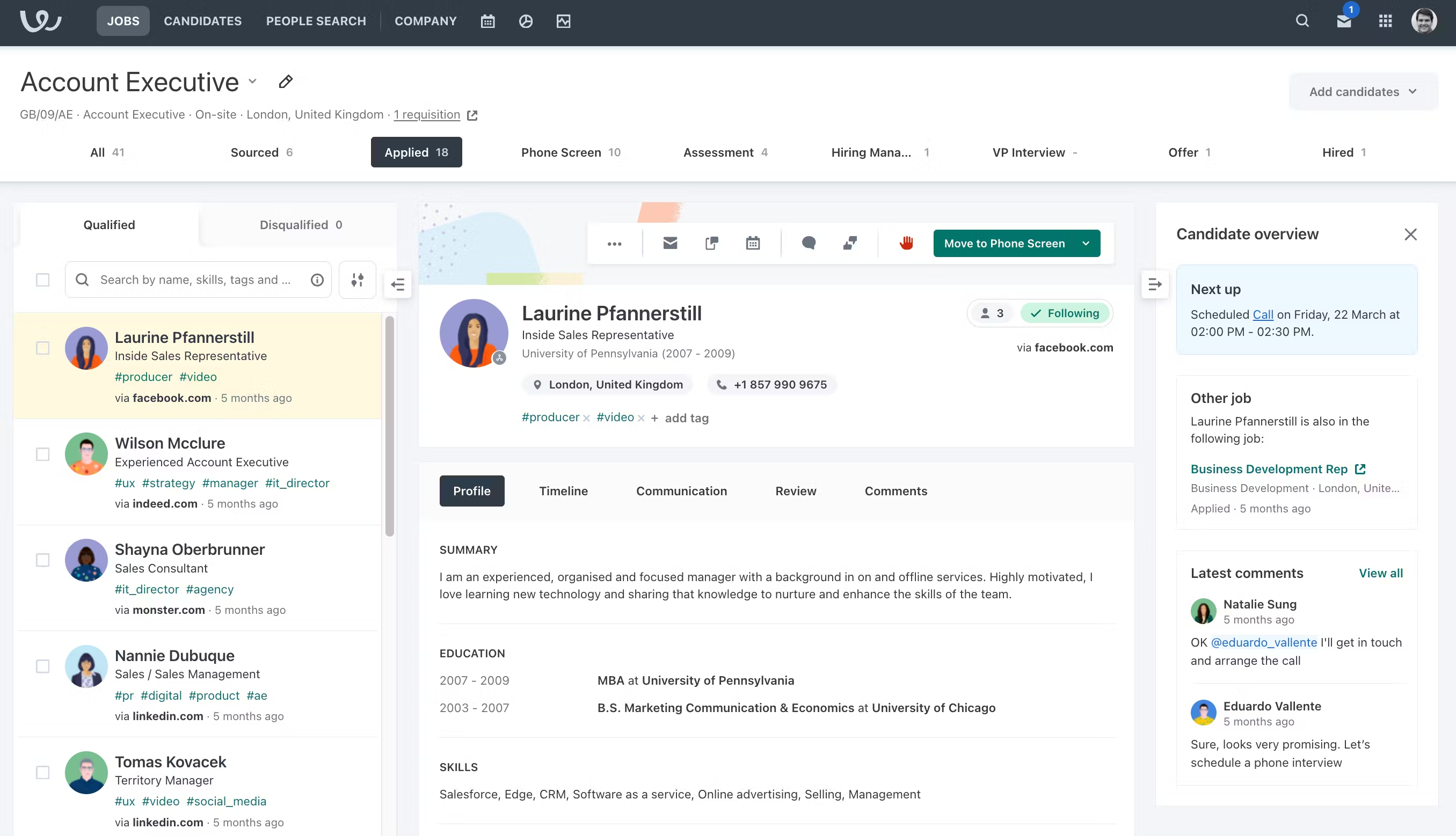
Workable Dashboard
Workable has invested heavily in AI, and unlike a lot of throwing around AI buzzwords, it shows.
Their talent acquisition software includes automated sourcing that finds passive candidates across social networks and professional platforms.
It’s like having a dedicated sourcer on your team who never sleeps and doesn’t drink your office coffee.
But here’s what impressed me – the platform combines traditional ATS functionality with CRM-style candidate relationship management.
You can maintain long-term relationships with promising candidates who aren’t quite ready to move yet.
This has been incredibly valuable for building our talent pipeline.
I was surprised to learn how much their bias-mitigation tools matter.
Features like anonymized resumes and structured interview guides help reduce unconscious bias in hiring decisions.
As we’ve grown, maintaining fair and consistent hiring practices has become increasingly important – and honestly, more complicated than I expected.
Pricing: $149-$599 p.er month based on features and job postings. Best for: Companies focused on proactive talent sourcing and building long-term candidate relationships.Standout feature: AI-powered candidate discovery that feels like having a super-smart recruiting assistant.
Specialized ATS Solutions (For Specific Needs)
7. Teamtailor: The Employer Branding Expert
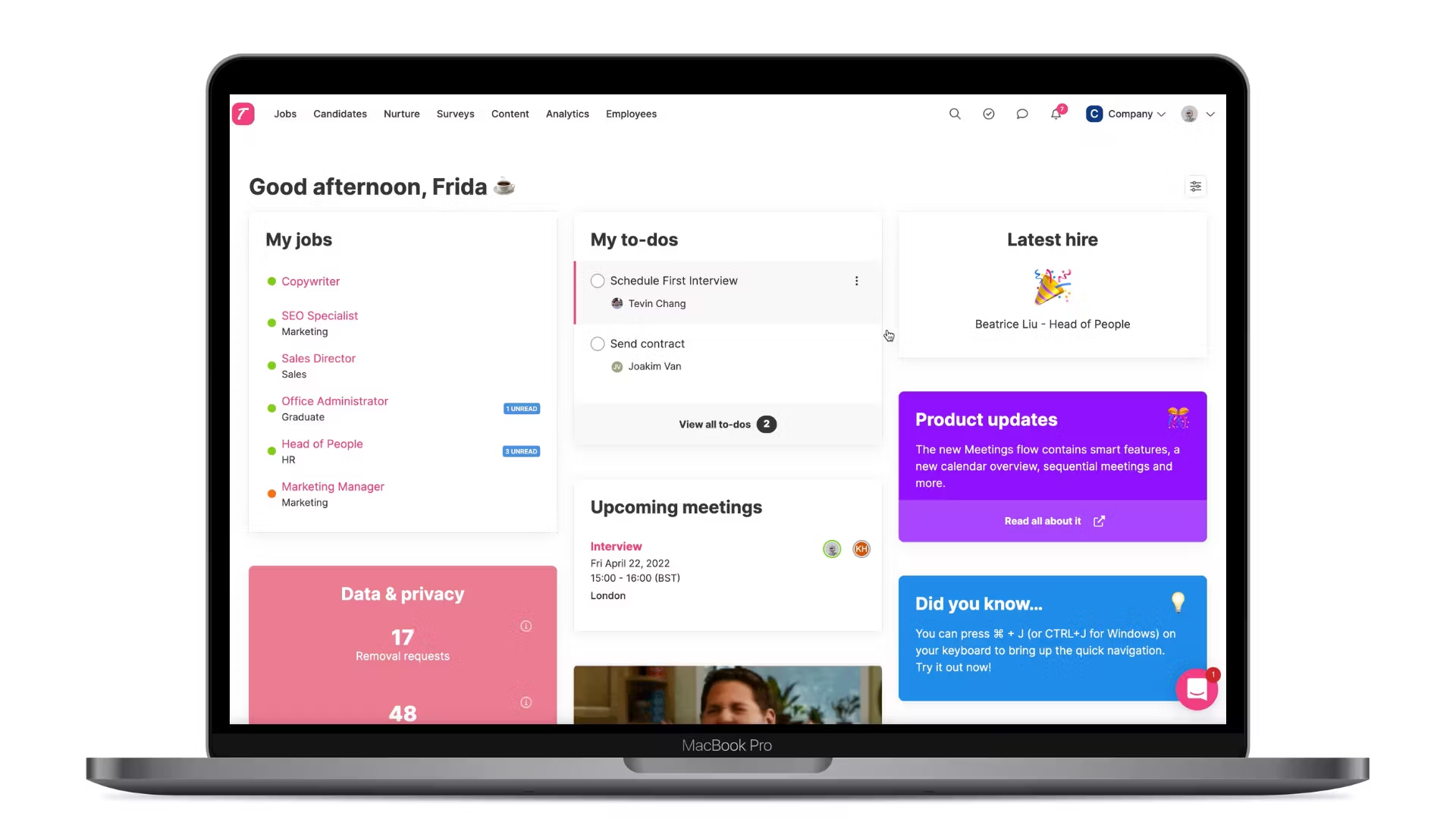
Teamtailor Interface – MacBook Mockup
If your company brand matters to your hiring success (and it should), Teamtailor is worth considering. Their platform focuses heavily on employer branding and candidate experience, with beautiful career pages and social media integration.
What impressed me was their emphasis on reducing hiring bias. Features like anonymized candidate screening and structured evaluation processes help ensure fair hiring decisions. Their analytics show you exactly where candidates drop off in your application process, so you can optimize for better completion rates.
The platform also includes employee referral management and internal mobility tools – features that become more important as your. Our team grows.
Pricing: $149-$349 per month.Best for: Companies where employer branding and candidate experience are prioritized.Standout feature: Beautiful career pages and comprehensive bias-reduction tools
8. Pinpoint: The In-House Talent Team’s Choice
![Pinpoint - ATS Interface]](https://i0.wp.com/profitbooks.net/wp-content/uploads/2025/07/Pinpoint-ATS-Interface.png?ssl=1 "Best Applicant Tracking System For Hiring Smarter 13")
Pinpoint is built specifically for internal talent acquisition teams rather than external recruiters. If you’re building a dedicated hiring function, their recruitment software includes features you won’t find elsewhere.
Their talent pipeline management is sophisticated – you can track candidate engagement over time and automate nurture campaigns for passive prospects. The platform also includes advanced analytics for measuring recruiter performance and identifying bottlenecks in your hiring process.
Pricing: Custom pricing based on team size and features. Best for: Companies with dedicated internal recruiting teams. Standout feature: Advanced talent pipeline management and recruiter analytics
9. Lever: The Modern CRM-ATS Hybrid

Lever Recruiting Tool Dashboard
Lever combines applicant tracking with customer relationship management principles. Instead of just processing applications, it helps you build long-term relationships with talent in your industry.
Their collaborative hiring tools are excellent – multiple team members can evaluate candidates simultaneously, and the feedback aggregation makes decision-making much clearer. The platform also includes headcount planning tools that help with workforce forecasting, recasting.
Pricing: .$500-$1,200+ per month, depending on features. Best for: Small teams that. Want enterprise-level collaboration features? Standout feature: CRM-style candidate relationship management.t
10. Manatal: The AI-Powered Budget Option

Manatal offers impressive AI-powered recruitment software at a fraction of enterprise pricing. Their resume parsing and candidate matching algorithms rival much more expensive platforms.
The platform includes social media enrichment – it automatically finds candidates’ LinkedIn and other social profiles to give you a more complete picture. Their candidate recommendation engine gets smarter over time as you provide feedback on it. Matches.
Pricing: $15-$35 per user per month.h Best for: Small businesses wanting AI features without enterprisecostss Standout feature: Social media enrichment and intelligent candidate matching
ATS Comparison: Features and Pricing at a Glance
| Platform | Monthly Cost | Best For | Key AI Features | Standout Benefit |
| Greenhouse | $500+ | Enterprise | Predictive scoring | Collaborative hiring |
| Workday | Custom | Fortune 500 | Analytics suite | Global compliance |
| BambooHR | $6-8/employee | Growing SMBs | Resume parsing | All-in-one HRIS |
| JazzHR | $39-349 | Small business | Basic automation | Easy job posting |
| Workable | $149-599 | Mid-market | AI sourcing | Talent CRM |
| Teamtailor | $149-349 | Brand-focused | Bias reduction | Employer branding |
| Lever | $500+ | Small teams | Candidate insights | CRM functionality |
| Manatal | $15-35/user | Startups | Social enrichment | Budget AI features |
What Others Miss: Addressing the Real Challenges
Most ATS software reviews focus on features and pricing. But after implementing these systems in real businesses, I’ve learned that the biggest challenges aren’t technical – they’re human.
The Candidate Experience Problem
Here’s something that keeps me up at night: 62% of candidates distrust AI screening.

We’ve created hiring processes that feel impersonal and frustrating for the very people we’re trying to attract.
The best companies are addressing this head-on. HireVue now provides audit trails for algorithmic decisions, so candidates can understand why they were or weren’t selected. Platforms like Teamtailor focus on transparent communication throughout the hiring process.
My recommendation: Whatever recruitment software you choose, prioritize candidate communication features. Automatic status updates, clear timelines, andnice–to–have–they’ren emails aren’t just nice–to–have–they’re essential for maintaining your employer brand.
The Bias Problem
AI-powered screening can perpetuate or even amplify hiring bias if not carefully managed. I’ve seen resume screening software that consistently ranked candidates from certain universities higher, regardless of actual qualifications.
The solution isn’t avoiding AI – it’s using it responsibly. Look for platforms that offer:
- Anonymized resume review options
- Structured interview guides
- Bias detection in job descriptions
- Regular algorithmic auditing
The Integration Challenge
Most businesses don’t operate in isolation. Your ATS software needs to play nicely with your existing tools: your HRIS system, payroll software, calendar applications, and communication platforms.
Before choosing a platform, map out your current tech stack. Tools like ProfitBooks handle financial management, but you’ll need your ATS to integrate with whatever systems manage your employee data and onboarding processes.
Bridging the Gap: Gig Economy and Modern Hiring
Here’s a content gap most applicant tracking systems haven’t addressed: the rise of contract and project-based hiring.
45% of hiring managers now seek features for managing freelance and contract work, but most ATS platforms are still built around traditional full-time employment.

A few innovative companies are adapting:
- Upwork has developed ATS features specifically for project-based hiring
- VanHack specializes in cross-border remote work with integrated tax and compliance features
- Toptal uses sophisticated matching algorithms for high-skill freelance placements
If you’re hiring a mix of full-time employees and contractors (like most modern businesses), factor this into your ATS comparison. The ability to manage different employment types in one system can save significant administrative overhead.
Frequently Asked Questions About ATS
After helping dozens of businesses implement hiring software over the past few years, I keep getting asked the same questions.
And honestly?
These are the same questions that kept me up at night when we were first exploring ATS options. Let me share what I wish someone had told me back when I was googling “do I need applicant tracking software” at 2 AM.
Do ATS systems automatically reject candidates?
You know that fear you have about robots making hiring decisions? Yeah, I had that too. Good news – they don’t. This is probably the biggest misconception about applicant tracking systems, and I was guilty of believing it early on.
Modern ATS platforms rank and filter candidates based on criteria you set, but they don’t make final rejection decisions. Think of them as more likely smart, ng systems than decision-makers.
However, and this is important, poorly configured systems can bury qualified candidates so deep in the rankings that they effectively disappear. It’s like having a messy garage where you know your tools are in there somewhere, but you can’t find anything. The key is understanding how to set up your screening criteria appropriately.
How can candidates optimize their resumes for ATS?
This question usually comes from candidates, but honestly? It’s worth understanding as an employer t, oo, because it affects the quality of applications you receive.
The basics are pretty straightforward:
- Use standard section headings (“Work Experience” instead of something creative like “My Journey”)
- Avoid graphics, tables, and unusual formatting that confuse parsing algorithms.
- Include keywords from the job description naturally (not stuffed awkwardly)
- Save resumes as .docx or .pdf files.
As employers, we can improve this whole dynamic by writing clear job descriptions and using resume screening software that handles various formats well. I was surprised to learn how much the quality of our job descriptions affected the applications we received.
What’s The Best Free Applicant Tracking System Option?
I get this question a lot, especially from fellow entrepreneurs who are watching every dollar. Zoho Recruit offers a genuinely useful free tier for small teams (up to 3 users), and Manatal provides a 14-day trial that gives you full access to their AI features.
But let me be frank here… free ATS options have significant limitations.
You’ll typically get limited job postings, basic reporting, and minimal integration options. If you’re serious about scaling your hiring beyond just a couple of people, budget for a paid solution.
Trust me, it’s worth it.
Can ATS improve diversity in hiring?
Absolutely, but only if implemented thoughtfully. This is one area where I was initially skeptical, but the data changed my mind. DEI-focused features like anonymized screening can reduce unconscious bias, but they require intentional setup and ongoing monitoring.
The most effective approach I’ve seen combines technology with process changes:
- Use structured interview guides (this was a game-changer for us)
- Train hiring teams on bias recognition
- Regularly audit your hiring data for disparities
- Set diversity goals and track progress
It’s not magic, but it definitely helps create more consistent, fair processes.
How much should I budget for ATS software?
For small business ATS solutions, expect to pay $50-$300 per month. Mid-market platforms typically range from $300-$1,000 monthly. Enterprise solutions can cost $10,000+ annually.
But here’s what nobody tells you – don’t just look at software costs. Factor in:
- Implementation and setup time (someone needs to configure everything)
- Training for your team (especially if they’re resistant to change)
- Potential integration costs (connecting to your existing tools)
- Ongoing maintenance and support
In my experience, the real cost is typically 30-50% higher than the base software price when you account for everything.

But honestly? It’s still worth it if it helps you hire better people faster.
How long does ATS implementation take?
Basic setup can happen in a few days, but meaningful implementation takes 2-6 weeks, depending on your needs and how thorough you want to be. Here’s what I learned the hard way about the typical timeline:
- Initial configuration and branding (1-2 days)
- Team training and getting buy-in (3-5 days, sometimes longer if people resist change)
- Process refinement based on real usage (1-2 weeks)
- Full adoption and optimization (2-4 weeks)
Pro tip: Start with one job posting as a pilot. Test your entire process with a real position before rolling it out company-wide. This saved us from some embarrassing mistakes during our rollout.
Should I integrate my ATS with other business software?
Yes, integration is crucial for efficiency. At a minimum, connect your candidate tracking system with:
- Your calendar application (Google Calendar, Outlook)
- Email systems for seamless communication
- Your HRIS or employee management system
- Background check and assessment tools
For growing businesses, integration with financial management tools like ProfitBooks becomes important for tracking recruitment costs and budgeting for new hires.
What happens to our data if we switch ATS platforms?
This is a critical question that many businesses don’t ask until it’s too late. Before choosing any recruitment software, understand:
- What data can you export (candidate profiles, communication history, etc)
- What form does the export come in
- How long does the vendor retain your data after cancellation
- Whether there are data migration fees
Most reputable platforms offer data export tools, but the format and completeness vary significantly.
Making the Decision: Your ATS Selection Framework
After testing numerous applicant tracking systems, I’ve developed a framework that’s helped several businesses choose the right platform:
Step 1: Assess Your Current State
Before evaluating any software, document your existing hiring process:
- How many positions do you fill per year?
- What’s your average time-to-hire?
- Which team members are involved in hiring decisions?
- What’s your biggest hiring pain point?
Step 2: Define Your Must-Haves
Based on our research, these features are non-negotiable for most growing businesses:
- Resume parsing that handles different formats accurately
- Job posting distribution to major job boards
- Interview scheduling with calendar integration
- Candidate communication tools with email templates
- Basic reporting for time-to-hire and source effectiveness
Step 3: Identify Your Nice-to-Haves
These features can differentiate platforms but aren’t essential for basic functionality:
- AI-powered candidate matching
- Advanced analytics and reporting
- Employer branding customization
- Bias reduction tools
- Mobile app access
Step 4: Consider Your Growth Trajectory
Choose a platform that can scale with your business. If you’re planning to double your team in the next two years, that budget-friendly solution might not work long-term.
Step 5: Test Before Committing
Most ATS vendors offer free trials or demos. Use them. Set up a real job posting, process actual applications, and involve your hiring team in the evaluation.
The Future of Hiring: What’s Coming Next
The ATS market continues evolving rapidly. Here are trends I’m watching that could reshape how we hire:
- Generative AI integration is moving beyond basic resume parsing. Platforms like Dover and GoHire now auto-generate job descriptions, interview questions, and personalized outreach emails. This could dramatically reduce the time spent on hiring administration.
- Video-first hiring is becoming standard, especially for remote positions. ATS platforms with video interviewing capabilities will likely become the norm rather than the exception.
- Predictive analytics are getting smarter. The best systems can now predict which candidates are most likely to accept offers, succeed in roles, and stay with the company long-term.
- Candidate relationship management is blurring the lines between ATS and CRM. Expect to see more platforms that help you build long-term relationships with talent in your industry.
My honest recommendations for different business stages:
If you’re just starting (5-25 employees): JazzHR or Manatal for core functionality without the complexity that makes your head spin
If you’re in growth mode (25-100 employees): BambooHR for integrated HR management or Workable for that advanced sourcing magic. If you’re established and scaling fast (100+ employees): Greenhouse for collaborative hiring, or Workday if you need enterprise-level features
But honestly? Start simple.
Pick a platform that handles your core needs well rather than one that promises everything but delivers confusion. You can always upgrade or switch later as your requirements evolve.
Trust me, I’ve done this dance before.
Looking Ahead: What’s Coming Next in Hiring Tech
The ATS market continues evolving rapidly, and I’ll be honest – some of the emerging trends excite me. Generative AI integration is moving beyond basic resume parsing. Platforms like Dover and GoHire now auto-generate job descriptions, interview questions, and personalized outreach emails. This could dramatically reduce the time we spend on hiring administration.
Video-first hiring is becoming standard, especially for remote positions. If you’re building a distributed team like we are, ATS platforms with video interviewing capabilities will likely become essential rather than nice-to-have.
Predictive analytics are getting smarter too. The best systems can now predict which candidates are most likely to accept offers, succeed in roles, and stay with the company long-term. It’s like having a crystal ball, but based on actual data rather than wishful thinking.
The Bottom Line (What This All Means)
You know what keeps me excited about this stuff? It’s not the technology itself – it’s what the technology enables. When you’re not drowning in administrative tasks, you can focus on what matters: building relationships with candidates and making thoughtful hiring decisions.
Remember, hiring great people is probably one of the most important things you’ll do as a business leader. The right applicant tracking system won’t make hiring decisions for you, but it will free up your time and mental energy to focus on what counts.
Running a business is challenging enough without adding unnecessary complexity to your hiring process. The tools exist to make this easier – you just need to choose the right ones for your specific situation and stage of growth.
And speaking of making business operations easier… if you’re looking to streamline your financial management alongside your hiring process, ProfitBooks can help you track recruitment costs, manage contractor payments, and maintain clear financial records as your team grows.

Because honestly? Great hiring is just one piece of building a successful business. You need all your operational pieces working together smoothly.
I think the real transformation happens when you stop seeing these tools as “nice-to-have” extras and start recognizing them as essential infrastructure for growth. Just like you wouldn’t try to run a modern business without email or the internet, you shouldn’t try to scale your team without proper hiring software.
But you might be wondering… how do you get started?
Pick one platform that resonates with your current needs. Most offer free trials, so set up a test job posting and see how it feels. Don’t overthink it – you can always adjust the course later.
Your future self (and your hiring team) will thank you for taking this step.
And honestly?
Your candidates will too, because they’ll have a much better experience applying to work with you.
Ready to streamline your business operations beyond just hiring? Sign up with ProfitBooks for free and discover how much easier managing a growing business can be when all your systems work together.